
エージェントたちは、デモ段階から日常業務へと、ほとんど誰も予想していなかったほど速いスピードで移行した。当社の「エージェント型AIの現状」レポートによると、組織の60 %が既にAIエージェントを本番環境で運用していますが、 40 %がセキュリティとコンプライアンスを、さらなる規模拡大を阻む最大の要因として挙げています。チームが既に出荷したものと、安全に運用できるものとの間のギャップこそが、現在のAIエージェントの真の姿なのだ。
しかし、AIエージェントとは一体何なのか、そしてなぜこの用語は突然、コーディングアシスタントから自律的な研究システムへと拡大解釈されるようになったのか?簡単に言うと、エージェントは単に応答するだけでなく、行動する。目標を与えれば、手順を計画し、ツールを呼び出し、結果を確認し、調整を行う。通常は、立ち止まって尋ねることもなく、それを実行する。それがエージェントと、その基盤となる生成型AIを区別する点であり、エージェントがどこで実行されるかが、その背後にあるモデルと同じくらい重要な理由です。
キーテイクアウト
- AIエージェントは、自らの意思で目標を追求する。それは、一度に1つの質問に答えるのではなく、ループの中で推論し、ツールを選択し、行動を起こす。
- モデルが決定を下し、ツールが動作し、環境はその動作が及ぶ場所となる。
- 自律性こそが重要であり、同時にリスクでもある。エージェントが自律的に行動できるようになると、そのエージェントがどこを移動するかによって、誤った行動がどれだけの損失につながるかが決まる。
- エージェントの構築は、主にインフラストラクチャの問題である。つまり、フレームワークの選択、ツールへのアクセス、そしてエージェントを安全に実行するための隔離された場所の確保といった問題である。
AIエージェントとは何ですか?
誇張表現を取り除けば、AIエージェントとは、目標を設定し、それを達成する方法を決定し、ツールを使って行動し、そして学習した内容に基づいて次の行動を選択するソフトウェアである。モデルは推論を提供し、ツールはモデルに実行力を与え、環境はその行動が実際に起こる場所である。この3つを組み合わせると、単にタスクを説明するだけでなく、タスクを実際に実行できるシステムが構築できます。
それが、エージェントと、多くの人が最初に経験したチャットボットとの違いです。チャットボットは、目の前の質問に答える。エージェントは目標を受け取り、問題に取り組みます。目標を段階に分解し、各段階に適したツールを決定し、実行し、結果を読み取り、目標が達成されるか行き詰まるまでこのプロセスを繰り返します。失敗したテストを修正するように指示されたコーディングエージェントは、コードベースを読み込み、ファイルを編集し、依存関係をインストールし、テストスイートを実行し、プルリクエストを開くといった一連の作業を、すべて1つの指示から実行できる。
それを可能にする3つの要素:
- 自律性により、各段階での承認を待つことなく、次の行動を決定できる。
- ツールを使用することで、テキストだけでなく、コードの実行、APIへのクエリ、ファイルの変更などにもアクセスできるようになります。
- 記憶によって、複数の段階にわたる文脈が保持されるため、後の決定は以前の決定に基づいて行われる。
それらのうちどれか一つでも削除すれば、エージェントではなく、より賢いチャットボットに戻ります。
AIエージェントはどのように動作するのですか?
内部では、エージェントがループ処理を実行している。それは、タスクの現在の状態を取り込み、次に何をすべきかを推論し、ツールを通して行動し、何が変わったかを観察し、それを次の推論の段階にフィードバックする。ループは目標が達成されるか、停止条件が満たされるまで繰り返されます。
ループの1回の実行において、エージェントはまず、目標、関連する記憶、そして直前に行ったことの結果といったコンテキストを収集して認識する。理由付けの段階では、モデルは次の行動を計画し、ツールを選択します。実行ステップでは、そのツール、シェルコマンド、API呼び出し、データベースクエリなどが呼び出されます。観察ステップでは、エラーを含めた結果を読み取ります。そして、何が起こったかに基づいて計画を更新し、適応します。なぜなら、テストの失敗はエージェントにとって行き止まりではなく、次のループのための新しい入力に過ぎないからです。
それを動かしている部品
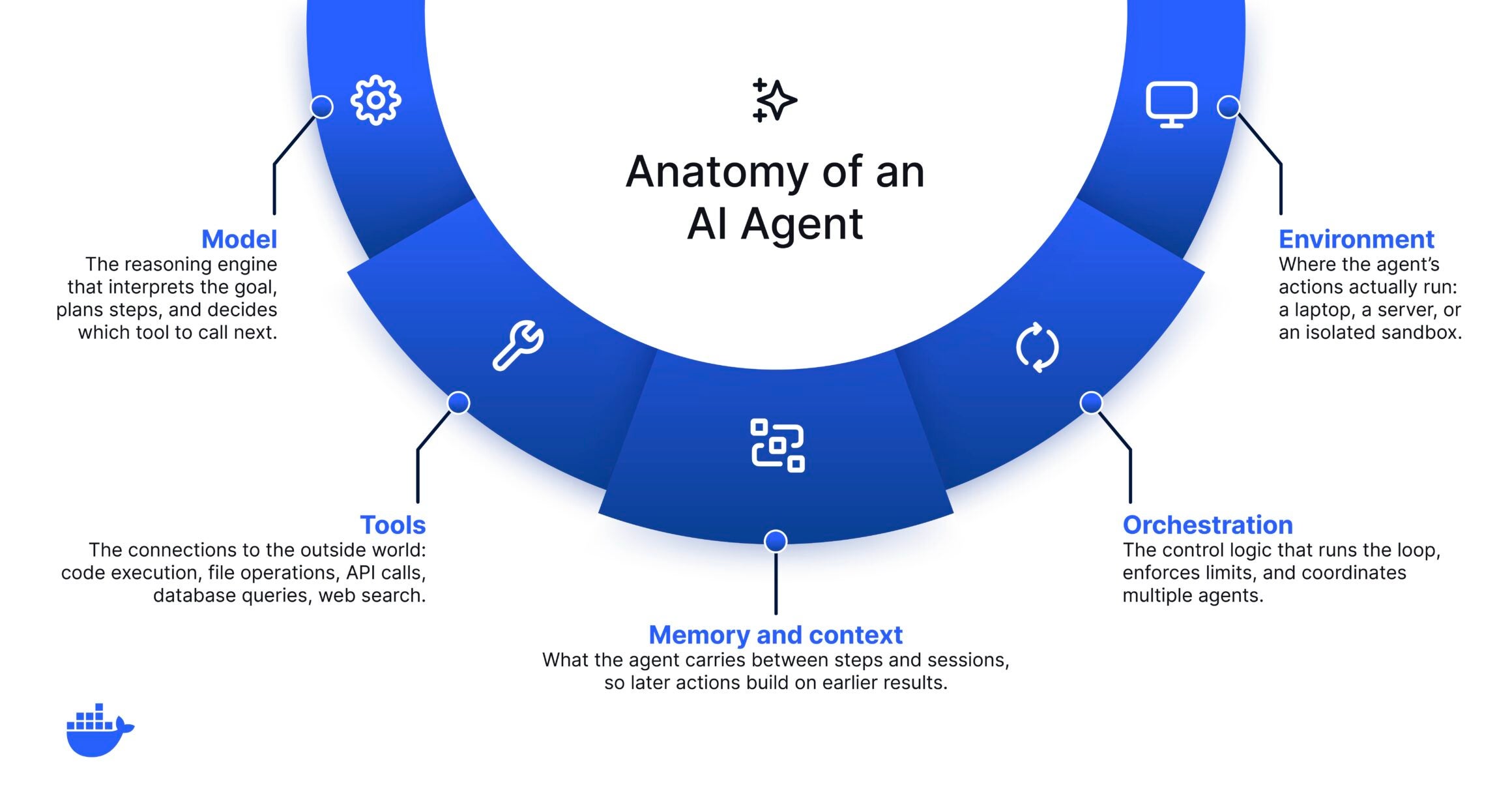
ほとんどのエージェントフレームワークは、名称が異なっていても、同じコアコンポーネントを組み合わせている。
|
コンポーネント |
その役割 |
|
モデル |
推論エンジン。目標を解釈し、手順を計画し、次にどのツールを呼び出すかを決定する。 |
|
ツール |
外部世界との接続:コード実行、ファイル操作、API呼び出し、データベースクエリ、ウェブ検索。 |
|
記憶と文脈 |
エージェントがステップ間やセッション間で引き継ぐ情報に基づいて、後のアクションはゼロから始めるのではなく、以前の結果に基づいて構築されます。 |
|
オーケストレーション |
ループを実行し、制限を適用し、タスクが複数のエージェントに分割された場合にそれらのエージェントを調整する制御ロジック。 |
|
環境 |
エージェントの動作が実際に実行される場所:あなたのノートパソコン、サーバー、または隔離されたサンドボックス。これはほとんどの説明で省略されている部分であり、あなたのリスクを左右する部分です。 |
AIエージェントは何に使われるのですか?
AIエージェントの一般的な例をいくつか紹介します。
- コーディングエージェントは、リポジトリを読み込み、コードを記述およびリファクタリングし、テストを実行し、プルリクエストを作成します。
- サポート担当者は、チケットの優先順位付けを行い、社内文書から回答を抽出し、接続されたシステムで対応措置を講じます。
- データエージェントは複数の情報源に問い合わせを行い、結果を照合し、要約を作成する。
- 運用担当者は、インフラを監視し、アラートを調査し、定期的な修復作業を実行します。
これらを結びつけているのは、作品の形状である。タスクが目標、いくつかのツール、そして完了の定義として説明できる場合、エージェントは通常、そのタスクを実行できる。だからこそ、エージェントがこれほど多くのロードマップに同時に登場しているのです。
エージェント対チャットボット対生成型AI
エージェント、チャットボット、そしてGenAIはしばしば混同して使われるため、区別が曖昧になる。生成型AIは、与えられた指示に応じてコンテンツを生成する。チャットボットはそれを会話という形で表現する。エージェントは、自律性とツールを付加することで、世界を単に記述するだけでなく、世界に対して行動を起こせるようにする。最も分かりやすい方法は、並べて比較することです。
|
機能 |
チャットボット |
AIエージェント |
|
プロンプトに応答する |
はい |
はい |
|
外部ツールを使用する |
めったに |
はい |
|
複数のステップを計画し実行する |
いいえ |
はい |
|
各段階で承認なしに行動する |
いいえ |
はい |
生成型システムとエージェント型システムのより詳細な比較については、 「GenAI vs. エージェント型AI」の記事をご覧ください。しかし本質的に、システムが自律的に行動できるようになった瞬間、もはや単に出力品質を評価しているだけではなくなる。また、そのシステムが何にアクセスできるかを決定するのもあなたです。
AIエージェントがソフトウェア開発をどのように変えているか
エージェントの安全性は、それが実行される環境と、許可されているアクセス権限によって左右される。幻覚を見るチャットボットは間違った答えを返す。エージェントに不具合が発生すると、ファイルが削除されたり、機密情報が漏洩したり、破損した変更がプッシュされたりする可能性があります。エージェントの生産性を高める自律性は、何かが誤作動した際に、その影響範囲を広げる自律性と同じである。
|
シナリオの注目点:エージェントが開発者のマシン上で直接実行される場合に、どのような問題が発生する可能性があるかを考えてみましょう。曖昧な表現のクリーンアップ指示により、コーディングエージェントが間違ったディレクトリに対して破壊的な削除を実行することになり、これはまさにDockerが文書化した種類の障害です。 rm -rf インシデントエージェントは助けようとしていた。誤りは何も封じ込められていなかったため、実際のファイルにまで影響を与えてしまった。 |
そのため、経験豊富なチームはエージェントを単なるモデル選択ではなく、インフラストラクチャに関する重要な決定事項として捉えるのです。興味深い技術的な問題は、封じ込めに関するものです。エージェントはどこで実行されるのか、この特定のタスクのためにどのツールを呼び出すことができるのか、誰の認証情報を使用するのか、そして実行後にエージェントが何をしたかをどのように確認できるのか、といった点です。これらを正しく設定すれば、各ステップを承認することなくエージェントを実行させることができます。
AIエージェントに関するよくある誤解
混乱の大部分は、いくつかの誤った認識によって引き起こされている。
- 「自主性が高まることは常に良いことだ。」そうではない。自律性はスイッチではなく、ダイヤルのようなものだ。その量が増えれば、速度が上がり、同時に爆発範囲も広がる。
- 「エージェントのセキュリティはモデルの役割だ。」このモデルは自己制御できない。真の安全性は、その周囲のインフラストラクチャによって確保される。そして、それがAIエージェントを隔離層とアクセス層で保護する最大の目的である。
- 「ガバナンスは巨大企業だけのものである。」たとえ一人で開発する場合でも、基本的な安全対策は役立つ。複数のユーザーがエージェントを運用するようになると、共通のルールが必要になります。そこでAIガバナンスが真価を発揮し始めるのです。
エージェントを安全に構築および実行する方法
プラットフォームチームを立ち上げる必要はなく、いくつかの意図的な選択をするだけで十分です。発射音が一番大きいハーネスではなく、自分の用途に合ったハーネスを選びましょう。エージェントが目の前の仕事に必要なツールだけを接続し、将来必要になるかもしれないすべてのツールを接続する必要はありません。そして、実際にアクセス権限を与える前に、それがどこで実行されるかを決定してください。
最後の選択肢が最も効果的です。隔離された使い捨て環境内でエージェントを実行することで、エージェントはホスト、認証情報、その他のプロジェクトから隔離された状態で、パッケージのインストール、ファイルの編集、サービスの実行などを行うための実際の作業場所を確保できます。何か問題が起きたら、その環境を捨てて新しい環境を作り直せばいい。これは、サンドボックスセキュリティやマイクロVMアーキテクチャの背後にある考え方と同じであり、エージェントの速度を低下させることなく強力な分離を実用的に実現するものです。許可を求めるプロンプトは、まるでコントロールされているように感じられますが、実際にはほとんどの場合、「許可」をクリックするようにユーザーを訓練する役割を果たしています。境界線は、スピードと安全性の両方をもたらしてくれる。
実際に信頼できるエージェントを運用する
AIエージェントは、何かをさせること自体が難しいのではなく、どれだけのことをどこで行うことを許可するかを決定するのが難しいという、珍しい技術である。エージェントをモデル、ツール、環境の集合体として捉えるようになれば、今後の方向性がより明確になります。つまり、モデルを選択し、ツールの範囲を定め、環境について真剣に検討すればよいのです。最初の2つが最も注目を集める。3つ目は、まさに安全が実現されている場所です。
Docker Sandboxesは、まさにそのギャップを埋めるために開発されたものです。各エージェントは、ネットワーク、ファイルシステムへのアクセス、リソース制限を制御できる専用の使い捨てマイクロVM内で実行されるため、マシン上で自由に動作するのではなく、境界内で迅速に移動できます。チーム全体でエージェントを実行する場合、 AIガバナンスを使用すると、許可されるアクション、ネットワークがアクセスできる範囲、使用可能な認証情報とツールなどのルールを一度設定するだけで、開発者が作業するすべての場所でそれらを強制できます。境界を定義したら、エージェントを実行させる。
よくある質問
AIエージェントとは、簡単に言うと何でしょうか?
AIエージェントとは、目標を設定し、それに向かって自律的に行動するソフトウェアであり、何をすべきかを推論し、ツールを使って行動し、結果に基づいて調整を行う。単一の質問に答えるチャットボットとは異なり、エージェントはタスクが完了するまで一連の判断と行動を繰り返す。
AIエージェントとチャットボットの違いは何ですか?
チャットボットは、あなたが入力した内容に応答します。エージェントは複数のステップを経て目的を達成しようとし、その過程でツールを呼び出してファイルを変更したり、コードを実行したり、システムに問い合わせたりします。エージェントは、固定されたスクリプトに従うのではなく、独自の行動順序を決定する。
AIエージェントは何に使われるのですか?
一般的な用途としては、コードの記述とテスト、サポートチケットのトリアージ、複数のソースにわたるデータの分析、および日常的な運用タスクの処理などが挙げられます。共通点は、単一の質問と回答ではなく、判断力といくつかのツールを必要とする複数段階の作業であるということだ。
AIエージェントは本番環境で安全に運用できるのか?
それらを制御できれば、そうなる可能性はある。エージェントは自律的に動作するため、安全性はモデル自体からではなく、エージェントが動作する環境とエージェントが持つアクセス権から生まれる。隔離、ツールへのアクセス範囲の制限、専用の認証情報、そして監視こそが、本番環境での責任ある利用を可能にする要素です。
AIエージェントを実行するには、特別なインフラが必要ですか?
実験の場合は、いいえ。実際のコード、データ、または認証情報に触れるものについては、エージェントを実行する場所を隔離する必要があります。そうすることで、エラーがホストに影響を与えることを防ぐことができます。そのため、サンドボックス化された使い捨て環境が、高性能エージェントを実行するための標準的なパターンとなっているのです。