Claude Codeは、開発者やコードで構築したい非開発者にとって、ますます頼りになるAIコーディングアシスタントとなっています。しかし、その潜在能力を真に引き出すには、適切なローカルインフラ、ツールへのアクセス、セキュリティの境界が必要です。
このブログでは、DockerでClaude Codeを動かしてモデルを完全に制御する方法、MCPサーバーを使って実世界のツールと安全に接続する方法、そして独立したサンドボックス内で安全に自律性を与える方法をお見せします。安全でプライベートかつコスト効率の良いAI開発ワークフローを構築するための実践的なリソースを以下にお読みください。
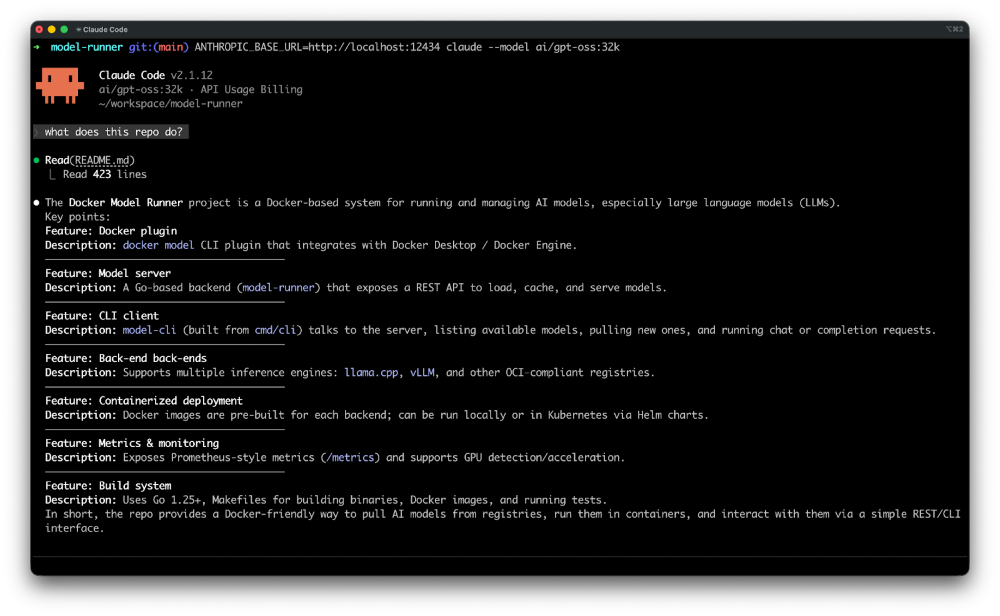
Docker Model Runner で Claude Code をローカル実行
この記事では、Claude CodeをDocker Model Runnerで設定する方法を解説し、データ、インフラ、支出を完全にコントロールできるようにします。Claude CodeはANTHROPIC_BASE_URL環境変数を通じてカスタムAPIエンドポイントをサポートしています。Docker Model RunnerはAnthropic互換APIを公開しているため、両者の統合は簡単です。これにより、Claude Codeの体験を維持しつつローカルでモデルを実行できます。
モデルが自分の管理下で動いている今、Claude Codeをツールと連携させてその機能を拡張する時が来ました。
Docker MCP ToolkitでClaudeコードにMCPサーバーを追加する方法
MCPは、Claude Codeのようなコーディングエージェントを実際のツール、データベース、リポジトリ、ブラウザ、APIとつなげる事実上の標準となりつつあります。300台以上の既成コンテナ化されたMCPサーバー、Docker Desktopでのワンクリック展開、自動認証処理により、開発者はClaude Codeを数時間ではなく数分で信頼できる環境に接続できます。依存関係の問題もなく、手動設定もなく、Mac、Windows、Linuxをまたぐ一貫した安全なワークフローが確保されています。
この ガイドでは、以下の方法を学びます:
- Claude Codeをセットアップし、Docker MCP Toolkitに接続します。
- Jira 統合用に Atlassian MCP サーバーを構成します。
- リポジトリ履歴にアクセスし、git コマンドを実行するように GitHub MCP サーバーを構成します。
- ローカルコードベースをスキャンして読み取るようにファイルシステムMCPサーバーを設定します。
- 15 TODO コメントを追跡された Jira チケットに変換することで、技術的負債の追跡を自動化します。
- Claude Codeが開発環境を離れることなく、Git履歴のクエリ、課題の分類、チケットの作成を行う方法をご覧ください。
動画の攻略動画が好みですか?Docker MCP ToolkitでClaude CodeにMCPサーバーを追加する チュートリアル をご覧ください。
ツールをつなぐことで強力な自動化が可能になりますが、能力が大きくなるほど責任も増えます。エージェントに行動を任せるなら、安全に運営する必要があります。
Docker Sandboxes:Claude Code やその他のコーディングエージェントを監視なしでも安全に実行
Claude Codeが提案からパッケージのインストールやファイルの修正といった現実的な操作へと移行するにつれて、隔離が極めて重要になります。
サンドボックス は、コーディングエージェント向けに特別に設計された使い捨ての分離環境を提供します。各エージェントは開発環境の独立したバージョンで動作するため、パッケージのインストール、設定の変更、ファイルの削除、Dockerコンテナの実行などを行っても、ホストマシンは手つかずのままです。
この隔離により、Claude Codeのようなエージェントを自律的に運用できます。彼らはあなたのコンピューターを傷つけられないので、自由に動かしておきましょう。より安全で使いやすく、より強力なDockerサンドボックスに関する 発表 をご覧ください。
概要
Claude Codeはそれ自体で強力ですが、Dockerと組み合わせて使うことで、安全で拡張性が高く、完全に制御されたAI開発環境となります。
この投稿で、あなたは以下の方法を学びました:
- Docker Model Runnerを使ってClaude Codeをローカルで実行し、Anthropic対応のAPIエンドポイントでデータ、インフラ、コストを完全にコントロールできます。
- Claude Code をDocker MCP Toolkitのツールに接続し、Jira、GitHub、ローカルファイルシステムなどのサービス向けに 300+コンテナ化されたMCPサーバーをワンクリックで展開できます。
- DockerサンドボックスでClaudeコードを安全に実行しましょう。Dockerは、コーディングエージェントがホストマシンを危険にさらさずに自律的に動作できる隔離された環境です。
ローカルモデル実行、安全なツール接続、独立したランタイム環境を組み合わせることで、Claude CodeのようなAIコーディングエージェントを自律性と制御の両方で実行可能にし、実際の開発ワークフローに実用的です。