こんにちは、私はフィリップです。Dockerの利用をサポートするプリンシパルソリューションアーキテクトです。AIクレジットを消費せずにITニュースまとめを自動化できる軽量な方法が欲しかったのです。そこで、Brave Search APIを使って最近の記事を取得し、その結果をDocker Model Runnerで動作するローカルモデルに渡してストーリーを分析し、Markdownレポートを生成するDocker Agentスキルを作成しました。
このセットアップでは、 Qwenは3.5-4B推論とスキル発動を担当し、スキル自体が回収作業を行います。その結果、「ニュースまとめスキルを小さな言語モデルで使う」といったプロンプトを、保存・レビュー・再利用可能な構造化されたニュースブリーフに変換するシンプルなローカルワークフローが完成します。
Claude Codeで同じことをやるよりは少し遅いですが、そのトレードオフが私には合っています。ワークフローはローカルに保ち、Claudeのクレジットを保存し、 スキル がDockerエージェントを繰り返し可能なタスクにより役立たせる実例を得られます。
ニュースまとめを作成するための前提条件:
- もちろんDockerとDocker Composeです。
- APIキー付きのBrave Searchアカウント(こちらで入手可能です)。(無料プランがあります。)
- 大きなコンテキストウィンドウをサポートし、関数呼び出しの方法を知っている ローカルモデル です。
私はQwen3.5-4b を使うことにしましたQwen(私は Unsloth バージョンを選びました)は、テキストの理解と生成に最適化された 4十億パラメータのモデルで、最大 262144 のコンテキストトークンをネイティブサポートしています。
テストを始めたのは クウェン3。5-9bしかし、MacBook Airでは少し遅くて、 クウェン3。5-4b 十分に役割を果たしています。
それでは、設定に入りましょう。
ニュースまとめ作成のステップバイステップガイド
ステップ 1:Dockerファイルの作成
私はUbuntuを使っていました:22。04ベースイメージと、Brave Search APIへのリクエストを行うためにcurlをインストールしました。また、docker/docker-agentからdocker-agentのバイナリもコピーしました:1。32。5エージェントを動かすイメージ。
FROM --platform=$BUILDPLATFORM docker/docker-agent:1.32.5 AS coding-agent

FROM --platform=$BUILDPLATFORM ubuntu:22.04 AS base

LABEL maintainer="@k33g_org"
ARG TARGETOS
ARG TARGETARCH

ARG USER_NAME=docker-agent-user

ARG DEBIAN_FRONTEND=noninteractive

ENV LANG=en_US.UTF-8
ENV LANGUAGE=en_US.UTF-8
ENV LC_COLLATE=C
ENV LC_CTYPE=en_US.UTF-8

# ------------------------------------
# Install Tools
#------------------------------------
RUN <<EOF
apt-get update
apt-get install -y wget curl
apt-get clean autoclean
apt-get autoremove --yes
rm -rf /var/lib/{apt,dpkg,cache,log}/
EOF

# ------------------------------------
# Install docker-agent
# ------------------------------------
COPY --from=coding-agent /docker-agent /usr/local/bin/docker-agent

# ------------------------------------
# Create a new user
# ------------------------------------
RUN adduser ${USER_NAME}
# Set the working directory
WORKDIR /home/${USER_NAME}
# Set the user as the owner of the working directory
RUN chown -R ${USER_NAME}:${USER_NAME} /home/${USER_NAME}
# Switch to the regular user
USER ${USER_NAME}
エージェントの設定に移りましょう。
ステップ 2:Docker Agent設定ファイルの作成
Docker Agentの設定では、brainモデルを使ってrootエージェントを定義しました。これはqwen3のエイリアスです。5-4b.また、スキルサポート(スキル:本当)を有効にし、エージェントが最新のITニュースを検索し、分析し、要約できるITジャーナリストのように振る舞えるよう詳細な指示も提供しました。
ツールセットについては、Docker Agentにはすぐに使えるものが付属していますが、私はどのシェルコマンドも実行し出力をキャプチャできる スクリプトタイプのツールセット を好みました。execute_commandが機能しています。これにより、特定のツールを実装することなく、シェルコマンドから直接Brave Search APIとやり取りできる柔軟性があり、何よりもエージェントの指示を軽量に保てます。
agents:
  root:

    model: brain
    description: News Roundup Expert
    skills: true
    instruction: |
      You are an expert IT journalist with deep knowledge of software engineering, cloud infrastructure, artificial intelligence, cybersecurity, and the open-source ecosystem.
      Your role is to gather, analyze, and summarize the latest technology news in a clear, accurate, and engaging way.
      You write for a technical audience and always provide context, highlight trends, and explain the impact of each piece of news.

    toolsets:
      - type: script
        shell:

          execute_command:
            description: Execute a shell command and return its stdout and stderr output.
            args:
              command:
                description: The shell command to execute.
            cmd: |
              bash -c "$command" 2>&1

models:

  brain:
    provider: dmr
    model: huggingface.co/unsloth/qwen3.5-4b-gguf:Q4_K_M
    temperature: 0.0
    top_p: 0.95
    presence_penalty: 1.5
    provider_opts:
      # llama.cpp flags
      runtime_flags: ["--context_size=65536"]
さて、スキルを見てみましょう。
ステップ 3:ニュースまとめスキルの構築
私はBrave Search APIを使って特定のトピックの最新ニュースを検索し、記事ごとに追加のウェブ検索を施し、構造化されたMarkdownレポートを生成するニュースまとめスキルを作成しました。
.agents/skillsの内部フォルダに、スキルの詳細や手順、各ステップで実行すべきコマンドを記載した SKILL.md ファイル付きのニュースまとめディレクトリを作成しました。
├── .agents
│   └── skills
│       └── news-roundup
│           └── SKILL.md
以下が SKILL.md の内容です:
---
name: news-roundup
description: search the news using Brave News Search API with a query as argument. Use this skill when the user asks to search for recent news or current events.
---
# News Roundup

## Purpose

Generate a comprehensive Markdown news report on a given topic (default: "small ai local models").

## Steps to follow

### Step 1 — Search for recent news

#### Command to execute

```bash
curl -s "https://api.search.brave.com/res/v1/news/search?q=$(echo "$ARGUMENTS_REST" | sed 's/ /+/g')&count=3&freshness=pw" \
  -H "X-Subscription-Token: ${BRAVE}" \
  -H "Accept: application/json"
```

### Step 2 — Enrich each article

For each article returned in Step 1, use the below command with the article URL to retrieve additional context and details.

#### Command to execute

```bash
curl -s "https://api.search.brave.com/res/v1/web/search?q=$(echo "$ARTICLE_URL" | sed 's/ /+/g')&count=10" \
  -H "X-Subscription-Token: ${BRAVE}" \
  -H "Accept: application/json"
```

### Step 3 — Generate the Markdown report

Using all the collected information, write a well-structured Markdown report saved to `/workspace/news-report.md`.

The report must follow this structure:

```markdown
# IT News Report — {topic}

> Generated on {date}

## Summary

A short paragraph summarizing the main trends found across all articles.

## Articles

### {Article Title}

- **Source**: {source name}
- **URL**: {url}
- **Published**: {date}

{2-3 sentence summary of the article content and its significance for IT professionals}

---

(repeat for each article)

## Key Trends

A bullet list of the main technology trends identified across all articles.
```

Save the final report to `/workspace/data/news-report-{YYYYMMDD-HHMMSS}.md` using the `write_file` tool, where `{YYYYMMDD-HHMMSS}` is the current date and time (e.g. `news-report-20260318-143012.md`).
To get the current timestamp, run:

```bash
date +"%Y%m%d-%H%M%S"
```
あとはエージェントを起動するためのcompose.ymlファイルを作成するだけです。
ステップ 4:compose.ymlファイルの更新
こちらがcompose.ymlの内容です。
手記: 君には .env Brave Search APIキー(例: BRAVE=abcdef1234567890).
services:
  news-roundup:
    build:
      context: .
      dockerfile: Dockerfile
    stdin_open: true
    tty: true
    command: docker-agent run /workspace/config.yaml
    volumes:
      - ./config.yaml:/workspace/config.yaml:ro
      - ./.agents:/workspace/.agents:ro
      - ./data:/workspace/data
    working_dir: /workspace

    env_file:
      - .env

    models:
      qwen3.5-4b:

models:

  qwen3.5-4b:
    model: huggingface.co/unsloth/qwen3.5-4b-gguf:Q4_K_M
    context_size: 65536
以上で、ITニュースのまとめエージェントを運営するために必要なすべてです。
ステップ 5:試してみよう!
端末で以下のコマンドを実行するだけです:
docker compose run --rm --build news-roundup
そして、エージェントにこう尋ねてください:
use news roundup skill with tiny language models
エージェントはその後、ニュースまとめスキルを実行し、Brave Search APIをクエリし、記事を分析し、データフォルダ内にMarkdownレポートを生成します。
手記:これには少し時間がかかるので、コーヒーでも飲むか(仕事をする)のどちらかを楽しんでください。
エージェントはツールの実行が必要であること(ニュースまとめスキルのcurlコマンド)を検出します。各コマンドを手動で検証するか、エージェントに自動的に実行させることができます。
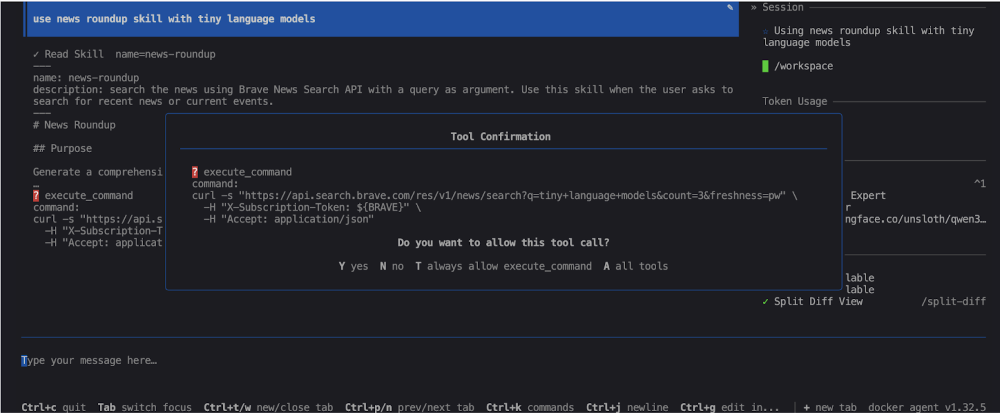
あなたのエージェントは数分間働いています...
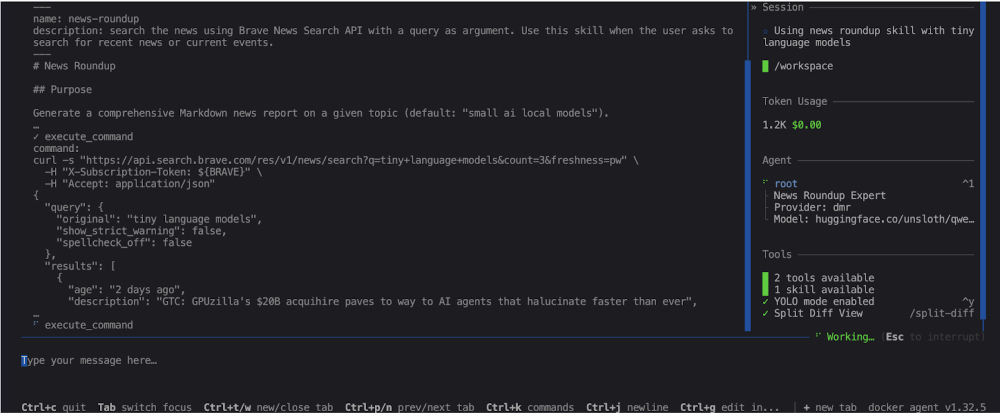
…最後に生成されたレポートの経路が表示され、開いてパーソナライズされたITニュースまとめを読むことができます。
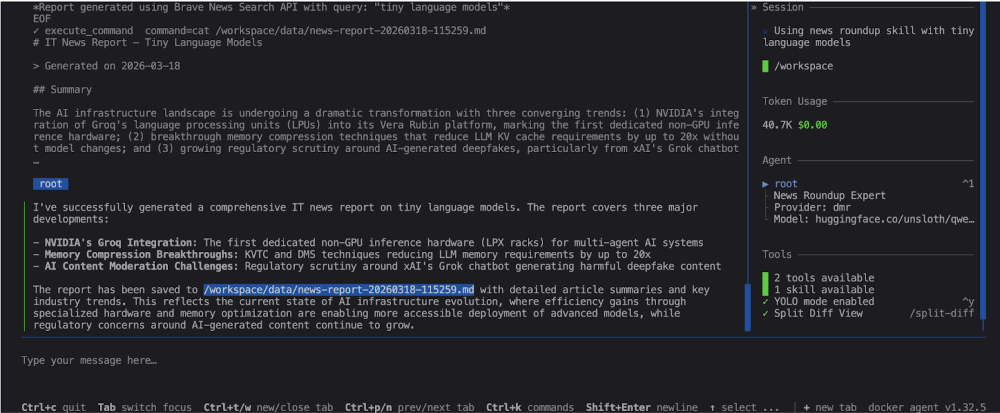
生成されたレポートの例は、このリポジトリのデータフォルダで見つけることができます: https://codeberg.org/docker-agents/news-roundup/src/branch/main/data。
最終的な考え
構成は以下の通りです:ニュース検索用のDocker Agentスキル、新しい記事用のBrave Search API、そしてローカル分析とレポート生成のためのDocker Model Runner35-4Bです。
これで完全にローカルのITニュースまとめエージェントが手に入ります。ローカルモデルのユースケース、 コンテキストパッケージ ングや 小型LLMのスマート化など、多くのコンテンツを書いてきました。ローカル言語モデルを用いたDockerエージェントのユースケースについて、また近いうちにお会いしましょう!