

オープンソースコンポーネントはほとんどの現代アプリケーションを支えています。新世代のハード化コンテナイメージはより安全な基盤を築くことができますが、強化されたイメージであっても、脆弱性スキャナーは優先順位をほとんど置かずに数十から数百のCVEを返すことがよくあります。このノイズはチームの動作を遅らせ、セキュリティのトリアージを複雑にします。VEX(脆弱性悪用性交換)標準は、特定の脆弱性が実際に組織のアプリケーションスタックやインフラに影響を与えるかどうかの情報を提供することで、この問題に対処します。
Docker Hardened Images(DHI)とWiz CLIの新しい統合により、VEXデータを分析することでセキュリティおよびプラットフォームチームに正確な到達可能性の洞察が提供されました。WizはDockerと連携し、カタログ内の 1以上の000 DHIイメージすべてに含まれるVEX文を正しく取り込み解析できるようにスキャナーを調整しました。この統合により、ユーザーは脆弱性の雑音を切り抜け、スキャン結果から明確で実用的な洞察が得られます。
WizスキャナーがDocker Hardened Imageを検出すると、画像のVEXドキュメントやOSVアドバイザリーから取得し、誤検知をフィルタリングします。すでにWizを使用している組織にとっては、コンテナフリート全体でハード画像を導入するより簡単な道筋が整います。最後に、FedRAMPやVEXカバレッジを規定する他のコンプライアンス認証を目指す組織にとって、WizがDHI VEXステートメントを読み取れる能力はコンプライアンスを加速し、展開までの時間を短縮し、結果として収益化の時間も短縮できます。
TLです。博士
DockerをWizと統合して:
- VEXおよびOSVデータを用いて誤検知を最小限に抑える
- ベースイメージやソフトウェアコンポーネントをより正確に識別する
- セキュリティチームにソフトウェア資材明細(SBOM)を明確に把握できるようにする
- 詳細な問題要約を修復ワークフローに統合することで、手動検証の手間を減らしましょう
- 最新のパッケージメタデータとSPDXスニペットによるより良い画像品質保証
- より自信を持ってDockerハード化イメージへの移行
なぜVEXなのか?
VEX(脆弱性利用可能性交換)は、既知の脆弱性が特定の製品に影響を与えるかどうかをソフトウェア提供者が明示できる機械可読の方法です。依存リストだけでリスクを推測するのではなく、VEXは脆弱性が影響を受けていない、影響を受けている、修正されている、調査中かどうかを明示的に宣言しています。これは重要な理由で、多くのスキャナーの発見は実際の製品では活用できず、誤検知や無駄な労力、そして実際のリスクが隠蔽される原因となっています。
VEXは、セキュリティツールや顧客が独立して検証できる透明性で監査可能な脆弱性の状態を可能にします。これは、文脈や過去のリスクを曖昧にする独自のアドバイザリーフィードとは異なります。
始める前に
- DockerとWizの両方の組織にアクセスできることを確認してください。
- Dockerの強化イメージを使用しているか確認してください
- Wizで SBOMのエクスポートとスキャンの可視 化を有効にしていることを確認してください。
- Wizの統合によるDocker強化イメージの識別
- この統合により、Wizは自動的にDockerの強化イメージを検出します。Wizダッシュボードの統合は主に2つの機能で構成されています。まず、以下の手順に従って、どれだけ多くのリソースや組織がDocker Hardened Imagesを使用しているかを確認します。
- Wiz Dockerの統合ページに移動し、「接続」をクリックしてください
- Wizダッシュボードへのログインを促されます
- ログインしたら、ダッシュボードの左側バーにある 「インベントリ」 セクションに移動します
- 「テクノロジー」ダッシュボードにリダイレクトされ、Wizは顧客環境で稼働しているすべての技術を検出します。検索バーで「Docker Hardened Images」を探してください
- Wizは各コンテナマウント上で動作する特定のオペレーティングシステムを自動検出し、それらをハード化イメージとしてフラグ付けします
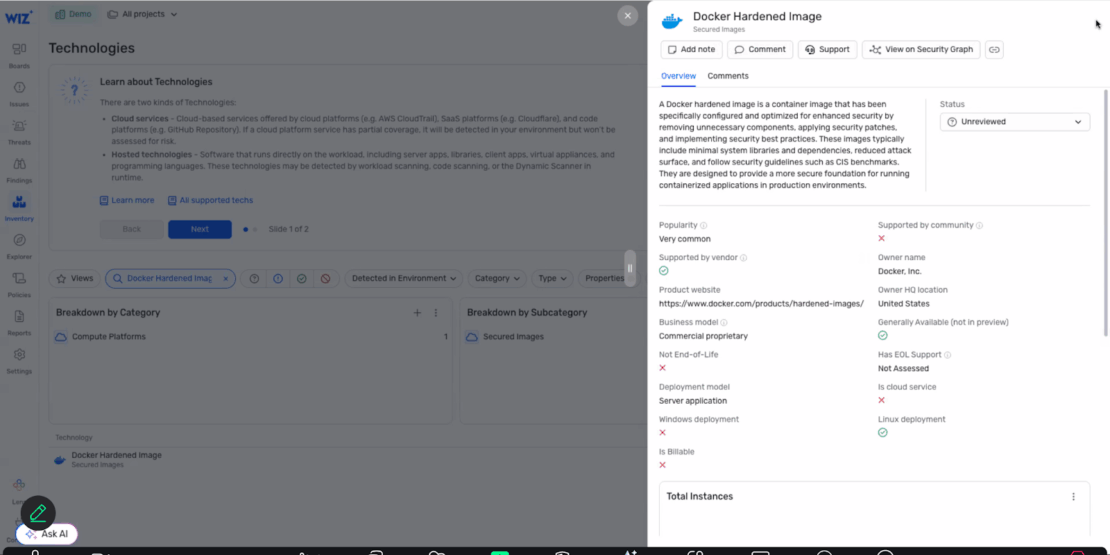
Wizダッシュボードの脆弱性チェック:
WizがDockerのハードンドイメージを識別できることを検証すれば、WizのセキュリティグラフとDockerのコンテナメタデータを使って脆弱性をチェックできるようになります。そのためには、技術のタブから以下の手順に従ってください:
- 在庫/技術のページにアクセスし、OSで絞り込むか、特定の技術を検索してください
- OS/技術をクリックするとメタデータとリソース数が表示されます
- その技術を実行しているすべてのリソースを表示するセキュリティグラフビューにアクセスするにはクリックしてください
- それらのリソースで検出された CVE をフィルタリングする条件を追加してください。
- 関連する脆弱性を含むすべてのリソースをテーブルまたはグラフ形式で表示
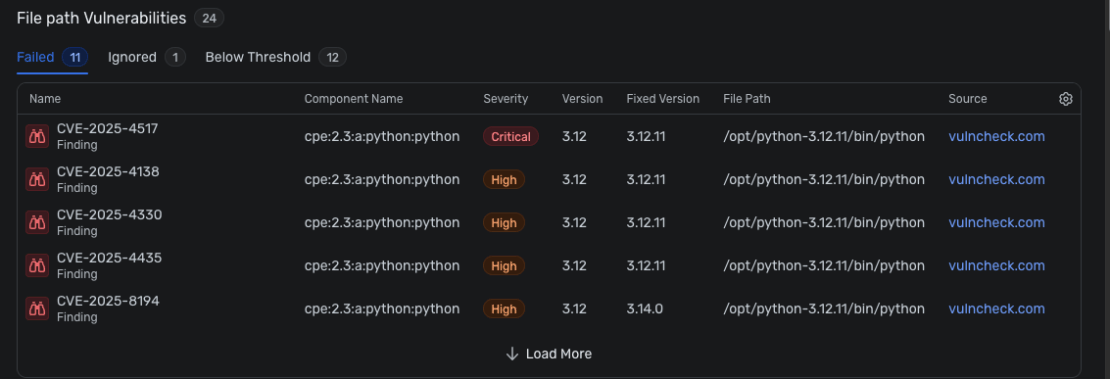
最終チェック
設定後、脆弱性は事前に設定したポリシーに従って表示されます。リストアップした各CVEの詳細概要、依存関係のグラフ可視化 、深刻度分布、潜在的なエクスプロイト経路などを把握できます。これらの洞察により、修復の優先順位付け、解決の進捗を追跡し、組織のセキュリティ基準への遵守を確保するのに役立ちます。
ソフトウェアサプライチェーンの可視化を改善するためのDockerハード化イメージの統合
DockerとWizの連携は、単なるセキュリティチェックリストのチェックボックス以上のものです。その内容は以下の通りです:
- 明確さ:VEX文書と正確なベース画像識別は推測を排除し、明確で文脈に合った脆弱性データを提供します。
- 信頼度:OSVアドバイザリーやDocker提供のメタデータを通じて誤検知を最小限に抑えることで、セキュリティチームは確認した情報を信頼できます。
- コントロール:SBOMや技術利用状況の可視化により、チームは修復の優先順位付けと効果的な管理が可能になります。
- カバレッジ:Wizとのフルスタック統合により、強化されたイメージやソースビルドコンポーネントを含むすべてのDocker環境における脆弱性が明らかになります。
このパートナーシップにより、DevSecOpsチームは迅速に対応し、コンテナ脆弱性に対して積極的に対応できるよう支援されます。これは、高速リリース、オープンソースリスク、複雑なクラウドネイティブ環境を管理する現代的でリーンなチームにとって不可欠な能力です。
始める準備はできましたか?
すでにDocker Hardened ImagesやWizを使っているなら、数クリックで誤検知の減少、SBOMの可視性向上、脆弱性データの活用に近づけます。
- Docker + Wizのソリューションブリーフを確認してください
- Docker + Wizの統合ページをご覧ください
- VEXについては当社のドキュメントでさらに詳しくご覧 ください