
埋め込みは多くの現代AIアプリケーションの基盤となっています。セマンティックサーチから検索拡張生成(RAG)、インテリジェントレコメンデーションシステムに至るまで、埋め込みモデルは文字通りの言葉だけでなく、テキストやコード、文書の 意味 を理解することを可能にします。
しかし、埋め込みを生成するにはトレードオフがあります。組み込み生成にホストAPIを使用すると、データプライバシーの低下、通話コストの増加、モデルの再生の時間がかかることが多いです。データがプライベートであったり、常に変化し続ける場合(内部文書、独自コード、カスタマーサポートコンテンツなど)、これらの制限はすぐに障害となります。
リモートサービスにデータを送る代わりに、 Docker Model Runnerを使ってオンプレミスでローカル埋め込みモデルを簡単に実行できます。Model Runnerは現代的な埋め込み技術の力を地域の環境に持ち込み、箱から出してすぐにプライバシー、コントロール、コスト効率を実現します。
この記事では、セマンティックサーチに埋め込みモデルを使う方法を学びます。まずは埋め込みの理論と、なぜ開発者がそれを実行すべきかについて解説します。最後に、Model Runnerを使った実例で締めくくります。参考までに。
意味的探索埋め込みの理解
まず埋め込みとは何かを解きほぐしてみましょう。
埋め込みは 、単語、文、さらにはコードまでもを高次元の数値ベクトルとして表現し、意味的な関係を捉えています。このベクトル空間では、似たものは集まり、異なるものはより離れています。
例えば、従来のキーワード検索では正確な一致を探します。「authentication」で検索すると、その用語がまさに含まれた文書しか見つかりません。しかし埋め込みの場合、「ユーザーログイン」で検索すると、認証、セッション管理、セキュリティトークンなどの情報も出てくることがあります。なぜなら、モデルはこれらが意味的に関連したアイデアであることを理解しているからです。
これにより、埋め込みはより知的な検索、検索、発見の基盤となります。システムが単に入力した内容だけでなく、 あなたの意味を理解するのです。
言語と意味がAIでどのように交差しているかをより深く知りたい方は、「The Language of Artificial Intelligence」をご覧ください。
ベクター類似性が埋め込みを用いた意味的検索を可能にする方法
ここで意味検索の数学が登場しますが、それは洗練されたシンプルさです。
テキストがベクトル(数値のリスト)に変換されると、コサイン類似度を用いて2つのテキストの類似度を測定できます。
どこ:
- Aはクエリベクトル(例:「ユーザーログイン」)です。
- Bは別のベクトル(例:コードスニペットやドキュメント)です。
その結果、通常 0 と 1の間の類似度スコアが生まれ、 1 に近いほどテキストの意味がより似ていることを示します。
実際に:
- 検索クエリと関連文書は高い余弦類似性を持ちます。
- 無関係な結果は類似度が低い。
この簡単な数学的指標により、クエリと意味的にどれだけ近いかで文書をランク付けでき、以下のような機能が実現します。
- ドキュメントやコードによる自然言語検索
- コンテキストに関連するスニペットを取得するRAGパイプライン
- 関連コンテンツの重複除去またはクラスタリング
Model Runnerを使えば、これらの埋め込みをローカルで生成し、Milvus、Qdrant、pgvectorのようなベクターデータベースに入力し、サードパーティAPIにバイトを送ることなく独自のセマンティックサーチシステムを構築し始めることができます。
なぜ埋め込みモデルを実行するのにDocker Model Runnerを使うのか
Model Runnerなら環境や依存関係の設定を心配する必要がありません。モデルを抽出し、ランナーを起動すれば、馴染みのあるDockerワークフロー内で埋め込みを生成する準備が整います。
完全なデータプライバシー
あなたの機密データは決して環境から離れません。ソースコード、内部文書、顧客コンテンツの埋め込みであっても、すべてがローカルに保たれ、サードパーティのAPI呼び出しやネットワークへの露出はありません。
埋め込みごとコストゼロ
使用量に基づくAPIコストは発生しません。モデルを ローカルで実行させたら、追加費用なしで必要な頻度で埋め込みを生成、更新、再構築できます。
つまり、データセットを繰り返し改良したり新しいプロンプトを試したりしても予算には影響しません。
性能と制御
自分のユースケースに最も合ったモデルを実行し、自社のCPUやGPUを使って推論しましょう。
モデルはOCIアーティファクトとして配布されるため、既存のDockerワークフロー、CI/CDパイプライン、ローカル開発環境にシームレスに統合されます。これにより、他のコンテナイメージと同様にバージョンモデルを管理でき、環境間での一貫性と再現性を確保します。
Model Runnerはモデルをデータに持ち込むことができ、その逆ではなく、ローカルでプライベートかつコスト効率の高いAIワークフローを解放します。
実践的な体験:Docker Model Runnerでの埋め込み生成
埋め込みとは何か、そして意味意味をどのように捉えるかを理解したところで、Model Runnerを使ってローカルで埋め込みを生成することがいかに簡単か見てみましょう。
ステップ 1。モデルを引き出せ
docker model pull ai/qwen3-embedding
ステップ 2。埋め込み生成
このエンドポイントには、curlやお好みのHTTPクライアントを通じてテキストを送信できます。
curl http://localhost:12434/engines/v1/embeddings \
  -H "Content-Type: application/json" \
  -d '{
    "model": "ai/qwen3-embedding",
    "input": "A dog is an animal"
  }'
回答には埋め込みベクトルのリストが含まれ、入力テキストの数値表現です。
これらのベクトルは、Milvus、Qdrant、pgvectorのようなベクトルデータベースに保存して、意味検索や類似性クエリを行えます。
例のユースケース:コードベースのセマンティックサーチ
実用的にしよう。
プロジェクトリポジトリ全体でセマンティックコード検索を有効にしたいと想像してください。
プロセスは以下の通りになります:
ステップ 1。コードをチャンク化して埋め込む
コードベースを論理的なチャンクに分割しましょう。ローカルのDocker Model Runnerエンドポイントを使って各チャンクごとに埋め込みを生成します。
ステップ 2。ストア埋め込み
埋め込みとメタデータ(ファイル名、パスなど)を保存してください。通常はベクターデータベースを使ってこれらの埋め込みを保存しますが、このデモでは簡単さのためにファイルとして保存します。
ステップ 3。意味によるクエリ
開発者が「user login」で検索すると、クエリを埋め込み、保存ベクトルとコサイン類似度を使って比較します。
私たちは、まさにその目的を DorkのModel Runnerリポジトリにデモ として掲載しています。
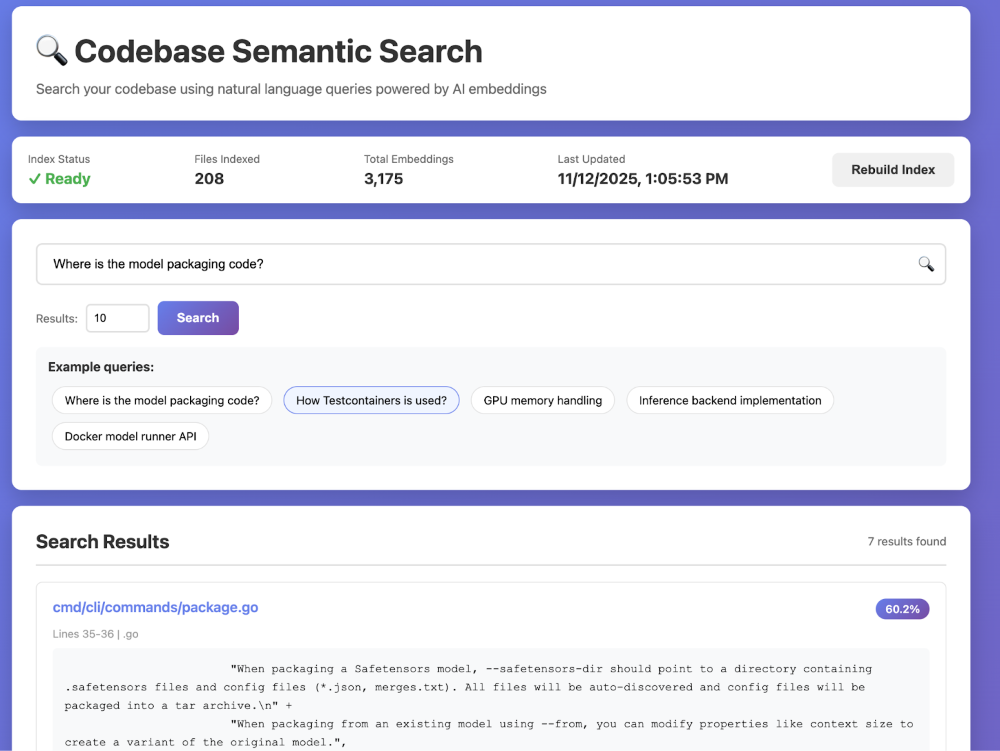
図 1:組み込み統計、例クエリ、検索結果を含むコードベースの例デモ。
結論
埋め込みは、キーワードだけでなく知的な意味でアプリケーションを動かすのに役立ちます。昔の面倒は、サードパーティAPIの配線、データプライバシーの調整、そして通話あたりのコストの上昇を見守ることでした。
Docker Model Runnerはこのスクリプトを逆にします。今では、データが保管されているローカルで埋め込みモデルを実行でき、データやインフラを完全にコントロールできます。セマンティックサーチ、RAGパイプライン、カスタム検索を一貫したDockerワークフローで提供しましょう — プライベートでコスト効率が高く、再現性が高まります。
使用料はかかりません。外部からの依存関係はありません。モデルを直接データに届けることで、Dockerはこれまで以上に安全に、自分のペースで探索・実験・イノベーションを容易にします。
参加方法
Docker Model Runnerの強みはコミュニティにあり、成長の余地は常にあります。このプロジェクトを最高のものにするために、皆さんのご協力が必要です。参加するには、以下の方法があります:
- リポジトリに星をつける: Docker Model Runnerリポジトリに星をつけて、私たちの認知度を高めるためにご支援いただければ幸いです。
- アイデアを投稿してください。 新機能やバグ修正のアイデアはありますか?問題を作成して議論します。または、リポジトリをフォークし、変更を加えて、pull request を送信します。私たちはあなたがどんなアイデアを持っているかを見るのを楽しみにしています!
- 言葉を広める: 友人、同僚、および Docker で AI モデルを実行することに興味がある可能性のある人に伝えてください。
私たちは Docker Model Runner のこの新しい章に非常に興奮しており、一緒に何を構築できるかを見るのが待ちきれません。さあ、仕事に取り掛かりましょう!
Docker Model Runner →を始めましょう
詳しく見る
- Docker Model RunnerとvLLMの連携発表をチェックしてみてください
- Model Runner GitHub リポジトリにアクセスしてください。Docker Model Runner はオープンソースであり、コミュニティからのコラボレーションと貢献を歓迎します。
- シンプルなhello GenAIアプリケーションでDocker Model Runnerを使い始める