

特別な感謝を Cody Ebberson そしてMedplumチームのオープンソース貢献と移行体験の共有に感謝します。HIPAA準拠のEHRプラットフォームを最小限のコード変更でDHIに移行した実例です。
医療ソフトウェアは信頼に基づいて動いています。患者データがかかっている場合、セキュリティは単なる機能ではなく、根本的な要件となります。医療プラットフォームプロバイダーにとって、企業顧客への信頼を証明することは継続的な課題であり、セキュリティ体制、コンプライアンス認証、脆弱性管理への継続的な投資が必要です。
だからこそ、2000万人以上の患者にサービスを提供するオープンソースの医療プラットフォーム、Medplumが最近Docker Hardened Images(DHI)に移行したことをお知らせできることを嬉しく思います。この移行は、DHIが実現するために設計されたもの、すなわち最小限の摩擦でエンタープライズグレードのセキュリティを実現していることを示しています。Medplumのチームは、ファイル全体でわずか 54 行の変更で切り替え 5 、ほぼネットゼロのコード変更でセキュリティ体制を劇的に向上させました。
メドプラム はヘッドレスEHRです。このプラットフォームは患者データ、臨床ワークフロー、コンプライアンスを管理し、開発者は医療アプリの開発に専念できます。医療開発者によって、また医療開発者のために構築されたこのプラットフォームは、以下を提供します:
- HIPAA(健康・医療・責任保護法) そして SOC2 標準化されたコンプライアンス
- FHIR R4 医療 データ相互運用性のためのAPI
- セルフホストまたは管理型デプロイメント の選択肢
- 数百の診療所で 20+百万患者 への支援
500000 HubをPrón Hubでメドプラムサーバーイメージとして利用し、世界中の医療開発者にとって信頼される基盤となっています。Apache 2のもとでライセンスされたオープンソースプロジェクトとして。0、Dockerの設定を含む彼らの全コードベースはGitHub上で公開されています。この透明性が、彼らのDHI移行を地域社会にとって理想的なケーススタディにしました。
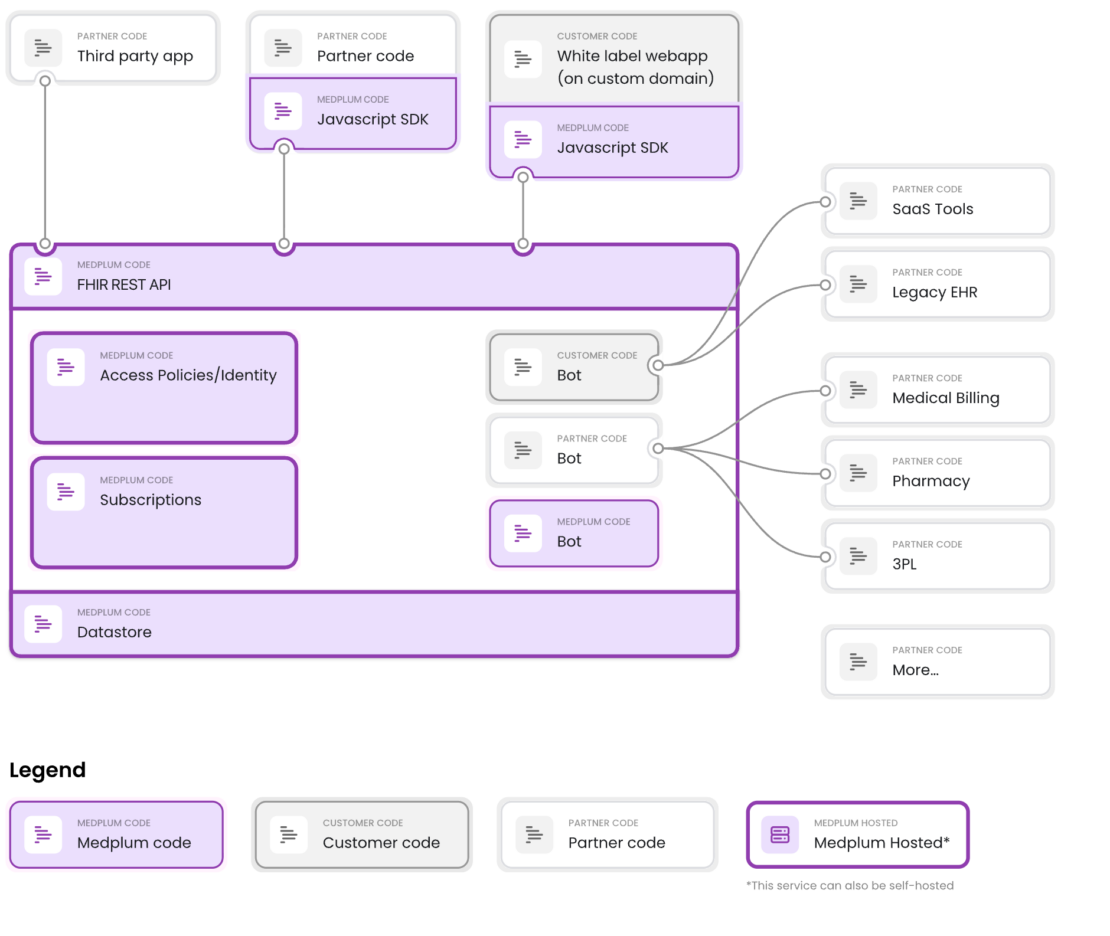
キャプション:メドプラムはヘッドレスEHRです。このプラットフォームは患者データ、臨床ワークフロー、コンプライアンスを管理し、開発者は医療アプリの開発に専念できます。
Medplumは開発者優先です。これはプラグアンドプレイのローコードツールではなく、コードベースを完全にコントロールできる強力なFHIRベースの基盤を求めるエンジニアリングチーム向けに設計されています。
課題:脆弱性、ノイズ、そしてセキュリティの労力
医療ソフトウェア開発には独自の課題があります。既存のEHRシステムとの統合、HIPAAなどの規制遵守、堅牢なセキュリティの必要性は、開発サイクルに複雑さとコストを加えています。
「Medplumチームは、多くの急成長プラットフォームに共通する課題、すなわち「脆弱性ノイズ」に直面しました。リーンベースイメージであっても、標準ディストリビューションには企業監査時にセキュリティフラグをトリガーする非必須パッケージが含まれていることが多いです。HIPAA準拠を達成するために他社を支援する企業にとって、「低」または「中程度」の各CVE(共通脆弱性および曝露)は調査と文書化を必要とし、エンジニアリングチームにとって大きな「セキュリティ負担」となっています。
レシュマ・キルナーニ
CEO、メドプラム
Medplumは、コンプライアンスに適合する基盤を提供することでこれに対応しています。しかし、その基盤があっても、チームは高成長プラットフォームに共通するもう一つの課題、「脆弱性ノイズ」に直面しました。
医療は最もセキュリティ意識の高い業界の一つです。Medplumのエンタープライズ顧客、特にシリーズCやD資金で資金提供されるデジタルヘルス企業も、セキュリティについてだけを尋ねるわけではありません。彼らは積極的にそれを検証しています。これらの顧客はセキュリティのデューデリジェンスの一環として、MedplumのDockerイメージを日常的にスキャンしています。
リーンベースイメージであっても、標準ディストリビューションには企業監査時にセキュリティフラグをトリガーする非必須パッケージが含まれていることが多いです。他社がHIPAA準拠を達成するのを支援する場合、すべての「低」または「中程度」の CVE には調査と文書化が必要です。これにより、エンジニアリングチームにとって大きな「セキュリティ負担」が生じます。
最初の試み:Distroless(ディストロレス)
これはメドプラムが問題を解決しようとした最初の試みではなかった。2024年11月、チームはGoogleのディストロレス画像を解決策として調査しました。
その動機は、後にDHIが提供したものと似ていました。
- 本番イメージの表面積が小さく、それに伴いCVEノイズも少なくなります
- より迅速な展開のための小さなイメージ
- 手動のハードニングスクリプトなしでより簡単なビルドプロセス
その考えは理にかなっていた。ディストロレスイメージはアプリケーションの実行時以外すべてを削ぎ落とします。シェルもパッケージマネージャーも最小限の攻撃面です。紙の上では、まさにメドプラムが必要としていたものだった。
しかし、結果は賛否両論でした。画像のサイズは実際に大きくなりました。ビルド時間が長くなりました。ネイティブ依存関係のマルチアーキテクチャサポートについて懸念がありました。 PRは合併せずに閉鎖されました。
核心的な問題は依然として残りました。標準イメージに含まれる多くのCVEは単純に実行可能ではありません。多くの場合、解決策が見つからないこともあるので、できることはドキュメントを作成し、なぜ自分のユースケースに当てはまらないのかを説明することだけです。そして多くの場合、その脆弱性は使っている画像の隅にあることもあります。例えばPerlはDebianにプリインストールされていますが、Node.jsアプリケーションでは役に立ちません。
これらの未使用部品を完全に取り除くのが唯一の本当の解決策です。チームは、より硬いイメージが必要だと分かっていた。ただ、まだ正しい解決策が見つかっていなかっただけだ。
解決策:Docker強化イメージ
DockerがHardened ImagesをApache 2で無料で提供したとき。0、Medplumのチームは、既存のワークフローとの互換性を維持しつつ、セキュリティ体制を簡素化する機会を見出しました。
Docker Hardened Imagesに切り替えることで、MedplumはOSレベルの強化作業、例えばrootユーザーでない設定や不要なバイナリの削除など、 重複作業をDockerに委ね ることができました。これにより、オープンソースコードベースの複雑さを加えることなく、エンタープライズ要件を満たす 「デフォルトで安全 」なイメージをユーザーに提供できました。
この変化はオープンソースプロジェクトにとって特に重要です。貢献者が理解し維持する必要があるカスタムハードニングスクリプトの維持に頼る代わりに、MedplumはDockerの専門知識と継続的なメンテナンスに頼ることができます。セキュリティ体制は、MedplumのDockerファイルを変更することなく、DHIの更新ごとに自動的に改善されます。
「Docker Hardened Imagesに切り替えることで、MedplumはOSレベルの強化作業、例えば非rootユーザーの設定や不要なバイナリの削除などの繰り返し作業をDockerに任せることができました。これにより、ユーザーはオープンソースコードベースに複雑さを加えることなく、エンタープライズ要件を満たす「Secure-by-Default」イメージを提供できるようになりました。」
Cody Ebberson
メドプラムのCTO
移行:実際のコード変更
移住は非常にクリーンでした。以前は、MedplumのDockerfileはセキュリティのベストプラクティスを確保するために手動の手順が必要でした。DHIに移行することで、構成を大幅に簡素化できる。
実際に何が変わったのか見てみましょう。移行後のサーバーDockerファイルの完全な状態はこちらです:
# Medplum production Dockerfile
# Uses Docker "Hardened Images":
# https://hub.docker.com/hardened-images/catalog/dhi/node/guides

# Supported architectures: linux/amd64, linux/arm64

# Stage 1: Build the application and install production dependencies
FROM dhi.io/node:24-dev AS build-stage
ENV NODE_ENV=production
WORKDIR /usr/src/medplum
ADD ./medplum-server-metadata.tar.gz ./
RUN npm ci --omit=dev && \
  rm package-lock.json

# Stage 2: Create the runtime image
FROM dhi.io/node:24 AS runtime-stage
ENV NODE_ENV=production
WORKDIR /usr/src/medplum
COPY --from=build-stage /usr/src/medplum/ ./
ADD ./medplum-server-runtime.tar.gz ./

EXPOSE 5000 8103

ENTRYPOINT [ "node", "--require", "./packages/server/dist/otel/instrumentation.js", "packages/server/dist/index.js" ]
そこに ない ものに気づいてください:
groupaddやuseraddコマンドなし:DHIはデフォルトで非rootとして動作しますchown命令は使えません:権限はすでに正しいですUSER指示なし:デフォルトユーザーはすでに非特権です
ビフォー vs. アフター:サーバー Dockerfile
Before (ノード:24-slim):
FROM node:24-slim
ENV NODE_ENV=production
WORKDIR /usr/src/medplum

ADD ./medplum-server.tar.gz ./

# Install dependencies, create non-root user, and set permissions
RUN npm ci && \
  rm package-lock.json && \
  groupadd -r medplum && \
  useradd -r -g medplum medplum && \
  chown -R medplum:medplum /usr/src/medplum

EXPOSE 5000 8103

# Switch to the non-root user
USER medplum

ENTRYPOINT [ "node", "--require", "./packages/server/dist/otel/instrumentation.js", "packages/server/dist/index.js" ]
(dhi.io/node:24)
FROM dhi.io/node:24-dev AS build-stage
ENV NODE_ENV=production
WORKDIR /usr/src/medplum
ADD ./medplum-server-metadata.tar.gz ./
RUN npm ci --omit=dev && rm package-lock.json

FROM dhi.io/node:24 AS runtime-stage
ENV NODE_ENV=production
WORKDIR /usr/src/medplum
COPY --from=build-stage /usr/src/medplum/ ./
ADD ./medplum-server-runtime.tar.gz ./

EXPOSE 5000 8103

ENTRYPOINT [ "node", "--require", "./packages/server/dist/otel/instrumentation.js", "packages/server/dist/index.js" ]
また、移行によりマルチステージビルドパターンがよりクリーンになり、メタデータ(package.jsonファイル)とランタイムアーティファクトを分離しました。
ビフォー vs. アフター:App Dockerfile(Nginx)
ウェブアプリの移行はさらに劇的でした:
以前(nginx-unprivileged:alpine):
FROM nginxinc/nginx-unprivileged:alpine

# Start as root for permissions
USER root

COPY <<EOF /etc/nginx/conf.d/default.conf
# ... nginx config ...
EOF

ADD ./medplum-app.tar.gz /usr/share/nginx/html
COPY ./docker-entrypoint.sh /docker-entrypoint.sh

# Manual permission setup
RUN chown -R 101:101 /usr/share/nginx/html && \
    chown 101:101 /docker-entrypoint.sh && \
    chmod +x /docker-entrypoint.sh

EXPOSE 3000

# Switch back to non-root
USER 101

ENTRYPOINT ["/docker-entrypoint.sh"]
( dhi.io/nginx:1):
FROM dhi.io/nginx:1

COPY <<EOF /etc/nginx/nginx.conf
# ... nginx config ...
EOF

ADD ./medplum-app.tar.gz /usr/share/nginx/html
COPY ./docker-entrypoint.sh /docker-entrypoint.sh

EXPOSE 3000

ENTRYPOINT ["/docker-entrypoint.sh"]
結果:セキュリティ体制の改善
変更を統合した後、メドプラムのチームは改善されたセキュリティスキャン結果を共有しました。DHIへの移行により、以下の成果が生まれました:
- CVE数の劇的な減少 – DHIの最小限のベースはパッチ適用すべきパッケージ数が少なくなっています
- デフォルトで非root化 – 手動設定は不要
- 本番環境でのシェルアクセスなし – コンテナ脱出の攻撃面を削減
- 継続的なパッチ適用 – すべてのDHIイメージは、上流のセキュリティアップデートが利用可能になると再構築されます
より強力な保証を必要とする組織向けには、Docker Hardened Images EnterpriseはSLA支援による修復スケジュール、画像カスタマイズ、FIPS/STIGバリアントを追加しています。
最も重要なのは、これらすべてがアプリケーションの 機能変更 を一切行わずに実現されたことです。同じテストが通過し、同じワークフローが動作し、同じ展開プロセスが適用されました。
CI/CD統合
Medplumはまた、GitHub Actionsワークフローを更新し、DHIレジストリでの認証を可能にしました:
- name: Login to Docker Hub
  uses: docker/login-action@v2.2.0
  with:
    username: ${{ secrets.DOCKERHUB_USERNAME }}
    password: ${{ secrets.DOCKERHUB_TOKEN }}

- name: Login to Docker Hub Hardened Images
  uses: docker/login-action@v2.2.0
  with:
    registry: dhi.io
    username: ${{ secrets.DOCKERHUB_USERNAME }}
    password: ${{ secrets.DOCKERHUB_TOKEN }}
これにより、CI/CDパイプラインはビルド時にハード化されたベースイメージを取得できます。同じDocker Hubの認証情報は、標準イメージレジストリーとハードドされたイメージレジストリーの両方で動作します。
DHIのマルチステージパターン
メドプラムの移行から注目すべきパターンの一つは、DHIバリアントを用いたマルチステージビルドの使用です。
- ビルド段階:依存関係をインストールするためにnpm/yarnを含む
dhi.io/node:24-devを使います - ランタイムステージ:パッケージマネージャーを含まない最小限の
dhi.io/node:24を使います
このパターンにより、ビルドツールが本番イメージに入らないことが保証され、攻撃面がさらに減少します。これはあらゆるコンテナ化されたNode.jsアプリケーションにとってベストプラクティスであり、DHIは各段階ごとに専用のバリアントを提供することでそれをシンプルにしています。
メドプラムのプロダクションアーキテクチャ
Medplumのホスティングサービスは、コンテナ化されたワークロードを用いてAWS上で動作します。彼らの medplum/medplum-server イメージはDHIベースイメージをベースにしており、現在は本番環境に展開されています。
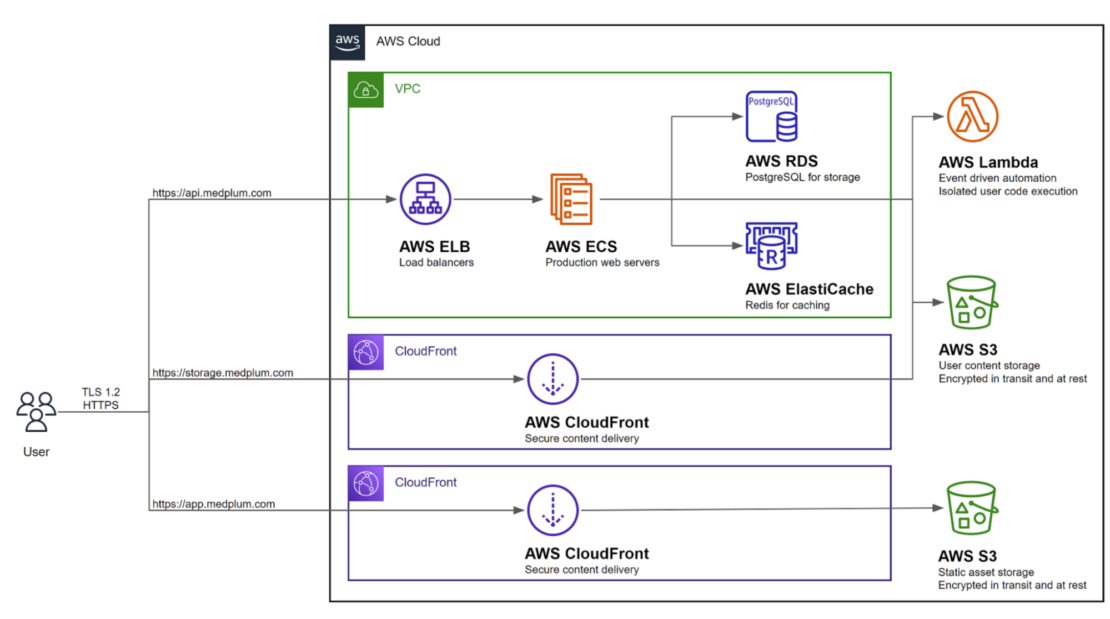
ビルドからデプロイまでの流れは以下の通りです:
- ビルド時間:GitHub Actionsは
dhi.io/node:24-devとdhi.io/node:24をベース画像として取得します - プッシュ:得られた強化イメージをDocker Hubで
medplum/medplum-serverにプッシュします - デプロイ:AWS Fargateが
medplum/medplum-server:latestをプルしてハード化されたコンテナを実行します
デプロイされたコンテナは、DHIのベースイメージに基づいて構築されているため、すべてのDHIセキュリティプロパティ(非root実行、最小限の攻撃対象、シェルなし)を継承します。これは、DHIが以下の本番環境のインフラとシームレスに連携していることを示しています:
- AWS Fargate/ECS for container orchestration
- 高可用性のための弾性負荷均衡
- Aurora PostgreSQL for managed database
- ElastiCache for Redisキャッシュ
- CloudFront for CDNおよび静的資産
インフラの変更は必要ありませんでした。同じデプロイメントパイプライン、同じFargate構成、より安全なベースイメージです。
なぜこれが医療にとって重要なのか
コンテナセキュリティを評価する医療機関にとって、Medplumの移行はいくつかの教訓を提供します。
1。「脆弱性ノイズ」の排除
DHIの最大の成果は単なるセキュリティだけでなく、セキュリティの運用負担を軽減することです。パッケージが少なければ、調査やドキュメント化、顧客への説明が必要なCVEも減ります。専任のセキュリティスタッフがいないチームにとって、この取り戻された時間は非常に貴重です。
2。コンプライアンスに優しいデフォルト
HIPAAは、対象機関に対しアクセス制御や監査管理などの技術的保護策を実施することを義務付けています。DHIの非rootデフォルトと最小限の攻撃面は、これらの要件に最初から合致しています。Medplumが1日から導入したSOC2タイプ2認証、すなわちHITRUST認証を目指す企業にとって、DHIは監査官が評価する技術統制のより強固な基盤を提供します。
3。監査表面の削減
セキュリティチームがコンテナ構成を監査する際、DHIはより明確なストーリーを提供します。カスタムハードニングスクリプトや特定のCVEが適用されない理由を説明する代わりに、チームはDockerの文書化されたハードニング手法、SLSAレベルの起源、SRLabsによる独立したセキュリティ検証3を挙げることができます。これは特に、顧客がデューデリジェンスの一環としてベンダー画像をスキャンするエンタープライズ営業サイクルにおいて非常に価値があります。
4。自分の言うことを実践すること
Medplumのようなプラットフォームが顧客のコンプライアンス達成を支援する場合、強化画像の使用は単なるセキュリティ向上だけでなく、ビジネスにもつながります。医療機関が規制要件を満たすのを支援する際には、自社のインフラが模範を示す必要があります。
5。より迅速なセキュリティ対応
DHI Enterpriseでは、重要なCVEは7日以内にパッチ適用されます。セキュリティインシデントが規制上の影響を及ぼす医療機関にとって、このSLAは意味のあるリスク軽減と顧客との共有に関する具体的なコミットメントを提供します。
結論
MedplumのDocker Hardened Imagesへの移行は、コンテナセキュリティの向上が必ずしも苦痛である必要はないことを示しています。最小限のコード変更(54 の追加や 52 削除)で、彼らは以下の成果を達成しました:
- エンタープライズ要件を満たすデフォルトによるセキュリティイメージ
- 自動非ルート実行
- CVE表面の大幅な減少
- 手動のハードニングスクリプトを使わない簡易Dockerファイル
- エンジニアリングチームの「セキュリティ負担」が減る
- エンタープライズ顧客にとってより強力なコンプライアンスストーリー
OSレベルのハードニングをDockerに任せることで、MedplumはDHIアップデートごとにセキュリティ体制が自動的に改善されながら、医療インフラの構築という得意分野に集中できます。
500、000+ Docker Hubを備えたプラットフォームとして、世界中の医療機関を活用しているため、この移行はDHIが大規模に本番環境のワークロードに対応できる準備ができていることを示しています。さらに重要なのは、セキュリティ改善が運用上の負担を増やすのではなく 、 むしろ軽減できることを示している点です。
他者がコンプライアンスを達成するのを支援するプラットフォームにとっては、自分が説くことを実践することが重要です。Docker Hardened Imagesを使えば、それがずっと簡単になりました。
コンテナを硬化させる準備はできていますか?Docker Hardened Imagesのドキュメント を探索するか、 無料のDHIカタログ を閲覧して、お気に入りのベースイメージのハード化バージョンを見つけてください。