
モデルコンテキストプロトコル(MCP)サーバーは、共通インターフェースを通じてツール、モデル、またはサービスを言語モデルに公開するための仕様です。スマートアダプターのようなものと考えてください。ツールとLLMの間に位置し、実装の詳細を知らずにAPIやデータベース、エージェントと連携できる予測可能なプロトコルを伝えます。
しかし、多くの良いアイデアと同様に、細部に悪魔が潜んでいる。
約束とMCPサーバーの運用上の問題点
MCPを動かすのは簡単そうに聞こえます。PythonやNodeサーバーを立ち上げてツールを公開するだけです。終わったよね?まだまだです。
問題にすぐ直面します:
- ランタイム摩擦:MCPがPythonで書かれている場合、環境にはPython(依存関係、場合によってはvirtualenv戦略、GPUドライバー)が必要です。ノードも同様です。多くのMCPを管理したり、チーム間で展開したりすると、この数は急速に増えます。
- 秘密管理:MCPはしばしば認証情報(APIキー、トークンなど)を必要とします。それらの秘密をMCPランタイムに保存し注入する安全な方法が必要です。異なるチームやツール、クラウドが関わっている場合、それは複雑になります。
- N×N統合の悩み:例えば、3つのクライアントがMCPを消費したいとし、5つのMCPをサービスしたいとします。今は 15 個別の統合を見ています。遠慮します。
MCPを実用的にするには、ランタイムの複雑さ、秘密注入、クライアントからサーバーへの配線という3つの核心的な問題を解決する必要があります。
もし私が何を目指しているのか気になるなら、その問題を見てみてください。すでに開発者が10年以上使ってきた技術、それがDockerコンテナです。
このブログの残りの部分では、MCPサーバーを開発者体験に統合するための3つの異なるアプローチを、最も単純なものから最も複雑なものへと順に解説します。
Option 1 — Docker MCP Toolkit & Catalog
すでにコンテナを使っていて、MCPを始めるのにスムーズにしたい開発者のために。
すでにDockerに慣れていて、MCPをまだ使い始めたばかりなら、これがちょうど良いタイミングです。生のMCPの世界では、PythonやNodeサーバーをクローンし、ランタイムを管理し、秘密を自分で注入し、すべてのクライアントへの接続を手作業でワイヤーヤリングします。まさにDockerのMCPエコシステムが解決しようとした問題です。
DockerのMCPカタログ は、MCPサーバーの厳選されたコンテナ化されたレジストリです。各エントリはMCPサーバーを動かすために必要なすべてのものが入ったあらかじめ構築されたコンテナです。
MCPツールキット (Docker Desktopで利用可能)はコントロールパネルとして機能します。カタログを検索し、安全なデフォルトでサーバーを起動し、クライアントに接続できます。
役立つ方法:
- インストールする言語ランタイムはありません
- 組み込みの秘密管理
- Docker Desktopを使ったワンクリックイネーブルメント
- MCPを既存のエージェント(Claude Desktop、Copilot in VS Codeなど)に簡単に有線接続できます。
- MCPゲートウェイを通じた集中アクセス
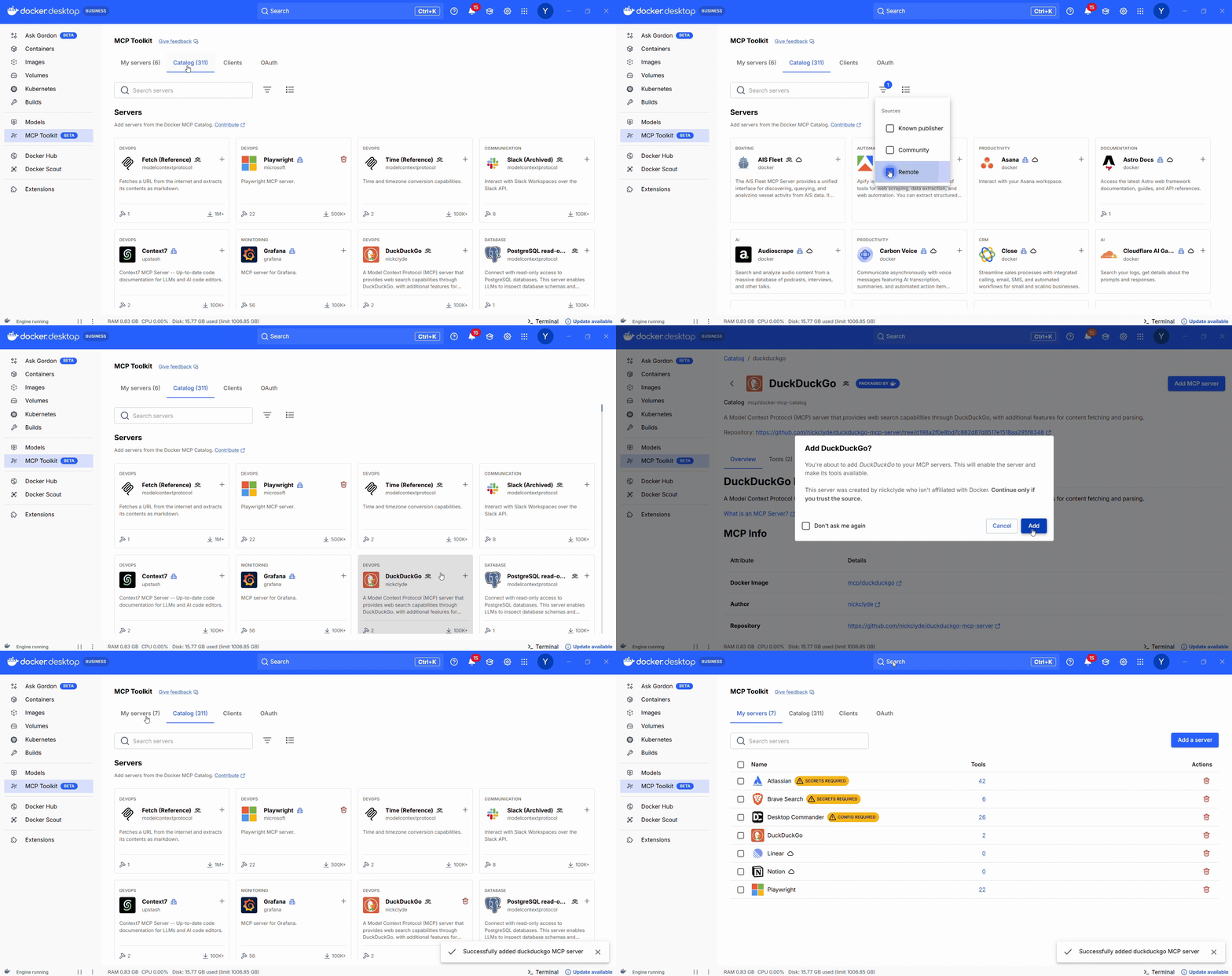
図 1:Docker MCPカタログ:数百のMCPサーバーをローカルまたはリモートのフィルター付きで閲覧し、公式サーバーとコミュニティサーバーの明確な区別を図ります
MCPゲートウェイに関する注記
MCP Toolkitとcagent(以下で紹介するマルチエージェントアプリケーションを簡単に構築するためのフレームワーク)の両方の裏で重要な機能の一つが MCP Gatewayです。これはDockerのオープンソースプロジェクトで、すべてのMCPサーバーの集中型フロントエンドとして機能します。コンテナを起動するGUIを使う場合でも、YAMLでエージェントを定義する場合でも、ゲートウェイはクライアントとツール間のルーティング、認証、変換をすべて処理します。また、カスタムアプリやエージェントフレームワークが直接呼び出せる単一のエンドポイントを公開し、GUIベースのワークフローとプログラマティックエージェント開発をつなぐクリーンな橋渡しとなります。
次に進むと、MCPサーバーを既存のAIエージェントと併用することが、多くの開発者にとって最初のステップであることが多いです。いくつかのツールを接続し、カレンダーや検索APIに接続して、ClaudeやChatGPT、あるいは小さなカスタムエージェントなどで使うのが良いでしょう。人気クライアント向けのDockerのMCPカタログとツールキットで開発ワークフローを自動化するステップバイステップのチュートリアルについては、 ChatGPT、 Claude Desktop、Codex、 Gemini CLI、 Claude Codeのガイドをご覧ください。
そのパターンが理解できたら、次の論理的なステップは、同じMCPサーバーをマルチエージェントシステムのツールとして使うことです。
Option 2 — cagent: Declarative Multi-Agent Apps
カスタムマルチエージェントアプリケーションを作りたいけれど、従来のエージェントフレームワークに詳しくない開発者向けです。
単純なMCPサーバーを卒業して、委任し、調整し、一緒に推論できるエージェントが欲しいなら、 cagent が次のステップです。これはDockerのオープンソースでYAMLを先に定義し、複雑なエージェントSDKやLLMループロジックに深入りすることなくマルチエージェントシステムを定義・運用するためのフレームワークです。
Cagentは以下を記述させてくれます:
- エージェント自体(モデル、役割、指示)
- 誰が誰に委任するのか
- 各エージェントがアクセスできるツール(MCPまたはローカル機能を通じて)
以下は海賊風のチャットボットの例です:
agents:
  root:
    description: An agent that talks like a pirate
    instruction: Always answer by talking like a pirate.
    welcome_message: |
      Ahoy! I be yer pirate guide, ready to set sail on the seas o' knowledge! What be yer quest?
    model: auto


cagent run agents.yaml
オーケストレーションコードを書くわけではありません。君は自分の望むものを説明し、ケイジェントがシステムを動かす。
なぜ効果があるのか:
- ツールはエージェントごとにスコープが割り当てられています
- 委任は明示的です
- 裏方でMCPゲートウェイを使用しています
- Pythonを書かずにエージェントシステムを構築するのに最適です
もしcagentを試してみたいなら、プロジェクトのGitHubリポジトリにたくさんの 例 があります。マルチエージェントシステムを5分で構築する方法のガイドをご覧ください。
オプション 3 — 従来のエージェントフレームワーク(LangGraph、CrewAI、ADK)
複雑でカスタム、完全プログラマティックなエージェントシステムを構築する開発者向けです。
LangGraph、CrewAI、GoogleのAgent Development Kit(ADK)などの従来のエージェントフレームワークは、コード内でエージェントの動作を定義、制御、オーケストレーションを直接行うことを可能にします。ロジック、状態、メモリ、ツール、ワークフローを完全にコントロールできます。
必要なときに彼らは輝きます:
- 複素分岐論理
- エラー回復、再試行、そして永続性
- カスタムメモリ層またはストレージ層
- 既存のバックエンドコードとの緊密な統合
例:LangGraph + MCP via Gateway
import requests
from langgraph.graph import StateGraph
from langchain.agents import Tool
from langchain_openai import ChatOpenAI

# Discover MCP endpoint from Gateway
resp = requests.get("http://localhost:6600/v1/servers")
servers = resp.json()["servers"]
duck_url = next(s["url"] for s in servers if s["name"] == "duckduckgo")

# Define a callable tool
def mcp_search(query: str) -> str:
    return requests.post(duck_url, json={"input": query}).json()["output"]

search_tool = Tool(name="web_search", func=mcp_search, description="Search via MCP")

# Wire it into a LangGraph loop
llm = ChatOpenAI(model="gpt-4")
graph = StateGraph()
graph.add_node("agent", llm.bind_tools([search_tool]))
graph.add_edge("agent", "agent")
graph.set_entry_point("agent")

app = graph.compile()
app.invoke("What’s the latest in EU AI regulation?")
このセットアップでは、利用可能なツールを自分で決めます。エージェントはコンテキストに応じていつ使うかを決めますが、メニューはあなたが定義しています。
そして、Docker MCP Toolkitでも今でも同じです:何を有効にするかは自分で決めます。LLMは、あなたが見えていないものを「表示」することはできません。
正しいアプローチの選択
|
アプローチ |
ベスト・フォー |
君はうまくやってる |
あなたは |
|---|---|---|---|
|
Docker MCP Toolkit + Catalog |
MCP初心者の開発者で、すでにコンテナを使っています |
工具選択 |
ワンクリック設定、組み込みシークレット、ゲートウェイ統合 |
|
カジェント |
カスタムコードなしのYAMLベースのマルチエージェントアプリ |
役割とツールアクセス |
宣言的オーケストレーション、マルチエージェントワークフロー |
|
LangGraph / CrewAI / ADK |
複雑な生産グレードエージェントシステム |
フルオーケストレーション |
ロジック、メモリ、ツール、フローの最大コントロール |
まとめ
ツールをClaudeに接続するだけでも、カスタムマルチエージェントシステムを設計する場合でも、手動で本番のワークフローを構築する場合でも、DockerのMCPツールは簡単かつ安全に始められるようにサポートします。
Docker MCP Toolkit、 cagent、 MCP Gateway など、コードやドキュメント、その他多くの入門方法をチェックしてみてください。