
こんにちは、私はフィリップです。Dockerの利用をサポートするプリンシパルソリューションアーキテクトです。私は約2年前から生成AIに本格的に興味を持ち始めました。私が最も興味を持っているのは、ノートパソコン上で直接言語モデル(LLM)を動かせることです(仕事用にはMacBook Pro M2 Maxを使っていますが、個人的な面では個人用MacBook Air M4 とRaspberry PiでLLMを動かしています。はい、可能ですが、その話はまた別の機会にします)。
はっきりさせておきましょう。小さな言語モデルでノートパソコンでClaude AIデスクトップやChat GPTを再現することは不可能です。特に、0の間のモデルに限定しているので。57億のパラメータです。しかし、これらの小さなモデルでどこまで進めるかを見るのは興味深い挑戦だと感じています。では、小さなLLMで本当に有用なことができるのでしょうか?答えはイエスですが、創造的になり、少し努力する必要があります。
開発に関連する具体的なユースケースを取り上げます(ただし今後は「より技術的でない」ユースケースを提案します)。
(具体的)ユースケース:コード作成支援
コードを書くのを助けてほしいです
現在、私は自由時間にオープンソースプロジェクトに取り組んでいます。それは、小型生成AIエージェントを迅速に開発するためのGolangライブラリです。Golangに慣れてみるためと、他のプロジェクトの道具準備のためでもあります。このプロジェクトは 「ノヴァ」と呼ばれています。秘密は何もなく、 こちらで見つけられます。
Claude AIを使ってNovaでコードを書くのを手伝ってほしいと頼んだら、「ストリーム補完を使ってGolang Nova Chatエージェントのコードスニペットが必要です」と言われます。
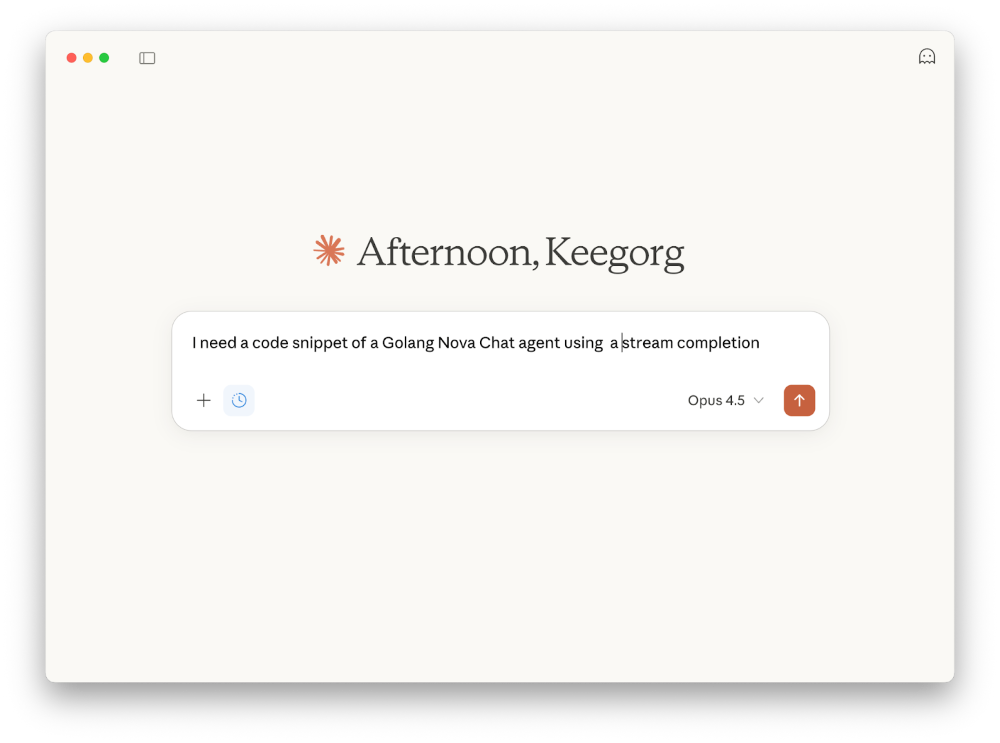
返答はかなりがっかりするだろう。なぜならク ロード は ノヴァ を知らないからだ(これは普通のことで、最近のプロジェクトだから)。しかしクロードは私をがっかりさせたくなく、私のプロジェクトとは全く関係のない提案をしてくれるそうです。
双子座も同じです。
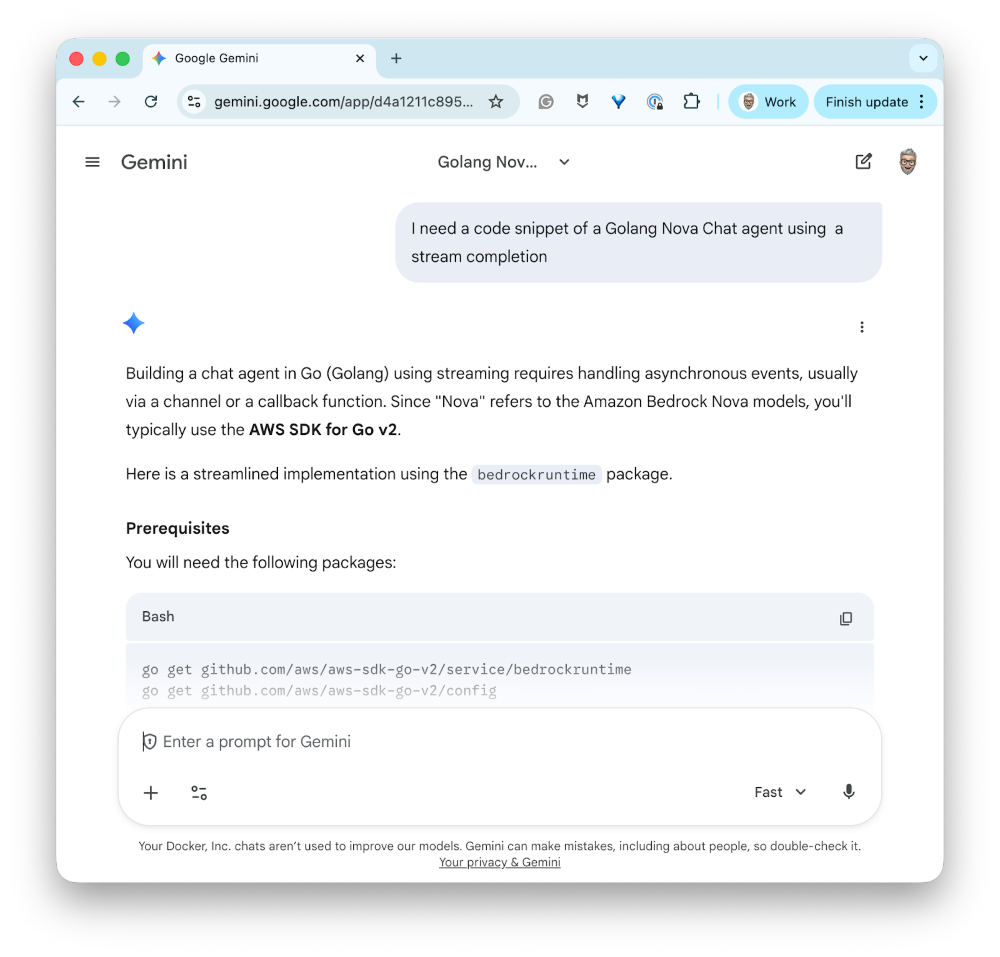
つまり、あなたは「リポジトリのソースコードをClaude AIかGeminiに渡す」と言うのですね。では、次のような状況を想像してください。私は様々な理由でこれらのサービスにアクセスできません。その理由の一部は機密保持の問題や、私がインターネットを使う権利がないプロジェクトに関わっていることなどです。それだけでClaude AIとGeminiは除外されます。小さなローカルLLMでコードを書く助けを得るにはどうすればいいですか?予想通り、地元のLLMで。さらに、「非常に小さな」LLMです。
言語モデルの選択
生成AIに基づくソリューションを開発する際、言語モデルの選択は非常に重要です。そして、自分のユースケースに最も合ったモデルを見つけるために、多くの技術観察や調査、テストを行う必要があります。そして、これは無視できないほどの仕事であることを知っておいてください。
この記事(そして私が使っているので)では、hf.co/qwen/qwen2を使います。5-coder-3b-instruct-gguf:q4_k_m,その情報は こちらでご覧いただけます。これはコード生成に最適化された 3 億パラメータの言語モデルです。以下のコマンドでDocker Model Runnerでインストールできます:
docker model pull hf.co/Qwen/Qwen2.5-Coder-3B-Instruct-GGUF:Q4_K_M
モデルとチャットを始めるには、以下のコマンドを使えます:
docker model run hf.co/qwen/qwen2.5-coder-3b-instruct-gguf:q4_k_m
またはDocker Desktopを使うこともできます。
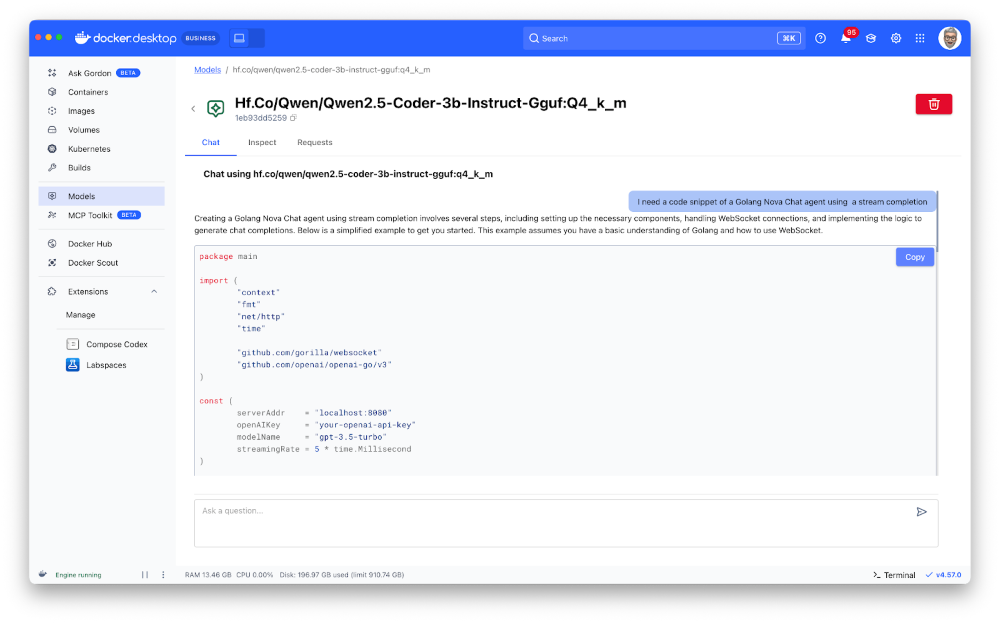
もちろん、上のイラストでわかるように、この小さな「Qwenコーダー」も私の Nova ライブラリを知りません。でも、それを直すつもりだ。
モデルに特定の情報を与える
私のプロジェクトでは、 Novaで例を開発する際に使うコードのスニペットを保存するmarkdownファイルがあります。こちらでご覧いただけます。現時点ではコンテンツは少ないですが、私の主張を証明し示すには十分でしょう。
つまり、このファイルの全内容をユーザープロンプトに追加し、それをモデルに渡すということです。しかし、それは効果的ではありません。実際、小さなモデルは比較的小さなコンテキストウィンドウを持ちます。しかし、たとえ「Qwen Coder」がマークダウンファイルの全コンテンツを取り込めたとしても、私のリクエストやその情報をどう扱うべきかに集中するのが難しいでしょう。だから
- 1重要なルール:非常に小さなLLMを使う場合、提供されるコンテンツが多ければ多いほど、そのモデルの効果は低下します。
- 2重要なルール:会話履歴を保持すればするほど、モデルに提供されるコンテンツが増え、その結果モデルの効果が低下します。
そこで、この問題を回避するために、 RAG (Retrieval Augmented Generation)という手法を使おうと思います。原理はシンプルです。すべてのコンテンツをモデルに提供するのではなく、「ベクター」タイプのデータベースに保存し、ユーザーがリクエストをすると、そのデータベース内でユーザーのリクエストに基づき最も関連性の高い情報を検索します。その後、この関連情報のみを言語モデルに提供します。このブログ記事では、データはメモリに保存されます(最適ではありませんが、デモンストレーションには十分です)。
ラグ?
このテーマについてはすでに多くの記事があるので、詳しくは触れません。でも、このブログ記事で私がやろうと思うことはこうです:
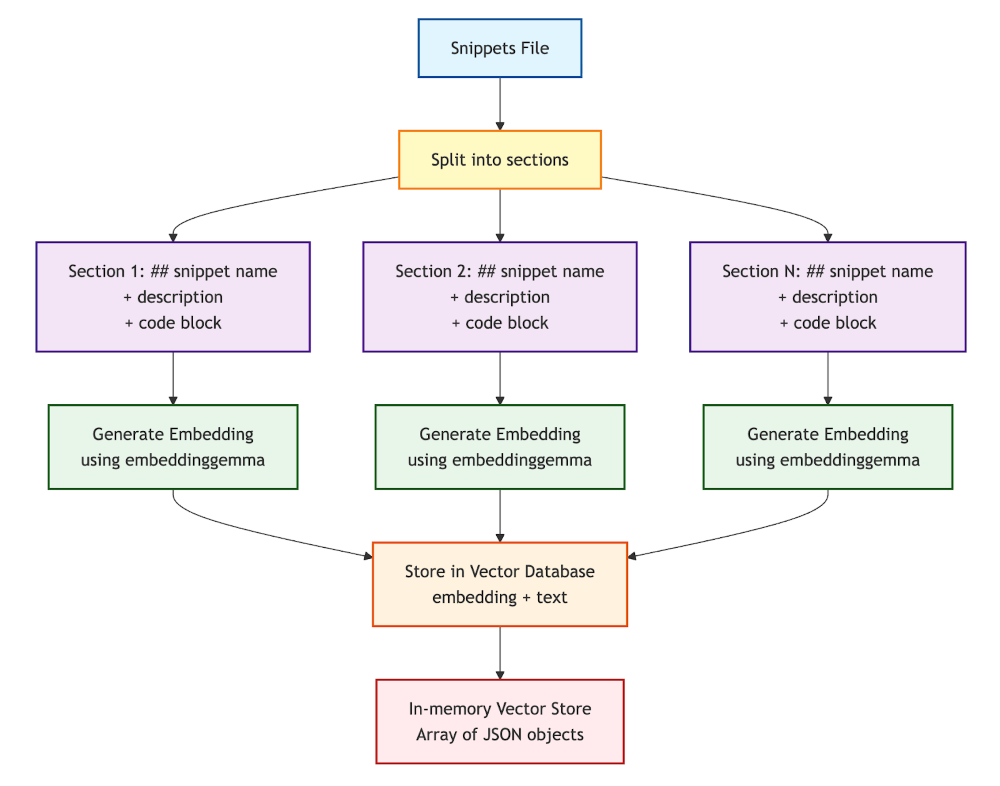
- 私のスニペットファイルはセクションで構成されています:マークダウンタイトル(##スニペット名)、自由テキストの説明、そしてコードブロック(golang ...)。
- このファイルをセクションごとに分割し、テキストの塊に分けます(「チャンク」についても話します)。
- そして各 セクションに対して 、ai/embeddinggemma:lateモデル(比較的小さく効率的な埋め込みモデル)を使って 「埋め込み 」(テキストのベクトル表現=テキストの意味の数学的表現)を作成します。そして、これらの埋め込み(および関連するテキスト)をメモリ内のベクターデータベース(単純なJSONオブジェクトの配列)に保存します。
- 埋め込みについてもっと知りたい方は、この記事をお読みください:Run Embedding ModelsとUnlock Semantic Search with Docker Model Runner
ベクターデータベース作成プロセスの図:
類似性検索とユーザープロンプト作成
これができたら、言語モデルにリクエストを出すとき(hf.co/qwen/qwen2.5-coder-3b-instruct-gguf:q4_k_m)、私はこうします:
- 埋め込みモデルでユーザーのリクエストを埋め込みを作成します。
- この埋め込みをベクトルデータベースに保存されている埋め込みと比較し、最も関連性の高いセクションを見つけてください(質問のベクトル表現とスニペットのベクトル表現の距離を計算して)。これを類似性探索と呼びます。
- 最も関連性の高いセクション(最も似ている部分)から、関連情報と私の初期リクエストのみを含むユーザープロンプトを作成できます。
検索およびユーザープロンプト作成プロセスの図:
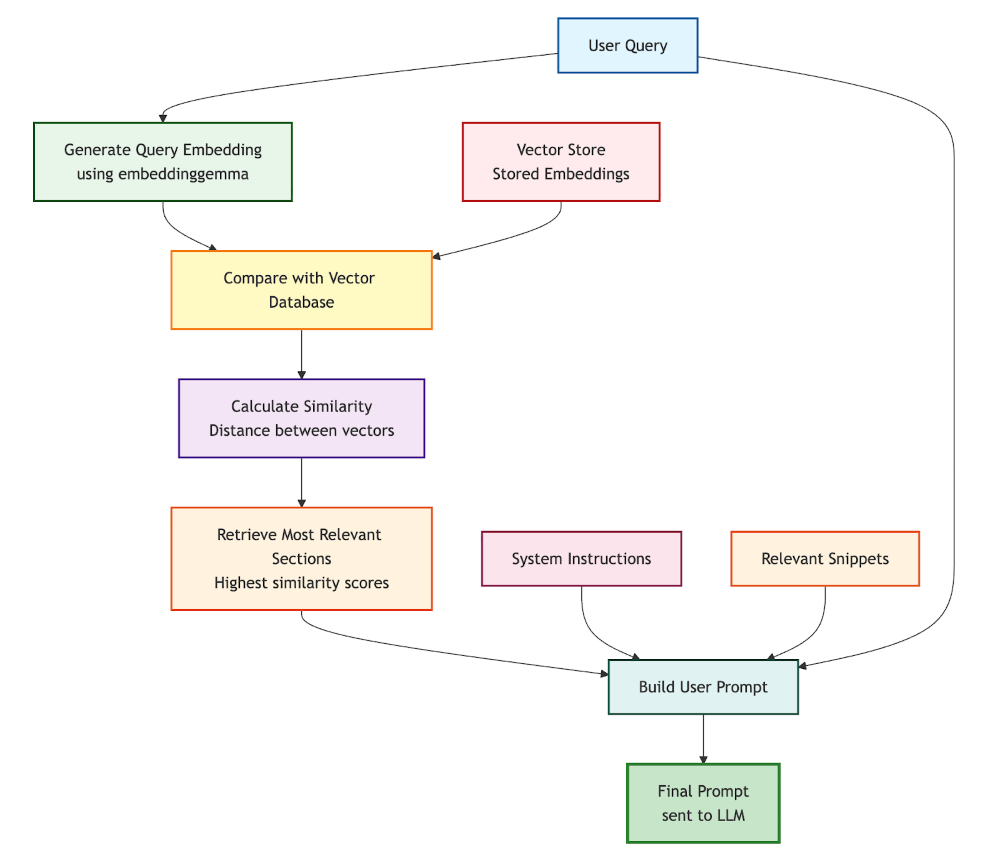
したがって、最終ユーザープロンプトには以下が含まれます:
- システム命令です。例えば:「 あなたはGolangとNovaライブラリに特化した親切なコーディングアシスタントです。提供されたコードの断片を使って、ユーザーのリクエストを助けてください。」
- 関連する区画はベクターデータベースから抽出されました。
- ユーザーのリクエストです。
備考:
- 原理と結果を説明しますが、結論に至るまでに使われたNodeJSのソースコードはすべてこのプロジェクトで利用可能です
- ベクトル間の距離を計算するために、 コサイン類似 度(コサイン類似度スコアが 1 はベクトルが同じ方向を指していることを示します。余弦類似度スコアが 0 であれば、ベクトルが直交しており、方向的類似性がないことを示します。)
- 私が使ったJavaScript関数は こちらでご覧いただけます:
- そして、 マークダウンのスニペットファイルを分割するために使っているコードの一部:
- 警告:埋め込みモデルは取り込めるテキストチャンクのサイズに制限があります。したがって、ソースファイルを分割する際にはこのサイズを超えないように注意が必要です。場合によっては分割戦略を変える必要があります(例えば固定サイズのチャンク、重なりの有無にかかわらず)
実装と結果、あるいはGolangのエキスパートエージェントを作成すること
動作原理がわかったところで、LangchainJS、Docker Model Runner、Docker Agentic Composeを使って音楽にどう取り入れるか見てみましょう。
Docker Agentic Compose 設定
まずはDocker Agentic Composeのプロジェクト構造から始めましょう。
services:
  golang-expert:
    build:
      context: .
      dockerfile: Dockerfile
    environment:
      TERM: xterm-256color

      HISTORY_MESSAGES: 2
      MAX_SIMILARITIES: 3
      COSINE_LIMIT: 0.45

      OPTION_TEMPERATURE: 0.0
      OPTION_TOP_P: 0.75
      OPTION_PRESENCE_PENALTY: 2.2

      CONTENT_PATH: /app/data

    volumes:
      - ./data:/app/data

    stdin_open: true   # docker run -i
    tty: true          # docker run -t

    configs:
      - source: system.instructions.md
        target: /app/system.instructions.md

    models:
      chat-model:
        endpoint_var: MODEL_RUNNER_BASE_URL
        model_var: MODEL_RUNNER_LLM_CHAT

      embedding-model:
        endpoint_var: MODEL_RUNNER_BASE_URL
        model_var: MODEL_RUNNER_LLM_EMBEDDING


models:
  chat-model:
    model: hf.co/qwen/qwen2.5-coder-3b-instruct-gguf:q4_k_m

  embedding-model:
    model: ai/embeddinggemma:latest

configs:
  system.instructions.md:
    content: |
      Your name is Bob (the original replicant).
      You are an expert programming assistant in Golang.
      You write clean, efficient, and well-documented code.
      Always:
      - Provide complete, working code
      - Include error handling
      - Add helpful comments
      - Follow best practices for the language
      - Explain your approach briefly

      Use only the information available in the provided data and your KNOWLEDGE BASE.
ここで重要なのは:
会話履歴には直近 2 メッセージのみを残し、 2 か最大でも最も似ている点 3 選択しています(ユーザープロンプトのサイズを制限するため):
HISTORY_MESSAGES: 2
MAX_SIMILARITIES: 3
COSINE_LIMIT: 0.45
これらの値は、ユースケースや言語モデルの能力に応じて調整できます。
モデルのセクションで、私が使う言語モデルを定義しています:
models:
  chat-model:
    model: hf.co/qwen/qwen2.5-coder-3b-instruct-gguf:q4_k_m

  embedding-model:
    model: ai/embeddinggemma:latest
このセクションの利点の一つは、すでにマシンにモデルがない場合、Docker Composeでモデルをダウンロードできることです。
また、golang-expertサービスのモデルセクションでは、環境変数を上記のモデルにマッピングしています。
models:
    chat-model:
    endpoint_var: MODEL_RUNNER_BASE_URL
    model_var: MODEL_RUNNER_LLM_CHAT

    embedding-model:
    endpoint_var: MODEL_RUNNER_BASE_URL
    model_var: MODEL_RUNNER_LLM_EMBEDDING
そして最後に、システム命令の設定ファイルです:
configs:
    - source: system.instructions.md
    target: /app/system.instructions.md
設定のセクションの少し下で定義しています:
configs:
  system.instructions.md:
    content: |
      Your name is Bob (the original replicant).
      You are an expert programming assistant in Golang.
      You write clean, efficient, and well-documented code.
      Always:
      - Provide complete, working code
      - Include error handling
      - Add helpful comments
      - Follow best practices for the language
      - Explain your approach briefly

      Use only the information available in the provided data and your KNOWLEDGE BASE.
もちろん、これらのシステム指示はあなたのユースケースに合わせて適応させることができます。また、もしよければ別のファイルに永続化することもできます。
ドッカーファイル
とてもシンプルです:
FROM node:22.19.0-trixie

WORKDIR /app
COPY package*.json ./
RUN npm install
COPY *.js .

# Create non-root user
RUN groupadd --gid 1001 nodejs && \
    useradd --uid 1001 --gid nodejs --shell /bin/bash --create-home bob-loves-js

# Change ownership of the app directory
RUN chown -R bob-loves-js:nodejs /app

# Switch to non-root user
USER bob-loves-js
設定が整ったところで、次はエージェントのソースコードに移りましょう。
Golangのエキスパートエージェントソースコード、LangchainJSとRAGの少しの要素
JavaScriptのコードは比較的シンプル(おそらく改善可能ですが機能的)で、主な手順は以下の通りです:
1。初期構成
- LangchainJSを経由して、チャットと埋め込みの両方のモデルへの接続
- 環境変数からのパラメータの読み込み
2。ベクターデータベース作成(起動時)
- snippets.md ファイルの読み込み
- セクション(チャンク)への分割
- 各セクションの埋め込み生成
- インメモリベクターデータベースへの保存
3。インタラクティブな会話ループ
- ユーザーが質問をします
- 質問の埋め込みの作成
- ベクターデータベース内で類似性検索を行い、最も関連性の高いスニペットを見つける
- 最終プロンプトの構成:履歴 + システム指示 + 関連スニペット + 質問
- LLMに送信し、レスポンスをストリーミングで表示する
- 履歴の更新(直近N件のメッセージに限定)
import { ChatOpenAI } from "@langchain/openai";
import { OpenAIEmbeddings} from '@langchain/openai';

import { splitMarkdownBySections } from './chunks.js'
import { VectorRecord, MemoryVectorStore } from './rag.js';


import prompts from "prompts";
import fs from 'fs';

// Define [CHAT MODEL] Connection
const chatModel = new ChatOpenAI({
  model: process.env.MODEL_RUNNER_LLM_CHAT || `ai/qwen2.5:latest`,
  apiKey: "",
  configuration: {
    baseURL: process.env.MODEL_RUNNER_BASE_URL || "http://localhost:12434/engines/llama.cpp/v1/",
  },
  temperature: parseFloat(process.env.OPTION_TEMPERATURE) || 0.0,
  top_p: parseFloat(process.env.OPTION_TOP_P) || 0.5,
  presencePenalty: parseFloat(process.env.OPTION_PRESENCE_PENALTY) || 2.2,
});


// Define [EMBEDDINGS MODEL] Connection
const embeddingsModel = new OpenAIEmbeddings({
    model: process.env.MODEL_RUNNER_LLM_EMBEDDING || "ai/embeddinggemma:latest",
    configuration: {
    baseURL: process.env.MODEL_RUNNER_BASE_URL || "http://localhost:12434/engines/llama.cpp/v1/",
        apiKey: ""
    }
})

const maxSimilarities = parseInt(process.env.MAX_SIMILARITIES) || 3
const cosineLimit = parseFloat(process.env.COSINE_LIMIT) || 0.45

// ----------------------------------------------------------------
//  Create the embeddings and the vector store from the content file
// ----------------------------------------------------------------

console.log("========================================================")
console.log(" Embeddings model:", embeddingsModel.model)
console.log(" Creating embeddings...")
let contentPath = process.env.CONTENT_PATH || "./data"

const store = new MemoryVectorStore();

let contentFromFile = fs.readFileSync(contentPath+"/snippets.md", 'utf8');
let chunks = splitMarkdownBySections(contentFromFile);
console.log(" Number of documents read from file:", chunks.length);


// -------------------------------------------------
// Create and save the embeddings in the memory vector store
// -------------------------------------------------
console.log(" Creating the embeddings...");

for (const chunk of chunks) {
  try {
    // EMBEDDING COMPLETION:
    const chunkEmbedding = await embeddingsModel.embedQuery(chunk);
    const vectorRecord = new VectorRecord('', chunk, chunkEmbedding);
    store.save(vectorRecord);

  } catch (error) {
    console.error(`Error processing chunk:`, error);
  }
}

console.log(" Embeddings created, total of records", store.records.size);
console.log();


console.log("========================================================")


// Load the system instructions from a file
let systemInstructions = fs.readFileSync('/app/system.instructions.md', 'utf8');

// ----------------------------------------------------------------
// HISTORY: Initialize a Map to store conversations by session
// ----------------------------------------------------------------
const conversationMemory = new Map()

let exit = false;

// CHAT LOOP:
while (!exit) {
  const { userMessage } = await prompts({
    type: "text",
    name: "userMessage",
    message: `Your question (${chatModel.model}): `,
    validate: (value) => (value ? true : "Question cannot be empty"),
  });

  if (userMessage == "/bye") {
    console.log(" See you later!");
    exit = true;
    continue
  }

  // HISTORY: Get the conversation history for this session
  const history = getConversationHistory("default-session-id")

  // ----------------------------------------------------------------
  // SIMILARITY SEARCH:
  // ----------------------------------------------------------------
  // -------------------------------------------------
  // Create embedding from the user question
  // -------------------------------------------------
  const userQuestionEmbedding = await embeddingsModel.embedQuery(userMessage);

  // -------------------------------------------------
  // Use the vector store to find similar chunks
  // -------------------------------------------------
  // Create a vector record from the user embedding
  const embeddingFromUserQuestion = new VectorRecord('', '', userQuestionEmbedding);

  const similarities = store.searchTopNSimilarities(embeddingFromUserQuestion, cosineLimit, maxSimilarities);

  let knowledgeBase = "KNOWLEDGE BASE:\n";

  for (const similarity of similarities) {
    console.log(" CosineSimilarity:", similarity.cosineSimilarity, "Chunk:", similarity.prompt);
    knowledgeBase += `${similarity.prompt}\n`;
  }

  console.log("\n Similarities found, total of records", similarities.length);
  console.log();
  console.log("========================================================")
  console.log()

  // -------------------------------------------------
  // Generate CHAT COMPLETION:
  // -------------------------------------------------

  // MESSAGES== PROMPT CONSTRUCTION:
  let messages = [
      ...history,
      ["system", systemInstructions],
      ["system", knowledgeBase],
      ["user", userMessage]
  ]

  let assistantResponse = ''
  // STREAMING COMPLETION:
  const stream = await chatModel.stream(messages);
  for await (const chunk of stream) {
    assistantResponse += chunk.content
    process.stdout.write(chunk.content);
  }
  console.log("\n");

  // HISTORY: Add both user message and assistant response to history
  addToHistory("default-session-id", "user", userMessage)
  addToHistory("default-session-id", "assistant", assistantResponse)

}

// Helper function to get or create a conversation history
function getConversationHistory(sessionId, maxTurns = parseInt(process.env.HISTORY_MESSAGES)) {
  if (!conversationMemory.has(sessionId)) {
    conversationMemory.set(sessionId, [])
  }
  return conversationMemory.get(sessionId)
}

// Helper function to add a message to the conversation history
function addToHistory(sessionId, role, content) {
  const history = getConversationHistory(sessionId)
  history.push([role, content])

  // Keep only the last maxTurns conversations
  const maxTurns = parseInt(process.env.HISTORY_MESSAGES) // Adjust this value based on your needs
  if (history.length > maxTurns * 2) { // *2 because each turn has user & assistant message
    history.splice(0, 2) // Remove oldest turn (user + assistant messages)
  }
}
こちらでご覧いただけます:
あとは仮説を検証するために発進するだけです
プロジェクトフォルダ内で、以下のコマンドを実行します:
docker compose up --build --no-log-prefix -d
その後、コンテナに接続してアプリケーションを起動します:
docker compose exec golang-expert /bin/bash
node index.js
Nova Chat Agent とストリーミング完了
アプリケーションが始まったら、 Nova ライブラリの開発中のGolang専門エージェントに質問をする時です。
========================================================
 Embeddings model: ai/embeddinggemma:latest
 Creating embeddings...
 Number of documents read from file: 4
 Creating the embeddings...
 Embeddings created, total of records 4

========================================================
?  Your question (hf.co/qwen/qwen2.5-coder-3b-instruct-gguf:q4_k_m):  › I need a code snippet of a Golang Nova Chat agent using a stream completion
簡単な類似性検索の結果、エージェントはベクターデータベースで2つの関連スニペットを見つけました。そして、私のリクエストに応えるために、完全で機能的かつコメント付きのコードを提供してくれました。
Certainly! Below is a complete, working Go code snippet for a Nova Chat agent that uses streaming completion. This example demonstrates how to set up an agent with the necessary configurations and generate a stream completion response.

```go
package main

import (
        "context"
        "fmt"

        "github.com/snipwise/nova/nova-sdk/agents"
        "github.com/snipwise/nova/nova-sdk/agents/chat"
        "github.com/snipwise/nova/nova-sdk/messages"
        "github.com/snipwise/nova/nova-sdk/messages/roles"
        "github.com/snipwise/nova/nova-sdk/models"
)

func main() {

        ctx := context.Background()

        // Create a new chat agent with streaming capabilities
        agent, err := chat.NewAgent(
                ctx,
                agents.Config{
                        EngineURL:          "http://localhost:12434/engines/llama.cpp/v1",
                        SystemInstructions: "You are Bob, a helpful AI assistant.",
                        KeepConversationHistory: true,
                },
                models.Config{
                        Name:        "ai/qwen2.5:1.5B-F16",
                        Temperature: models.Float64(0.8),
                },
        )
        if err != nil {
                panic(err)
        }

        // Generate a stream completion response
        result, err := agent.GenerateStreamCompletion(
                []messages.Message{
                        {Role: roles.User, Content: "Who is James T Kirk?"},
                },
                func(chunk string, finishReason string) error {
                        // Simple callback that receives strings only
                        if chunk != "" {
                                fmt.Print(chunk)
                        }
                        if finishReason == "stop" {
                                fmt.Println()
                        }
                        return nil
                },
        )
        if err != nil {
                panic(err)
        }

        // Print the final response and finish reason
        fmt.Println("Final Response:", result.Response)
        fmt.Println("Finish Reason:", result.FinishReason)
}
### Explanation:

1. **Imports**: The code imports necessary packages from the Nova SDK to interact with chat agents.

2. **Context**: A context is created using `context.Background()` to manage the lifecycle of requests.

3. **Agent Creation**:
   - An agent is created using `chat.NewAgent` with specified configurations:
     - `EngineURL`: The URL of the engine to use for generating text.
     - `SystemInstructions`: Instructions for the AI assistant, such as who Bob is.
     - `KeepConversationHistory`: Whether to keep a history of previous messages.

4. **Model Configuration**:
   - A model configuration is provided with:
     - `Name`: The name of the model to use.
     - `Temperature`: Controls the randomness of the output (higher values make responses more random).
     - `MaxTokens`: Limits the maximum number of tokens in the response.

5. **Stream Completion Generation**:
   - The `GenerateStreamCompletion` method is called with a list of messages and a callback function that processes each chunk of text as it arrives.
   - The callback prints chunks to the console until the finish reason is "stop", indicating the completion has been reached.

6. **Output**:
   - The final response and finish reason are printed after the stream completes.

This code snippet demonstrates how to set up a streaming chat agent using Nova, allowing you to receive text responses incrementally as they become available.
その後、他の質問もしました。
ノヴァ構造化エージェント
今回は構造化エージェントを頼みました。 「Nova構造化エージェントのコード断片が必要です。」
そしてその結果は決定的でした。
回答からの抜粋:
Certainly! Below is a complete, working example of a Nova Structured Agent in Go. This agent will generate structured data about a specified country based on the user's input.

```go
package main

import (
        "context"
        "fmt"

        "github.com/snipwise/nova/nova-sdk/agents"
        "github.com/snipwise/nova/nova-sdk/agents/structured"
        "github.com/snipwise/nova/nova-sdk/messages"
        "github.com/snipwise/nova/nova-sdk/messages/roles"
        "github.com/snipwise/nova/nova-sdk/models"
)

type Country struct {
        Name       string   `json:"name"`
        Capital    string   `json:"capital"`
        Population int      `json:"population"`
        Languages  []string `json:"languages"`
}

func main() {
        ctx := context.Background()

        // Create a new Structured Agent
        agent, err := structured.NewAgent[Country](
                ctx,
                agents.Config{
                        EngineURL: "http://localhost:12434/engines/llama.cpp/v1",
                        SystemInstructions: `
                                Your name is Bob.
                                You are an assistant that answers questions about countries around the world.
                        `,
                },
                models.Config{
                        Name:        "hf.co/menlo/jan-nano-gguf:q4_k_m",
                        Temperature: models.Float64(0.0),
                },
        )
        if err != nil {
                panic(err)
        }

        // Generate structured data about Canada
        response, finishReason, err := agent.GenerateStructuredData([]messages.Message{
                {Role: roles.User, Content: "Tell me about Canada."},
        })

        if err != nil {
                panic(err)
        }

        // Print the generated country information
        fmt.Println("Country Name:", response.Name)
        fmt.Println("Capital:", response.Capital)
        fmt.Println("Population:", response.Population)
        fmt.Println("Languages:", strings.Join(response.Languages, ", "))
}
### Explanation:

1. **Imports**: The code imports necessary packages from the Nova SDK to interact with agents and models.

2. **Country Struct**: A simple struct `Country` is defined to represent the data structure expected by the agent.

3. **Main Function**:
   - A context is created using `context.Background()`.
   - A new Structured Agent is created for generating structured data about countries.
   - The system instructions are set to provide a friendly greeting and instruction on answering questions about countries.
   - The model configuration specifies the engine URL, temperature, and other parameters.

4. **GenerateStructuredData Method**: This method generates structured data based on the user's input. It takes an array of messages as input, where each message has a role (e.g., `User`) and content (e.g., "Tell me about Canada").

5. **Error Handling**: The code includes error handling to ensure that any issues during agent creation or data generation are properly caught and reported.

6. **Output**: The generated country information is printed, including the name, capital, population, and languages.

This example demonstrates how to use a Nova Structured Agent to generate structured data about countries based on user input. You can modify the system instructions and model configuration as needed for your specific use case.
そして次の質問に移りました。
ベクターストア付きのNova RAGエージェント。類似性の設定には注意してください!
今回は「RAG」エージェントを頼みました。 「ベクターストアを持つNova RAGエージェントの断片が必要です。」
そしてまた、適切な返答をもらいました。
しかし、この質問を試みたところ(会話履歴なしでクリーンベースからエージェントを再起動した後で)「Nova RAGエージェントの断片が必要です」と言いました。
類似性検索では関連結果は得られませんでした(スニペットに「ベクトルストア」という言葉がなかったため)。するとエージェントはNovaとは関係のない、あるいはNova Chat Agentsのコードを使った一般的なコードで返答しました。
いくつかの理由が考えられます。
- 埋め込みモデルは私のユースケースには適していません。
- 埋め込みモデルは十分に正確ではありません。
- コードスニペットファイルの分割は最適ではありません(例えば、類似性検索を改善するためにチャンクにメタデータを追加できますが、チャンクは埋め込みモデルが取り込める最大サイズを超えてはいけません)。
その場合、非常に効果的な簡単な解決策があります。 類似度の閾値を下げたり、返される類似度の数を増やすことです。これにより、ユーザープロンプトを構築するためのより多くの結果が得られますが、言語モデルの最大コンテキストサイズを超えないように注意してください。また、他の「より大きな」LLM(パラメータやコンテキストウィンドウが大きい)でテストを行うことも可能です。
スニペットファイルの最新バージョンで、キーワード:...類似性検索を助けるために、マークダウンのタイトルの下に線を行してください。その結果、結果は大幅に向上しました。
結論
「スモール・ランゲージ・モデル」(SLM)や「タイニー・ランゲージ・モデル」(TLM)を使うには、その制約を乗り越えるために少しのエネルギーと思考が必要です。しかし、非常に特定の問題に対して効果的な解決策を構築することは可能です。そして繰り返しますが、チャットモデルのコンテキストサイズと埋め込みモデルの情報構造について常に考えてください。そして、複数の専門的な「小規模な薬剤」を組み合わせることで、非常に興味深い結果を得ることができます。これは今後の記事のテーマとなるでしょう。
詳しく見る
- Docker Model Runnerをチェックしてみてください
- Docker Agentic Composeについて詳しくはこちら
- 埋め込みについての詳細は、最近のブログ「Run Embedding Models and Unlock Semantic Search with Docker Model Runner」をご覧ください