According to Omdia’s 2026 software supply chain security report, 86% of organizations find SBOM generation challenging. A major driver is tool sprawl: teams cobbling together different scanners for different artifact types, getting inconsistent output across pipelines, and spending engineering time reconciling the results rather than acting on them.
SBOMs have become important to how security teams respond to vulnerability disclosures, how compliance teams satisfy auditors, and how procurement decisions get made. That makes the generation step load-bearing. If the SBOM your pipeline produces misses transitive dependencies, records declared versions instead of resolved ones, or is not cryptographically bound to the artifact it describes, every downstream decision built on that data inherits the gap.
This post covers the decisions that determine SBOM quality: when and where to generate, what separates actionable output from data that just checks a box, and how to keep generation reliable as your image portfolio grows.
Key takeaways
- Build-time SBOM generation produces more complete, accurate output than post-build scanning.
- Completeness, accuracy, freshness, and verifiability determine whether an SBOM is actionable.
- Generation tooling runs with elevated build access and may require additional security considerations, for example pinning to immutable references.
- Images that ship with pre-built SBOMs eliminate the generation burden for your base layer.
When to generate: Build-time vs. post-build
The single decision that most affects SBOM quality is when you generate it. There are two broad approaches, and they produce meaningfully different results.
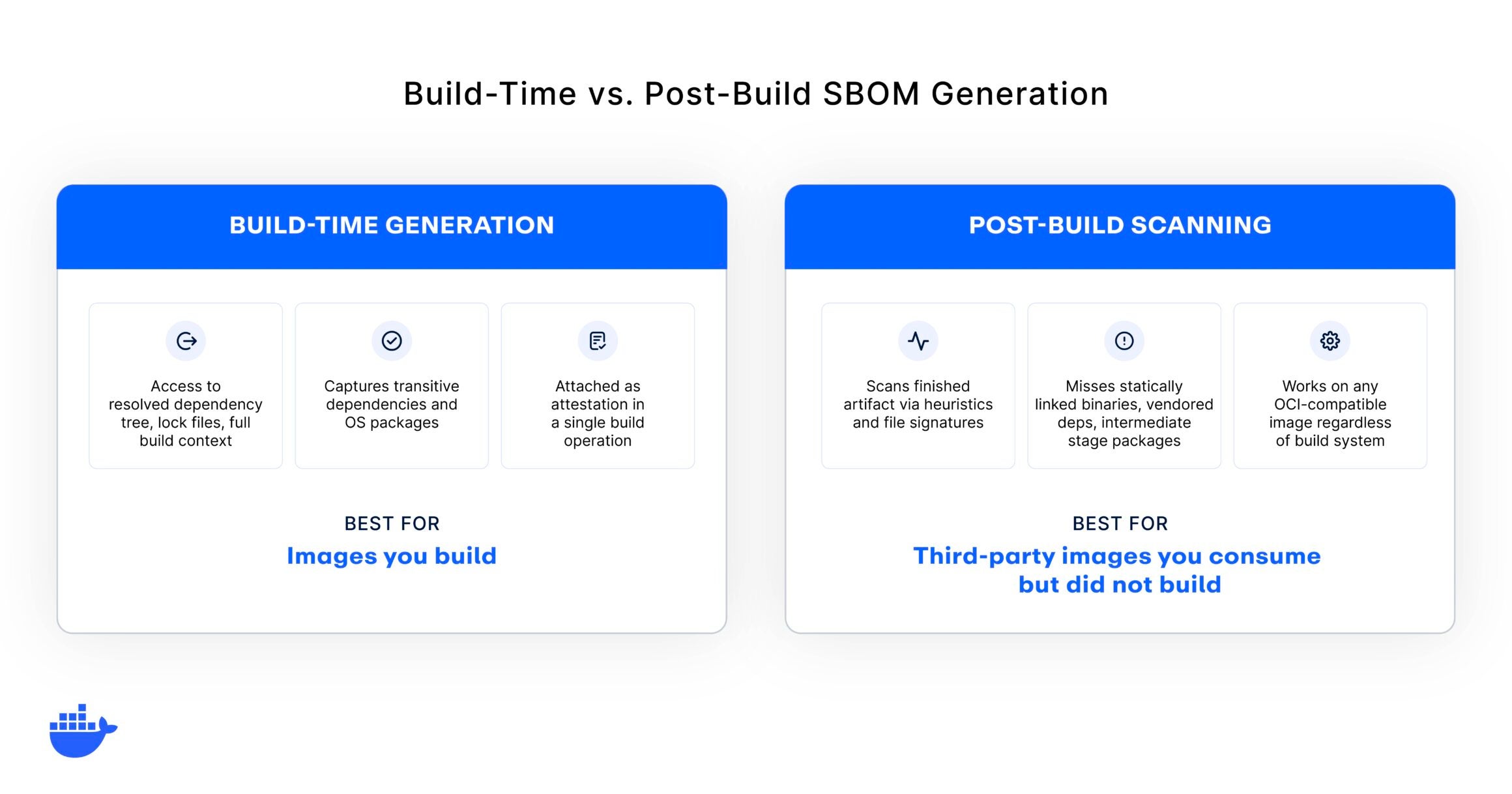
Build-time generation
Build-time generation hooks into the build system itself. The generator has access to the resolved dependency tree, the package manager files, and the full build context. It knows exactly what went into the artifact because it was present when the artifact was assembled.
Container build systems with native attestation support can produce an SPDX SBOM during the image build, attach it as an in-toto attestation, and push both the image and the SBOM to the registry in a single operation. Language-specific build plugins take a similar approach for application dependencies, generating SBOMs as part of the standard build lifecycle.
The advantage is structural: build-time generation captures the resolved state of every dependency, including transitive dependencies that post-build scanners may miss.
Post-build scanning
Post-build tools scan a finished artifact and reverse-engineer its contents. They work by identifying package manager metadata, file signatures, and known patterns within the artifact. This approach works on any OCI-compatible image, regardless of how it was built.
The trade-off is coverage. Statically linked binaries, vendored dependencies, and OS packages installed in intermediate build stages may commonly be missed by post-build scanners. The scanner can only report what it can detect, and detection is heuristic-based rather than derived from the actual build graph.
When you have build system access, generate at build time. Post-build scanning is the right choice for third-party images you consume but did not build, or for legacy artifacts without build system integration.
For container images, our documentation covers how to configure build-time SBOM attestation in detail, including the specific flags and generator options for different build workflows.
What makes an SBOM useful
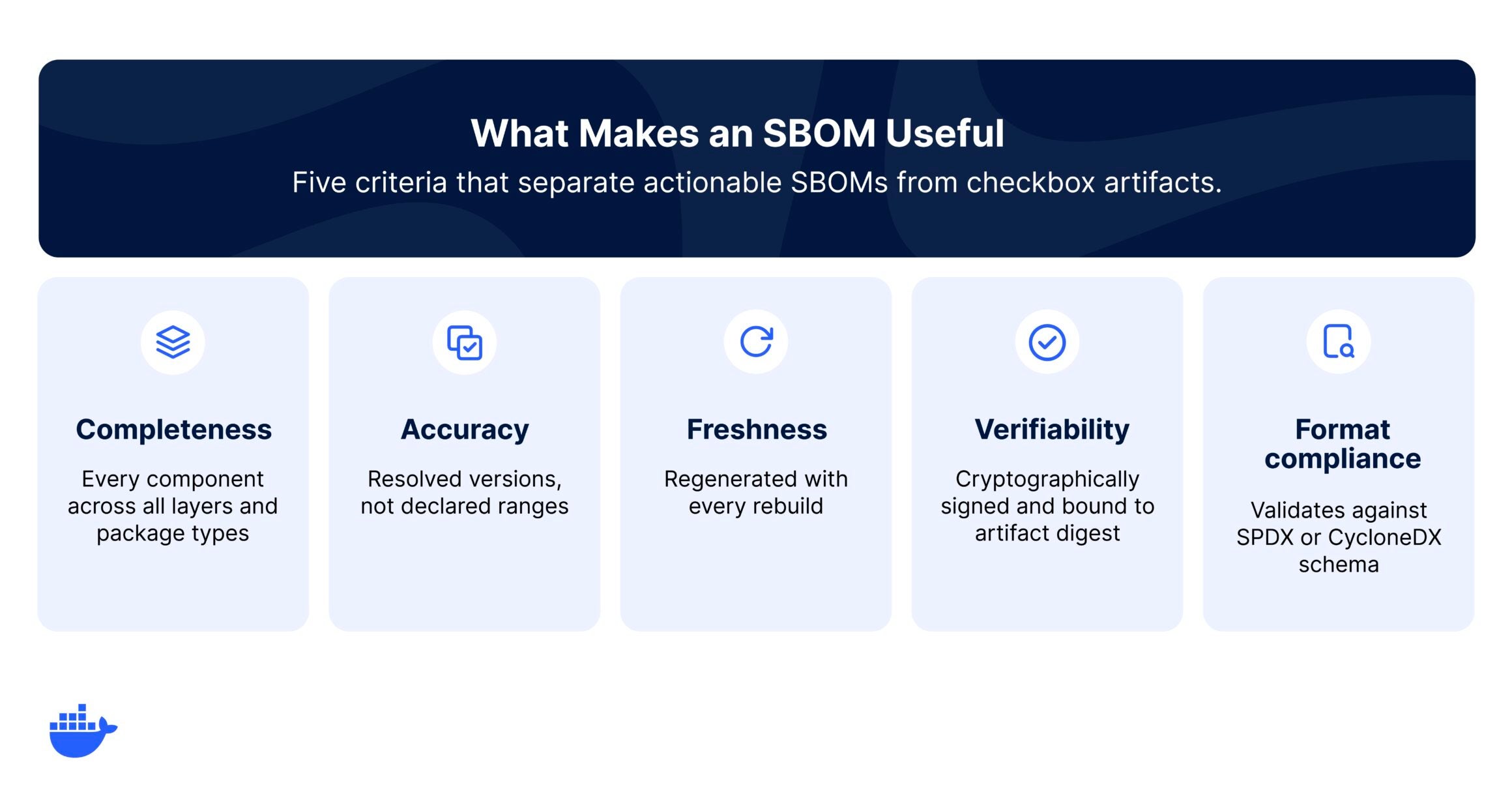
Generating an SBOM is not the same as generating a useful one. The file format is standard, but the quality of the content varies dramatically depending on how and when the SBOM was produced. Five criteria separate actionable SBOMs from checkbox artifacts.
1. Completeness
A complete SBOM accounts for every component in the artifact across all layers and all package types. This includes OS packages from the base image, application dependencies from every package manager in the build, and any tooling or utilities added during the build process.
This is where multi-stage and minimal base images create real gaps. A Dockerfile with a Node frontend, a C or C++ component compiled into a static binary, and a distroless final stage presents three distinct challenges: the Node layer has deep transitive dependency trees, the statically linked binary often carries no dependency manifest on disk, and the distroless base has no package manager at all. Post-build scanners can miss the statically linked dependencies and may undercount the Node tree. Build-time generation with access to each stage’s resolved dependency graph is the only way to get a complete picture.
2. Accuracy
Accuracy means the SBOM records resolved versions, not declared ranges. A package manifest might declare “^4.17.0” but the resolved version in the lock file is 4.17.21. The SBOM must reflect what was actually installed, not what was requested.
3. Freshness
An SBOM is a point-in-time snapshot tied to a specific build. Every time the artifact is rebuilt, the SBOM should be regenerated. Stale SBOMs create a false sense of visibility.
4. Verifiability
A verifiable SBOM is one that consumers can confirm was produced by the build system and has not been tampered with. Cryptographic signing and attestation frameworks bind the SBOM to a specific artifact digest, along with build provenance that records where and how the artifact was built.
5. Format compliance
Standard formats like SPDX and CycloneDX define required and optional fields. An SBOM that validates against the schema is interoperable across scanning tools, policy engines, and compliance workflows. One that does not may work with your current tools but will break when you change them.
Some base images already ship with SBOMs that meet all five criteria, along with SLSA Build Level 3 provenance and exploitability data. These SBOMs were generated at build time on hardened build platforms with non-falsifiable provenance, cryptographically signed, and attached as in-toto attestations bound to the image digest. They are continuously regenerated with every rebuild, so freshness is maintained without manual intervention. For those images, the generation question is answered for the most critical layer of the stack, and your effort shifts to generating a complete SBOM for the application layer you add on top.
Your generation toolchain is attack surface
The tools you use to generate SBOMs run with elevated access to your build environment. They read your source code, your dependency trees, and your build artifacts. A compromised generator does not just produce bad output; it has the access to exfiltrate or modify what it scans.
This is not a theoretical concern. Version tags on GitHub Actions and container images are mutable. A tool you pinned to v2.1 today can silently become something different tomorrow if a maintainer account is compromised or a tag is force-pushed. The exposure window for incidents like these is typically measured in hours, but automated pipelines can pull compromised versions within minutes.
Treat your generation tooling with the same rigor you apply to any other build dependency:
- Pin to immutable references (commit SHAs, not version tags).
- Verify checksums before execution.
- Run generation in CI, not on developer machines, for reproducible and auditable output.
- Monitor for upstream security advisories on your generation tools.
This is one dimension of a broader software supply chain security challenge: every tool in your pipeline is a dependency that needs the same scrutiny as your application code. For base images, you can sidestep this risk entirely. Images built on hardened build platforms with non-falsifiable provenance carry their supply chain metadata from the point of origin, cryptographically verified end-to-end.
Integrating SBOM generation into CI/CD
Manual SBOM generation works for one-off audits. For production workflows, generation needs to be automatic, reproducible, and wired into the rest of your delivery pipeline. The pattern is consistent across CI systems.
Generate at build
Add SBOM generation as a build stage step, immediately after the image is produced. For container images, BuildKit attestation flags are the most reliable approach. For application dependencies, language-specific plugins (CycloneDX for Maven/Gradle, npm/yarn for Node) produce the highest-quality output because they access the resolved dependency graph.
For multi-stage builds, generate from the final stage only. Intermediate stages often install build tools and test frameworks that do not ship in the production image. Generating against intermediate stages inflates the SBOM with components that are not deployed, creating noise in vulnerability scans.
Choose an attestation format
SPDX is the native output format for BuildKit attestation and the stronger choice if license compliance is a primary concern. CycloneDX has richer vulnerability correlation support and more granular component classification, making it the better fit for security-focused workflows. If your consumption tools (policy engines, vulnerability scanners, compliance dashboards) have a preference, follow it. If they support both, default to SPDX for container images since it requires no additional tooling beyond BuildKit’s built-in generator.
Attach to the artifact
Store the SBOM alongside the artifact it describes. For container images, this means attaching it as an OCI attestation in the registry rather than saving it as a separate file in an artifact store. Attestation-based storage keeps the SBOM discoverable, versioned, and bound to the specific image digest. When the image is promoted from dev to staging to production, the SBOM travels with it through every registry, rather than requiring a separate copy-and-sync workflow that inevitably drifts.
Validate before publishing
Add a validation step between generation and registry push. Run the SBOM through a format validator (SPDX and CycloneDX both provide official schema validators), check that the component count is reasonable for the artifact, and verify that the SBOM references the correct image digest. A build that produces 12 components for an image you know contains 200+ packages should fail the pipeline, not ship silently.
Scan and enforce continuously
SBOM generation at build time captures what’s shipped. Continuous scanning tells you what’s become vulnerable since. New CVEs drop daily, and an SBOM that was clean at build time can have critical exposures within weeks. Continuous analysis against SBOM data matches new disclosures against your inventory without re-pulling images, and surfaces policy violations as they emerge. With SBOMs attached to every image, you can gate deployment: no image ships without a valid SBOM, no image deploys with a known-vulnerable package above your severity threshold.
Implementation details vary by CI system. Our documentation covers the specific flags and configuration for generating and attaching SBOM attestations across common container build workflows.
Verifying your SBOM output
Before relying on your SBOM output for compliance reporting or vulnerability management, verify that it meets the quality criteria below.
- Component count sanity check: Compare the number of components in your SBOM against what you expect from the Dockerfile, lock files, and base image. A Node.js app with 200 declared dependencies should produce substantially more entries once transitive dependencies are included.
- Resolved versions, not ranges: Spot-check entries to confirm the SBOM records specific versions (4.17.21) rather than declared ranges (^4.17.0).
- Transitive dependency depth: Verify that transitive dependencies appear, not just top-level packages. If your app declares 30 direct dependencies but the SBOM contains 32 entries, transitive coverage is likely incomplete.
- OS package coverage: Confirm that base image OS packages appear alongside application dependencies.
- Digest binding: Verify the attestation references the correct image digest. An unbound SBOM cannot be trusted to describe its artifact.
- Format validation: Run the SBOM through a schema validator (SPDX and CycloneDX both provide official tools).
Start generating, then start verifying
The best time to add SBOM generation to your pipeline is the next time you touch your CI configuration. Start with your highest-traffic production image. Configure build-time generation, attach the SBOM as an attestation, and validate the output against the checklist above. Then expand to the rest of your portfolio.
If you want a head start, Docker Hardened Images ship with complete SBOMs, SLSA Build Level 3 provenance, and OpenVEX data already attached, so you can skip the generation step for your base layers entirely. For everything you build on top, Docker Scout provides continuous vulnerability matching against your SBOM data and enforces policies across your image portfolio.
- Get started with Docker Hardened Images →
- Explore vulnerability monitoring with Docker Scout →
Frequently asked questions
What is the best format for an SBOM?
For container images, default to SPDX since it is the native BuildKit attestation output and requires no additional tooling. Choose CycloneDX if your primary use case is security scanning and your downstream tools prefer it.
Do I need to generate an SBOM if my images already come with one?
If you are using base images that ship with pre-built SBOMs, provenance, and exploitability data, you do not need to regenerate for that layer. The included SBOM was generated at build time with full access to the build graph and is cryptographically bound to the image.
To verify the pre-built SBOM is trustworthy, check two things:
- Is the SBOM attached as a signed attestation (not a loose file)?
- Does the attestation include SLSA provenance?
If the provenance traces back to a hardened build platform with non-falsifiable provenance, you can treat the SBOM as authoritative for that layer. You still need to generate an SBOM for the application dependencies you add on top.
How often should I regenerate my SBOM?
Every time the artifact is rebuilt. If your CI pipeline produces a new image, it should produce a new SBOM to match. Between rebuilds, the existing SBOM is still accurate because the artifact has not changed.
Is SBOM generation required for compliance?
In the United States, Executive Order 14028 helped set SBOM requirements in motion for software sold to federal agencies. The EU Cyber Resilience Act extends SBOM requirements to all products with digital elements sold in the EU.
And as AI workloads come under newer regulations like the EU AI Act with its technical documentation and transparency expectations, component-level inventories are becoming a practical way for teams to show what is inside high-risk systems. Industry frameworks like NIST SSDF and CISA’s SBOM guidance increasingly reference SBOMs as a baseline expectation. Whether legally required today, SBOMs are becoming a procurement prerequisite.
Sources
Omdia, Securing the Software Supply Chain: Strategic Approaches to Support Scaling Development with AI Adoption, May 2026.