Hello, I’m Philippe, and I am a Principal Solutions Architect helping customers with their usage of Docker. I wanted a lightweight way to automate my IT news roundups without burning through AI credits. So I built a Docker Agent skill that uses the Brave Search API to fetch recent articles on a topic, then hands the results to a local model running with Docker Model Runner to analyze the stories and generate a Markdown report.
In this setup, Qwen3.5-4B handles the reasoning and skill invocation, while the skill itself does the retrieval work. The result is a simple local workflow for turning a prompt like “use news roundup skill with tiny language models” into a structured news brief I can save, review, and reuse.
It is a bit slower than doing the same thing with Claude Code, but that tradeoff works for me: I keep the workflow local, I save my Claude credits, and I get a practical example of how skills make Docker Agent more useful for repeatable tasks.
Prerequisites for building the news roundup:
- Docker and Docker Compose, obviously.
- A Brave Search account with an API key (you can get one here). (There’s a free plan.)
- A local model that supports a large context window and knows how to do function calling.
I chose to use qwen3.5-4b from Qwen (I went with the Unsloth version), a 4-billion-parameter model optimized for text understanding and generation, with native support for up to 262144 context tokens.
I started my tests with qwen3.5-9b, but on my MacBook Air, it’s a bit slow and qwen3.5-4b does the job just fine.
Let’s get into the setup.
Step-by-step guide to building the news roundup
Step 1: Creating the Dockerfile
I used an ubuntu:22.04 base image and installed curl to make requests to the Brave Search API. I also copied the docker-agent binary from the docker/docker-agent:1.32.5 image to run the agents.
FROM --platform=$BUILDPLATFORM docker/docker-agent:1.32.5 AS coding-agent

FROM --platform=$BUILDPLATFORM ubuntu:22.04 AS base

LABEL maintainer="@k33g_org"
ARG TARGETOS
ARG TARGETARCH

ARG USER_NAME=docker-agent-user

ARG DEBIAN_FRONTEND=noninteractive

ENV LANG=en_US.UTF-8
ENV LANGUAGE=en_US.UTF-8
ENV LC_COLLATE=C
ENV LC_CTYPE=en_US.UTF-8

# ------------------------------------
# Install Tools
#------------------------------------
RUN <<EOF
apt-get update
apt-get install -y wget curl
apt-get clean autoclean
apt-get autoremove --yes
rm -rf /var/lib/{apt,dpkg,cache,log}/
EOF

# ------------------------------------
# Install docker-agent
# ------------------------------------
COPY --from=coding-agent /docker-agent /usr/local/bin/docker-agent

# ------------------------------------
# Create a new user
# ------------------------------------
RUN adduser ${USER_NAME}
# Set the working directory
WORKDIR /home/${USER_NAME}
# Set the user as the owner of the working directory
RUN chown -R ${USER_NAME}:${USER_NAME} /home/${USER_NAME}
# Switch to the regular user
USER ${USER_NAME}
Let’s move on to the agent configuration.
Step 2: Creating the Docker Agent configuration file
For the Docker Agent configuration, I defined a root agent using the brain model, which is an alias for qwen3.5-4b. I also enabled skills support (skills: true) and provided detailed instructions so the agent behaves like an expert IT journalist, capable of searching, analyzing, and summarizing the latest tech news.
For the toolsets, Docker Agent ships with some ready-to-use ones, but I preferred a script-type toolset with an execute_command that can run any shell command and capture its output. This gives me the flexibility to interact with the Brave Search API directly from shell commands, without having to implement specific tools for it — and most importantly, it keeps the agent’s instructions lightweight.
agents:
  root:

    model: brain
    description: News Roundup Expert
    skills: true
    instruction: |
      You are an expert IT journalist with deep knowledge of software engineering, cloud infrastructure, artificial intelligence, cybersecurity, and the open-source ecosystem.
      Your role is to gather, analyze, and summarize the latest technology news in a clear, accurate, and engaging way.
      You write for a technical audience and always provide context, highlight trends, and explain the impact of each piece of news.

    toolsets:
      - type: script
        shell:

          execute_command:
            description: Execute a shell command and return its stdout and stderr output.
            args:
              command:
                description: The shell command to execute.
            cmd: |
              bash -c "$command" 2>&1

models:

  brain:
    provider: dmr
    model: huggingface.co/unsloth/qwen3.5-4b-gguf:Q4_K_M
    temperature: 0.0
    top_p: 0.95
    presence_penalty: 1.5
    provider_opts:
      # llama.cpp flags
      runtime_flags: ["--context_size=65536"]
Now let’s look at the skill.
Step 3: Building the news roundup skill
I created a news-roundup skill that uses the Brave Search API to search for the latest news on a given topic, enriches each article with additional web searches, and generates a structured Markdown report.
Inside the .agents/skills folder, I created a news-roundup directory with a SKILL.md file that describes the skill in detail, with the steps to follow and the commands to execute at each step.
├── .agents
│   └── skills
│       └── news-roundup
│           └── SKILL.md
Here’s the content of SKILL.md:
---
name: news-roundup
description: search the news using Brave News Search API with a query as argument. Use this skill when the user asks to search for recent news or current events.
---
# News Roundup

## Purpose

Generate a comprehensive Markdown news report on a given topic (default: "small ai local models").

## Steps to follow

### Step 1 — Search for recent news

#### Command to execute

```bash
curl -s "https://api.search.brave.com/res/v1/news/search?q=$(echo "$ARGUMENTS_REST" | sed 's/ /+/g')&count=3&freshness=pw" \
  -H "X-Subscription-Token: ${BRAVE}" \
  -H "Accept: application/json"
```

### Step 2 — Enrich each article

For each article returned in Step 1, use the below command with the article URL to retrieve additional context and details.

#### Command to execute

```bash
curl -s "https://api.search.brave.com/res/v1/web/search?q=$(echo "$ARTICLE_URL" | sed 's/ /+/g')&count=10" \
  -H "X-Subscription-Token: ${BRAVE}" \
  -H "Accept: application/json"
```

### Step 3 — Generate the Markdown report

Using all the collected information, write a well-structured Markdown report saved to `/workspace/news-report.md`.

The report must follow this structure:

```markdown
# IT News Report — {topic}

> Generated on {date}

## Summary

A short paragraph summarizing the main trends found across all articles.

## Articles

### {Article Title}

- **Source**: {source name}
- **URL**: {url}
- **Published**: {date}

{2-3 sentence summary of the article content and its significance for IT professionals}

---

(repeat for each article)

## Key Trends

A bullet list of the main technology trends identified across all articles.
```

Save the final report to `/workspace/data/news-report-{YYYYMMDD-HHMMSS}.md` using the `write_file` tool, where `{YYYYMMDD-HHMMSS}` is the current date and time (e.g. `news-report-20260318-143012.md`).
To get the current timestamp, run:

```bash
date +"%Y%m%d-%H%M%S"
```
All that’s left is to create the compose.yml file to launch the agent.
Step 4: Updating the compose.yml file
Here’s the content of compose.yml.
Note: you’ll need a .env file with your Brave Search API key (e.g. BRAVE=abcdef1234567890).
services:
  news-roundup:
    build:
      context: .
      dockerfile: Dockerfile
    stdin_open: true
    tty: true
    command: docker-agent run /workspace/config.yaml
    volumes:
      - ./config.yaml:/workspace/config.yaml:ro
      - ./.agents:/workspace/.agents:ro
      - ./data:/workspace/data
    working_dir: /workspace

    env_file:
      - .env

    models:
      qwen3.5-4b:

models:

  qwen3.5-4b:
    model: huggingface.co/unsloth/qwen3.5-4b-gguf:Q4_K_M
    context_size: 65536
And that’s it — everything we need to run our IT news roundup agent.
Step 5: Let’s test it out!
Just run the following command in your terminal:
docker compose run --rm --build news-roundup
And ask the agent:
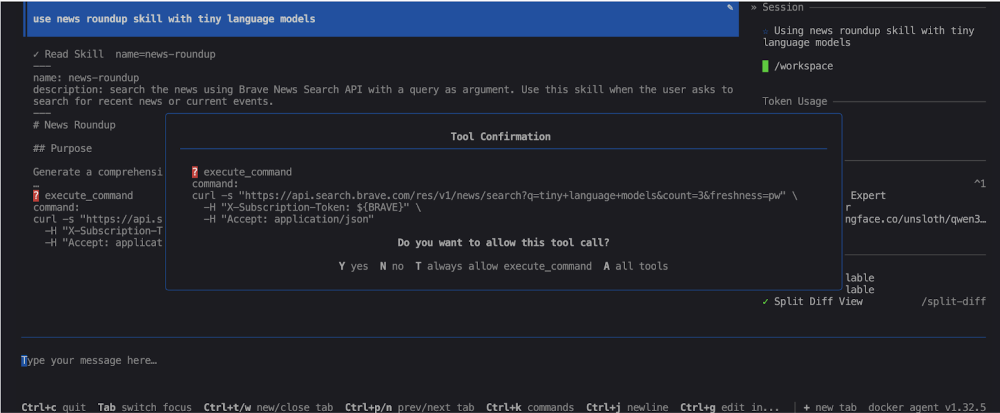
use news roundup skill with tiny language models
The agent will then execute the news-roundup skill, query the Brave Search API, analyze the articles, and generate a Markdown report in the data folder.
Note: this can take a little while, so feel free to grab a coffee (or get some work done).
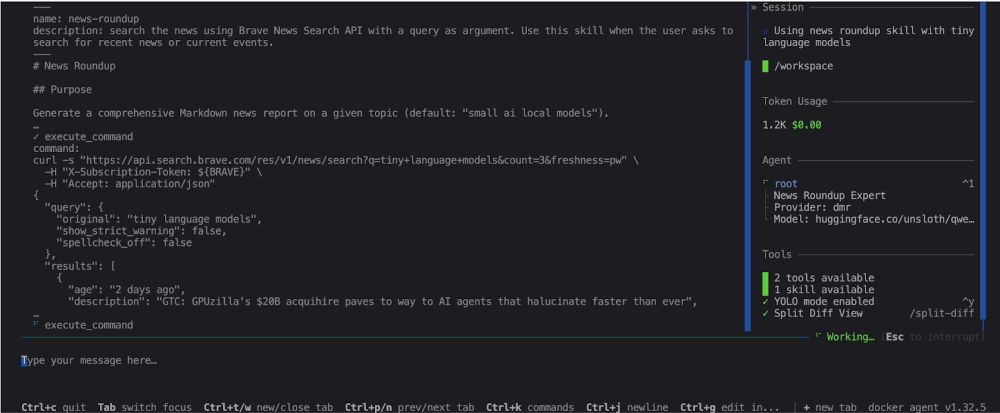
The agent will detect that it needs to run tools (the curl commands from the news-roundup skill) — you can validate each command manually or let the agent run them automatically:
Your agent will work for a few minutes…
…and at the end, it will give you the path of the generated report, which you can open to read your personalized IT news roundup:
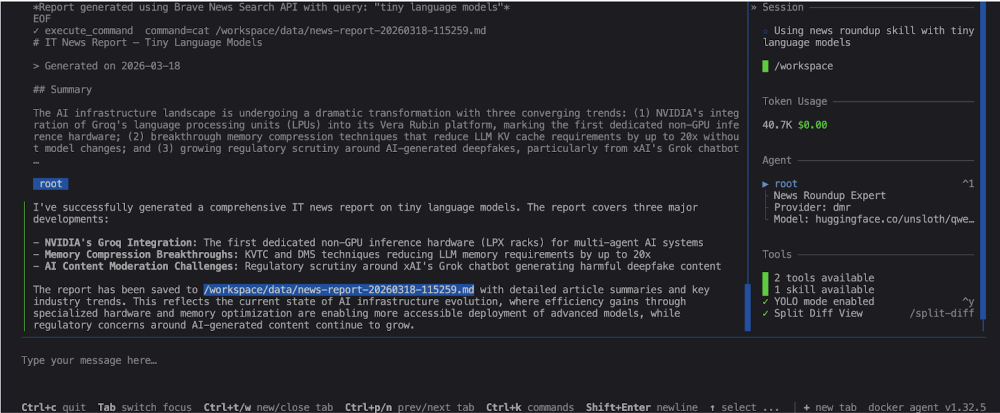
You can find examples of generated reports in the data folder of the project on this repository: https://codeberg.org/docker-agents/news-roundup/src/branch/main/data.
Final Thoughts
That’s the full setup: a Docker Agent skill for news retrieval, the Brave Search API for fresh articles, and Docker Model Runner with Qwen3.5-4B for local analysis and report generation.
You now have a fully local IT news roundup agent. I have written a lot of content on use cases for local models, including context packaging and making small LLMs smarter. See you soon for more Docker Agent use cases with local language models!