“AI agents will become the primary way we interact with computers in the future. They will be able to understand our needs and preferences, and proactively help us with tasks and decision making.“
Satya Nadella
CEO of Microsoft
Whether you are a software engineer, a product manager, or a designer, this quote should fundamentally change how we approach our daily routine. We are no longer just building interfaces; we are creating environments where agents can operate autonomously with minimal human interaction. What could be the fundamental requirement for such an environment ?
In a single word: Isolation.
A user interacting with traditional software is constrained by the actions it allows. But Agents are non-deterministic, and therefore prone to hallucination and prompt injections. Once you give an AI write access to your systems, there is nothing stopping it from executing a rm -rf to delete all your data. Of course, there are different ways to solve this problem, with one approach being sandboxing: an isolated, controlled environment used for experimentation and testing without affecting the surrounding system.
So, I started exploring different strategies to sandbox the agents. Starting with a bare minimum setup and going all the way to setting up a cloud VM. Here is what I learned at each step.
1. Let’s Start with the Baseline
Chroot has been the traditional way to achieve file system isolation. It works well when you want the process to think that a specific, restricted directory is the absolute root of the machine.
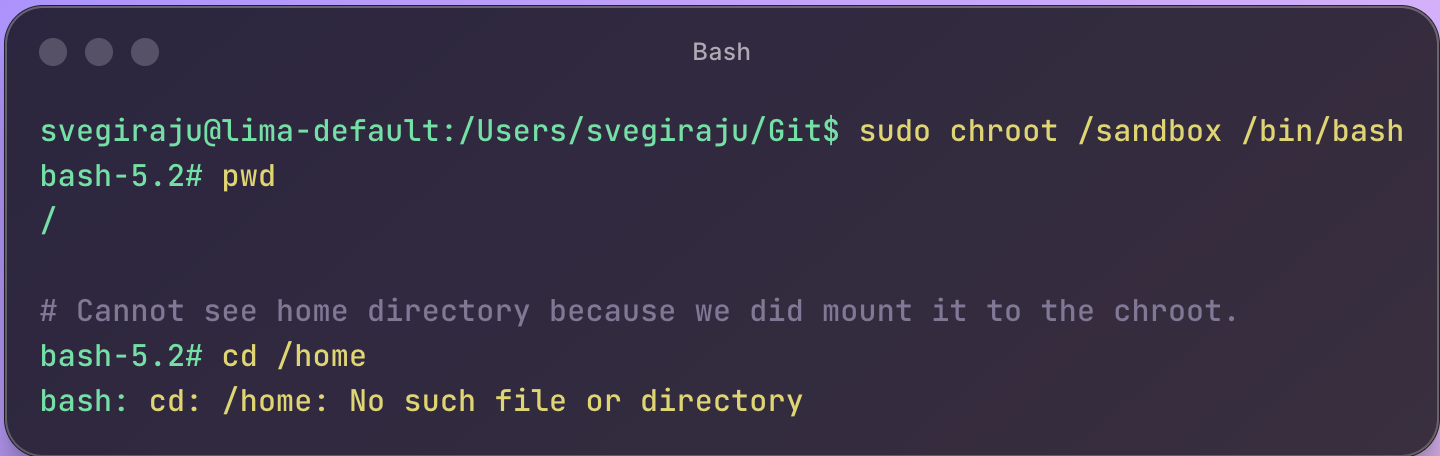
However, there are two major caveats.
- If the process inside the
chroothas root privileges, it could break out. - While it offers file isolation, process isolation is still a problem. A malicious agent can still see other processes running on your system and try to kill them.
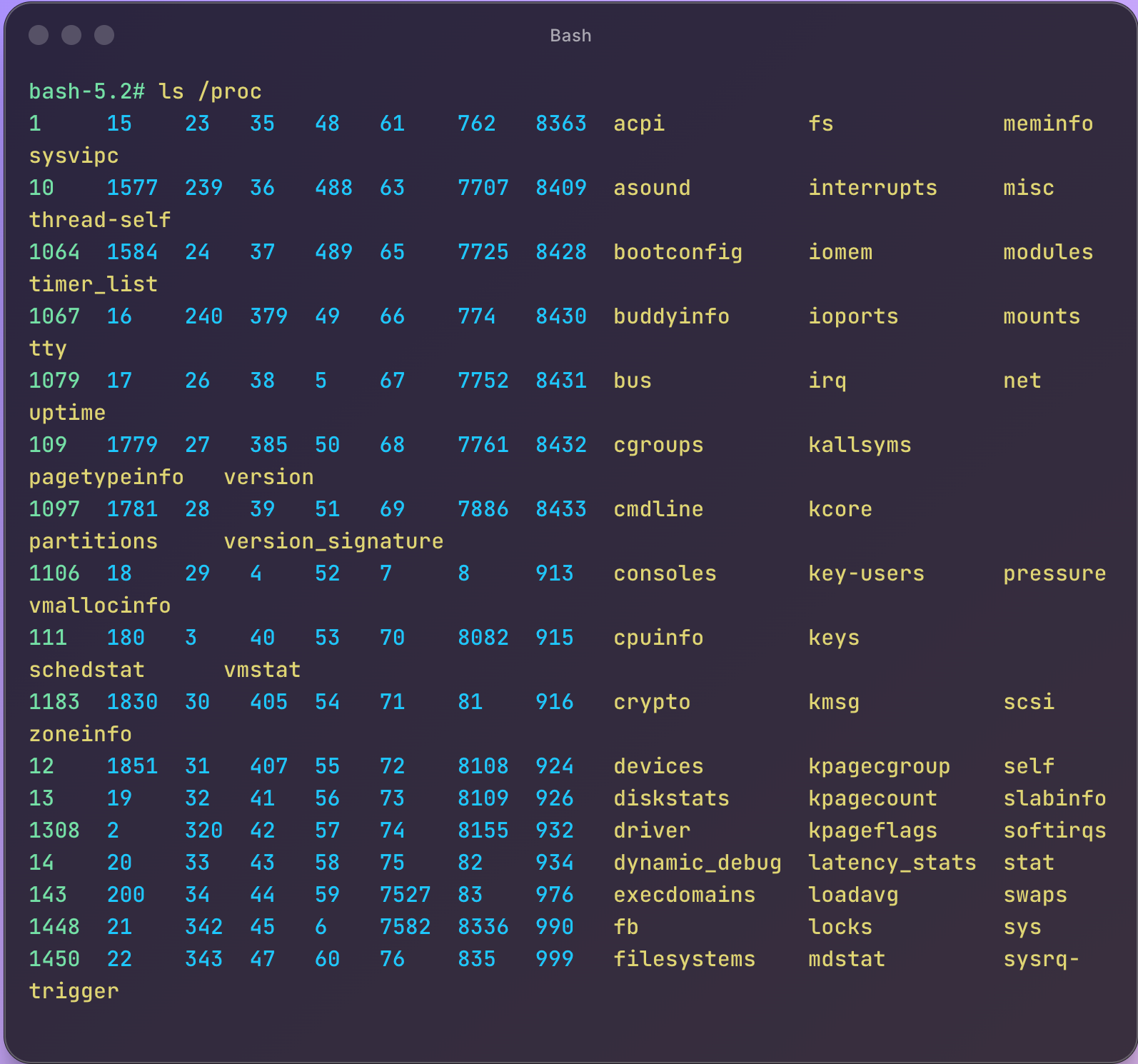
As you can see above, doing an ls /proc still shows all the processes running on the host.
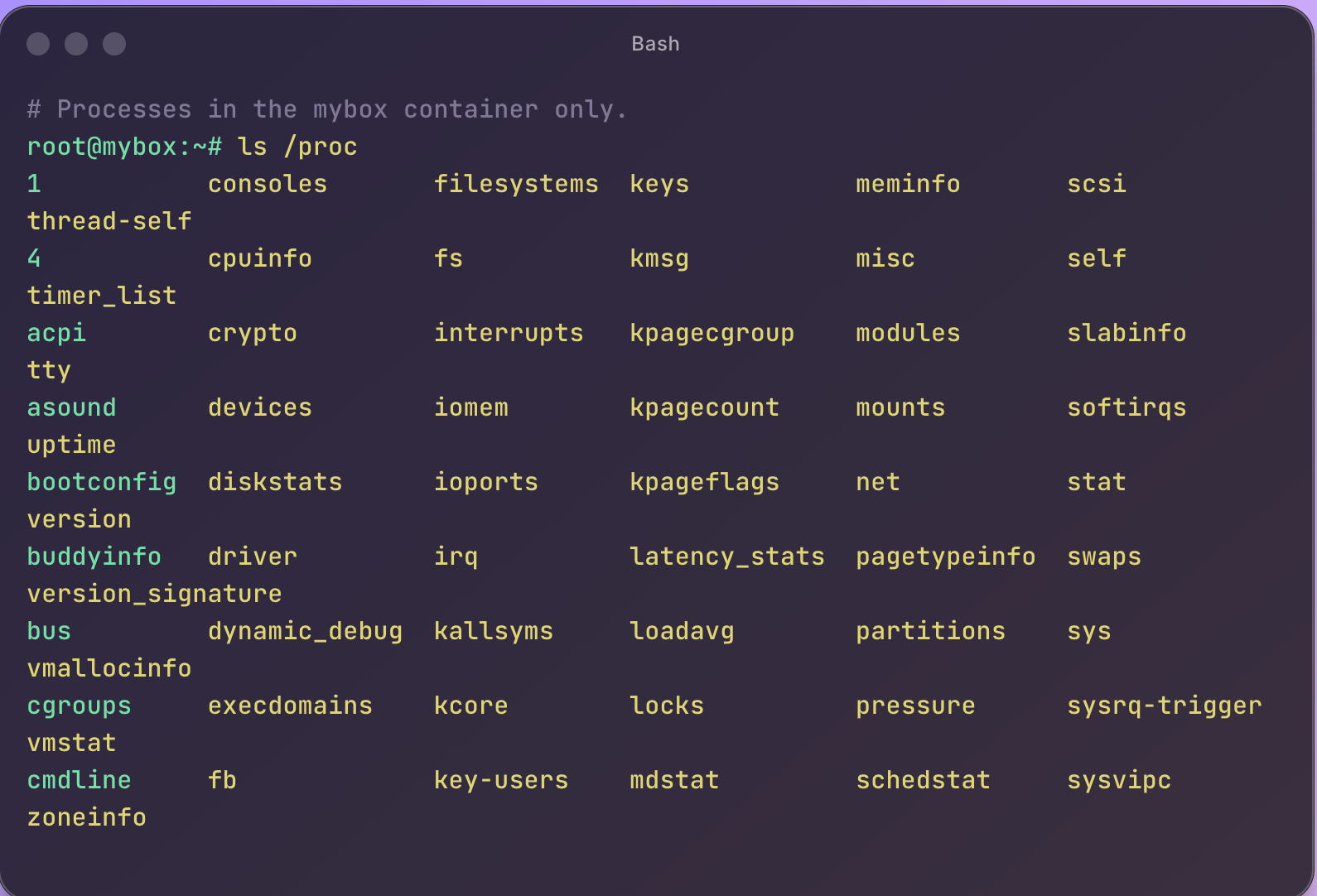
This is when I learnt about systemd-nspawn, also called “chroot on steroids”. The difference between chroot and systemd-spawn is that the latter provides isolation at the network and process levels in addition to the file system.

Now, when I do the same ls /proc in the systemd-nspawn mybox container, I just see the processes in the mybox container achieving process-level isolation.
Pros
- Lightweight compared to other container processes like Docker, it offers faster startup times.
- Native support in Linux.
Caveats
systemd-nspawnis not very popular in the developer community unless you are deep into Linux.- While this works for Linux, what if you need to run your agents on Windows? You will have to find alternatives depending on the platform.
2. Are Containers Enough?
Another technology that comes to mind when thinking about isolated environments is Docker. And unlike the previous concepts we discussed, Docker has a broader ecosystem and a strong community.
With containers, you also get isolated file systems, network interfaces, and process trees. They also come with cross-platform support across Mac, Windows, and Linux. With all these advantages, creating and running agents across different platforms becomes very easy, which makes containers an obvious choice.
However, the model becomes more complex when containers become a dev platform for agents. More often than not, agents need to execute generated code in separate environments, which in practice means spinning up new Docker containers on demand. This introduces a container-in-container pattern (Docker-in-Docker), where an agent running inside a container needs to build and run other containers.
To make Docker-in-Docker to work, we would have to run the container in privileged mode (--privileged), which gives the container processes elevated permissions rights and dramatically weakens the isolation. At this point, the isolation guarantees are significantly diminished. As a result, complete isolation for agents using only containers becomes tricky.
3. Do Virtual Machines Help?
As you might have already predicted, Virtual Machines (VMs) offer the strongest isolation. With a VM, you can get an entire OS, file system, and network of your own. For example, I currently run MacOS with lima – Linux VM to run Linux-specific workloads.
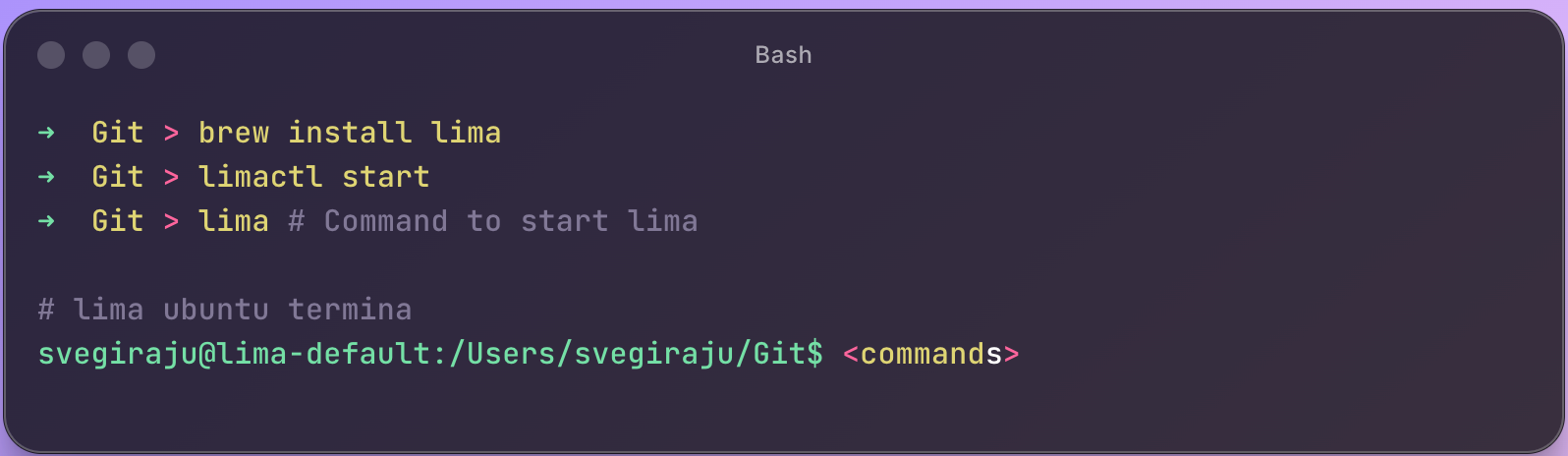
However, the tradeoff is that spinning up a VM is expensive. And if this needs to be done for every agent, it is not scalable. Some stats that show how expensive spinning up a VM with system-nspawn looks like.
|
Approach |
Per Agent Cost |
Boot Time |
10 Agents |
|---|---|---|---|
|
VM (Lima) |
~4GB RAM + 4 CPU |
30-60s |
~40GB RAM |
|
systemd-nspawn |
~10MB RAM |
< 1s |
~100MB RAM |
|
chroot |
1MB RAM |
instant |
~10MB RAM |
For example, in the below screenshot you can see the cost it takes to run a lima vm.

4. MicroVMs to the rescue
A MicroVM (Micro Virtual Machines) felt like the perfect answer to the isolation story. So what is MicroVM, and what makes it better?
MicroVM is a lightweight virtualisation technology that provides the strong security and isolation of a traditional VM, along with the speed of a container.
- Strong security and isolation are enabled because a MicroVM gets its own kernel, aka the Guest Kernel, unlike containers, which use a shared kernel. Because of this, any compromise inside the Guest OS does not directly affect the host or the other VMs.
- Speed: unlike traditional VMs, it is provisioned with minimal hardware (no USB or PCI buses) and bypasses BIOS/UEFI boot, significantly reducing device emulation overhead and startup latency.
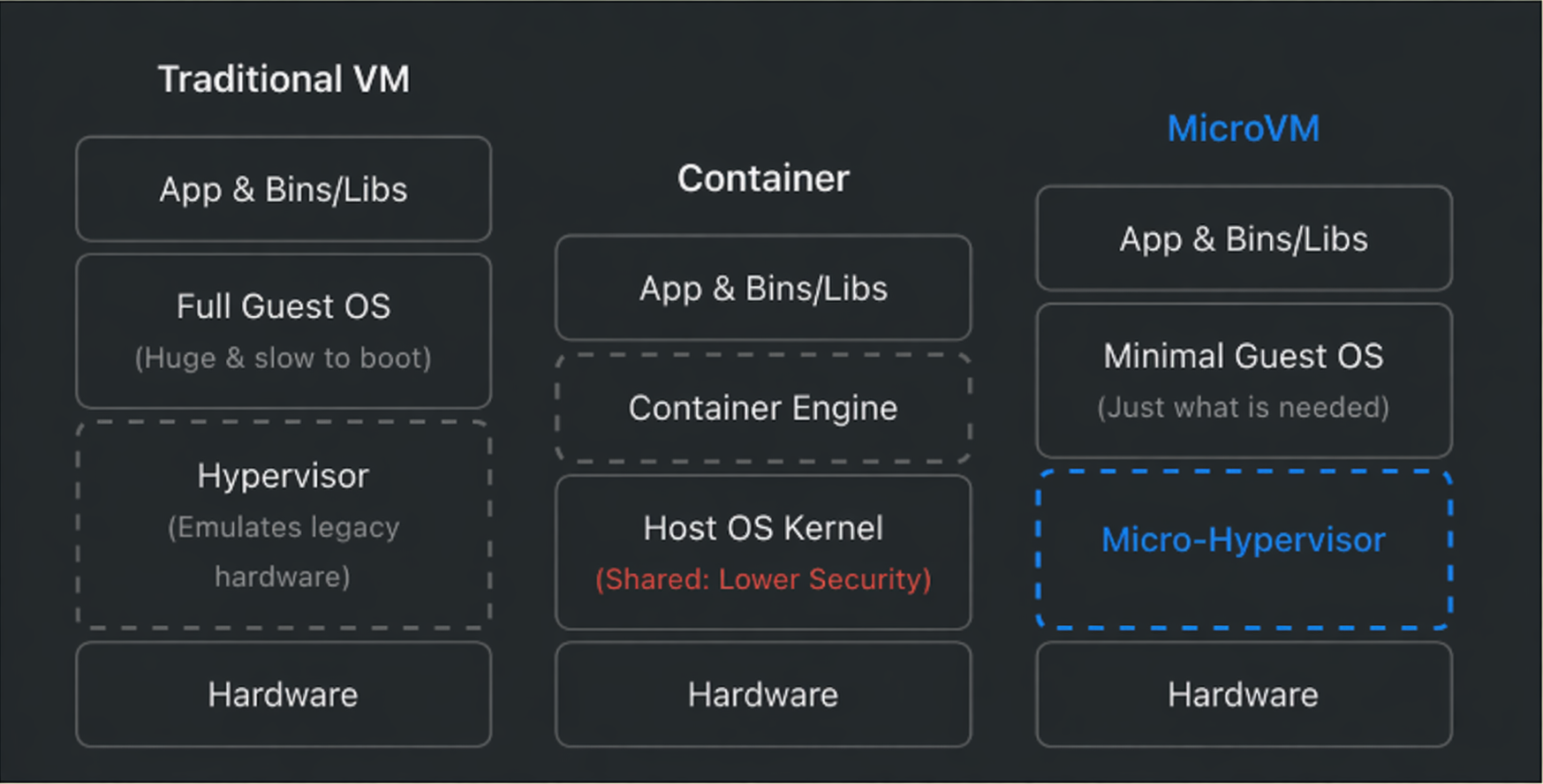
Amazon open-sourced Firecracker in 2018, which was the earliest adoption of the MicroVM architecture. While this helped catalyze the MicroVM architecture, Firecracker was restricted to Linux environments. And most of the agentic orchestration tends to happen on developers’ laptops which run MacOS and Windows as well.
Docker addressed this gap with its Sandbox offering. The best part is their MicroVM-based architecture, which runs natively across macOS, Windows, and Linux, delivering better isolation, faster startup times, and a smoother developer experience. We will learn about this in a bit.
5. gVisor
gVisor takes a unique approach to solving the isolation problem. While the previous strategies used the OS Kernel, gVisor creates its own Kernel called the “application kernel” running in the user space.
When a standard containerized app wants to do something like open a file, allocate memory, or send network traffic, it makes a “system call” (syscall) directly to the host’s Linux kernel.
With gVisor, your app is bundled with a component called the Sentry.
- The Sentry intercepts every single syscall your application makes.
- It processes that request in user-space using its own implementation of Linux networking, file systems, and memory management.
- If the Sentry absolutely needs the host kernel to do something (like actual disk I/O), it translates the request into an extremely restricted, heavily filtered, safe call to the host.
However, it suffers from the same problem as systemd-nspawn. Not much broader community supports and only supports Linux.
Docker Sandbox
With Docker Sandboxes, AI coding agents run in isolated microVM environments. The performance is as seamless as it can be, identical to running on the host, but with significantly stronger isolation and security. This means you can run your autonomous agents without worrying about host compromise or unintended access to your local environment.
Sandbox achieves this levels of security through three layers of isolation:
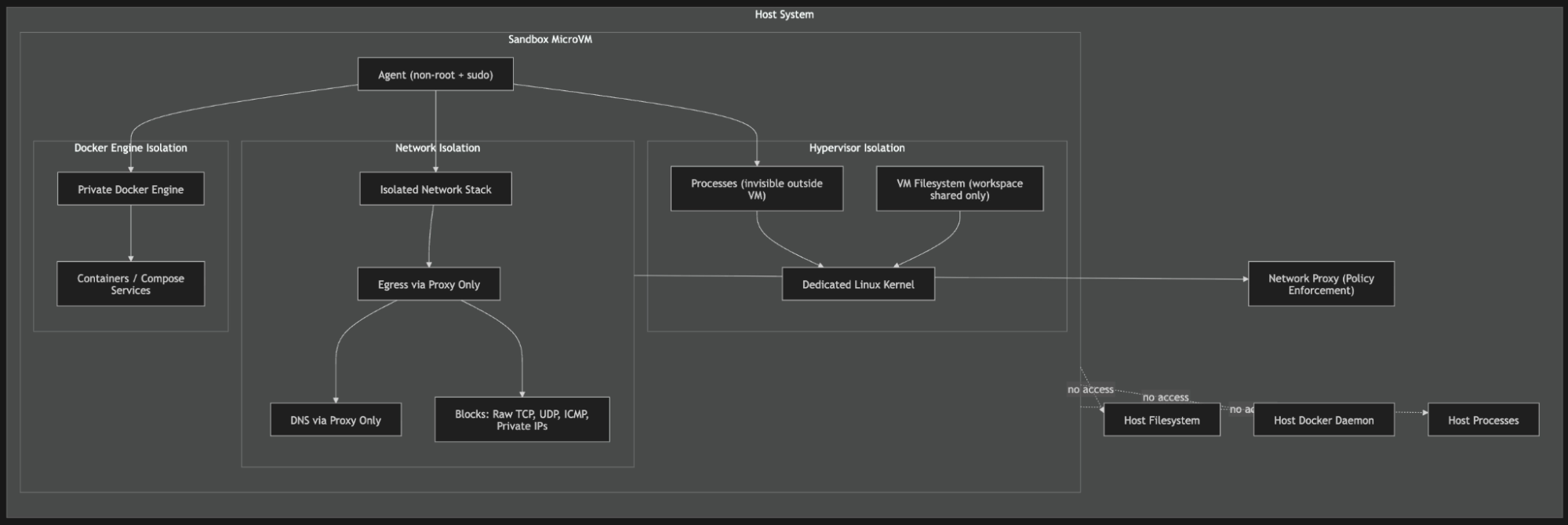
Hypervisor Isolation: Every Sandbox has its own Linux Kernel. So, anything that affects the sandbox kernel will not affect the host or other sandbox kernels.
Network Isolation
- Each Sandbox has its own isolated network. Meaning multiple sandboxes cannot communicate with each other or with the host.
- In addition, network policies can be enforced to allow or disallow traffic from a source.
Docker Engine Isolation
- This is what made me fall in love with this new architecture. Every Sandbox gets its own Docker Engine. As a result, whenever the agent runs
docker pullordocker compose, those commands are executed against the internal engine rather than the external Docker daemon. - Because of this, agents running inside can only see Docker services within their sandbox and nothing else, adding an additional layer of security.
|
Attribute |
Traditional VM |
Container |
Docker MicroVM |
|---|---|---|---|
|
Isolation |
Strong (dedicated kernel) |
Weak (shared kernel) |
Strong (dedicated kernel) |
|
Boot time |
Minutes |
Milliseconds |
Seconds (after the first image pull) |
|
Attack Surface |
Large |
Medium |
Minimal |
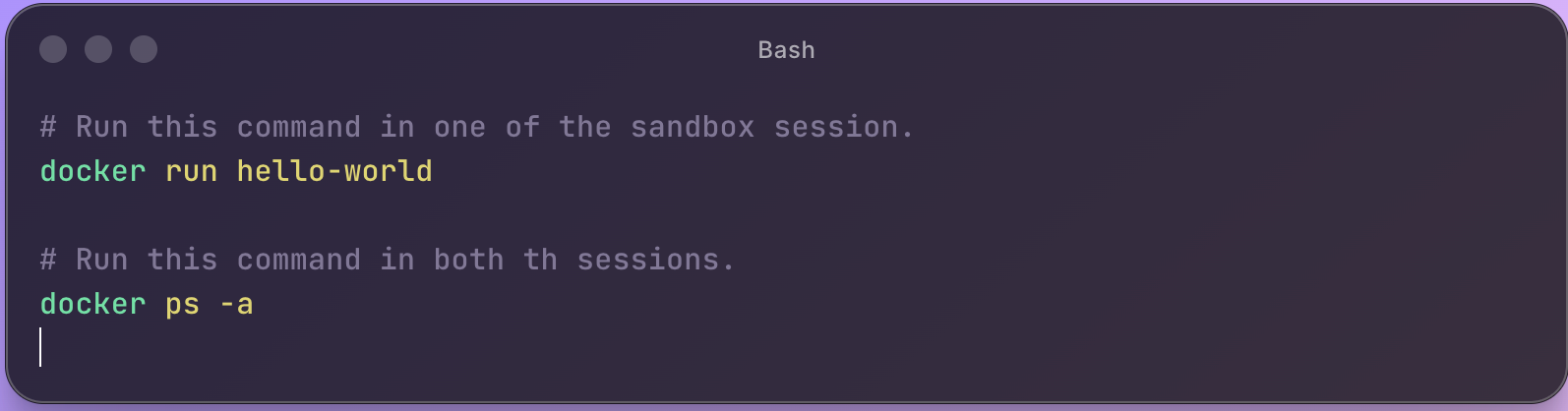
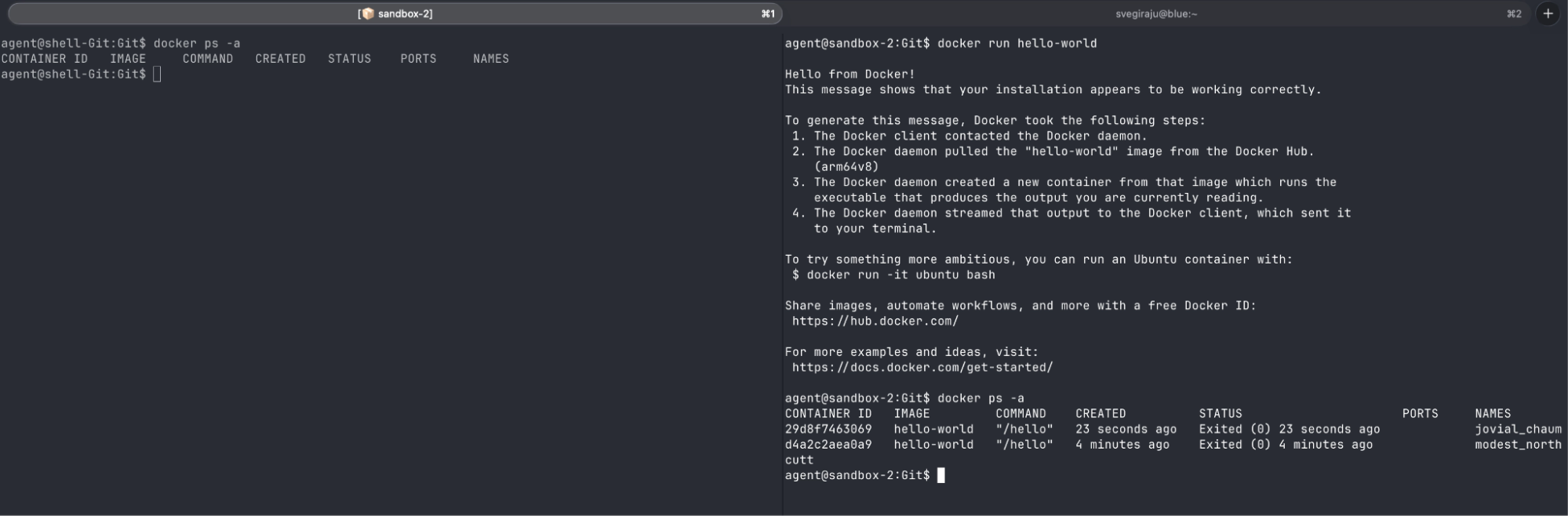
To demonstrate Docker Engine isolation, I created two Sandbox sessions, ran the Docker hello-world container image in one, and then ran docker ps -a in both.
As you can see from the screenshot below, one session has the hello-world container and the other does not. This is possible because both of them are running two different Docker engine daemons.
More on the Sandbox architecture here: https://www.docker.com/blog/why-microvms-the-architecture-behind-docker-sandboxes/
Conclusion
If there is one takeaway; it’s this: isolation plays a major role when building autonomous AI agents because the blast radius of a security mistake is significant.
Each approach we explored till now solves a different piece of the isolation puzzle. Containers improve portability and developer experience, but inherit the risks of a shared kernel. Virtual Machines deliver strong isolation, but the overhead doesn’t scale when you’re spinning up dozens of agents. gVisor sits in an interesting middle ground, though compatibility and community trade offs might slow you down.
Among all these, what makes Docker Sandbox with MicroVMs compelling is how it unifies these dimensions: VM-level security, container-like startup speed, and a workflow developers already know. Per-sandbox Docker Engines and strict network boundaries make it a strong foundation for running untrusted, autonomous workloads at scale.
So, what are you waiting for? Go ahead and try it out today.
For macOS: brew install docker/tap/sbx
For Windows: winget install Docker.sbx