Docker Sandboxes is a new primitive in the Docker’s ecosystem that allows you to run AI agents or any other workloads in isolated micro VMs. It provides strong isolation, convenient developer experience and a strong security boundary with a network proxy configurable to deny agents connecting to arbitrary internet hosts. The network proxy will also conveniently inject the API keys, like your ANTHROPIC_API_KEY, or OPENAI_API_KEY in the network proxy so the agent doesn’t have access to them at all and cannot leak them.
In a previous article I showed how Docker Sandboxes lets you install any tools an AI agent might need, like a JDK for Java projects or some custom CLIs, into a container that’s isolated from the host. Today we’re going a step further: we’ll run OpenClaw, an open-source AI coding agent, on a local model via Docker Model Runner.
No API keys, no cloud costs, fully private. And you can do it in 2-ish commands.
Quick Start
Make sure you have Docker Desktop and that Docker Model Runner is enabled (Settings → Docker Model Runner → Enable), then pull a model:
docker model pull ai/gpt-oss:20B-UD-Q4_K_XL
Now create and run the sandbox:
docker sandbox create --name openclaw -t olegselajev241/openclaw-dmr:latest shell .
docker sandbox network proxy openclaw --allow-host localhost
docker sandbox run openclaw
Inside the sandbox:
~/start-openclaw.sh
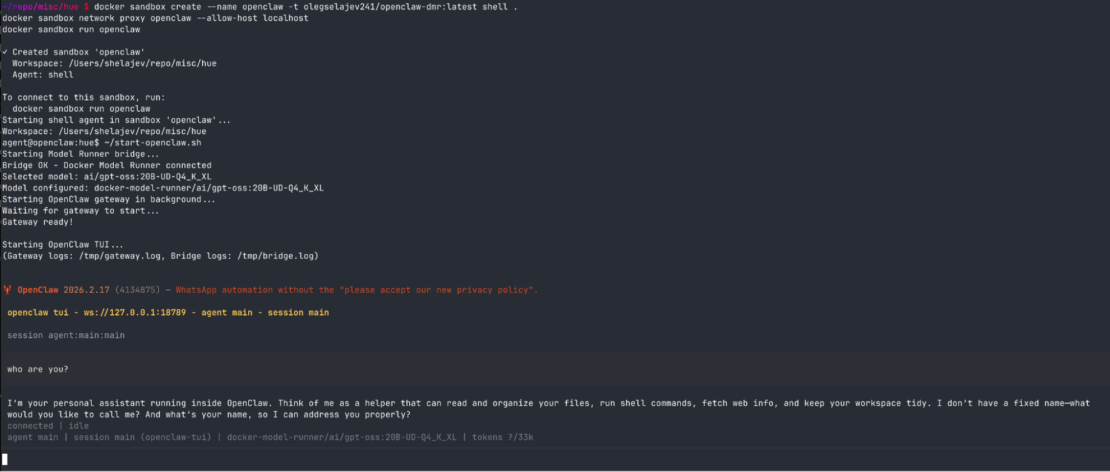
And that’s it. You’re in OpenClaw’s terminal UI, talking to a local gpt-oss model on your machine. The model runs in Docker Model Runner on your host, and OpenClaw runs completely isolated in the sandbox: it can only read and write files in the workspace you give it, and there’s a network proxy to deny connections to unwanted hosts.
Cloud models work too
The sandbox proxy will automatically inject API keys from your host environment. If you have ANTHROPIC_API_KEY or OPENAI_API_KEY set, OpenClaw can run cloud models, just specify them in OpenClaw settings. The proxy takes care of credential injection, so your keys will never be exposed inside the sandbox.
This means you can use free local models for experimentation, then switch to cloud models for serious work all in the same sandbox. With cloud models you don’t even need to allow to proxy to host’s localhost, so don’t run docker sandbox network proxy openclaw --allow-host localhost.
Choose Your Model
The startup script automatically discovers models available in your Docker Model Runner. List them:
~/start-openclaw.sh list
Use a specific model:
~/start-openclaw.sh ai/qwen2.5:7B-Q4_K_M
Any model you’ve pulled with docker model pull is available.
How it works (a bit technical)
The pre-built image (olegselajev241/openclaw-dmr:latest) is based on the shell sandbox template with three additions: Node.js 22, OpenClaw, and a tiny networking bridge.
The bridge is needed because Docker Model Runner runs on your host and binds to localhost:12434. But localhost inside the sandbox means the sandbox itself, not your host. The sandbox does have an HTTP proxy, at host.docker.internal:3128, that can reach host services, and we allow it to reach localhost with docker sandbox network proxy --allow-host localhost.
The problem is OpenClaw is Node.js, and Node.js doesn’t respect HTTP_PROXY environment variables. So we wrote a ~20-line bridge script that OpenClaw connects to at 127.0.0.1:54321, which explicitly forwards requests through the proxy to reach Docker Model Runner on the host:
OpenClaw → bridge (localhost:54321) → proxy (host.docker.internal:3128) → Model Runner (host localhost:12434)
The start-openclaw.sh script starts the bridge, starts OpenClaw’s gateway (with proxy vars cleared so it hits the bridge directly), and runs the TUI.
Build Your Own
Want to customize the image or just see how it works? Here’s the full build process.
1. Create a base sandbox and install OpenClaw
docker sandbox create --name my-openclaw shell .
docker sandbox network proxy my-openclaw --allow-host localhost
docker sandbox run my-openclaw
Now let’s install OpenClaw in the sandbox:
# Install Node 22 (OpenClaw requires it)
npm install -g n && n 22
hash -r

# Install OpenClaw
npm install -g openclaw@latest

# Run initial setup
openclaw setup
2. Create the Model Runner bridge
This is the magic piece — a tiny Node.js server that forwards requests through the sandbox proxy to Docker Model Runner on your host:
cat > ~/model-runner-bridge.js << 'EOF'
const http = require("http");
const { URL } = require("url");

const PROXY = new URL(process.env.HTTP_PROXY || "http://host.docker.internal:3128");
const TARGET = "localhost:12434";

http.createServer((req, res) => {
  const proxyReq = http.request({
    hostname: PROXY.hostname,
    port: PROXY.port,
    path: "http://" + TARGET + req.url,
    method: req.method,
    headers: { ...req.headers, host: TARGET }
  }, proxyRes => {
    res.writeHead(proxyRes.statusCode, proxyRes.headers);
    proxyRes.pipe(res);
  });
  proxyReq.on("error", e => { res.writeHead(502); res.end(e.message); });
  req.pipe(proxyReq);
}).listen(54321, "127.0.0.1");
EOF
3. Configure OpenClaw to use Docker Model Runner
Now merge the Docker Model Runner provider into OpenClaw’s config:
python3 -c "
import json
p = '$HOME/.openclaw/openclaw.json'
with open(p) as f: cfg = json.load(f)
cfg['models'] = cfg.get('models', {})
cfg['models']['mode'] = 'merge'
cfg['models']['providers'] = cfg['models'].get('providers', {})
cfg['models']['providers']['docker-model-runner'] = {
    'baseUrl': 'http://127.0.0.1:54321/engines/llama.cpp/v1',
    'apiKey': 'not-needed',
    'api': 'openai-completions',
    'models': [{
        'id': 'ai/qwen2.5:7B-Q4_K_M',
        'name': 'Qwen 2.5 7B (Docker Model Runner)',
        'reasoning': False, 'input': ['text'],
        'cost': {'input': 0, 'output': 0, 'cacheRead': 0, 'cacheWrite': 0},
        'contextWindow': 32768, 'maxTokens': 8192
    }]
}
cfg['agents'] = cfg.get('agents', {})
cfg['agents']['defaults'] = cfg['agents'].get('defaults', {})
cfg['agents']['defaults']['model'] = {'primary': 'docker-model-runner/ai/qwen2.5:7B-Q4_K_M'}
cfg['gateway'] = {'mode': 'local'}
with open(p, 'w') as f: json.dump(cfg, f, indent=2)
"
4. Save and share
Exit the sandbox and save it as a reusable image:
docker sandbox save my-openclaw my-openclaw-image:latest
Push it to a registry so anyone can use it:
docker tag my-openclaw-image:latest yourname/my-openclaw:latest
docker push yourname/my-openclaw:latest
Anyone with Docker Desktop (with the modern sandboxes includes) can spin up the same environment with:
docker sandbox create --name openclaw -t yourname/my-openclaw:latest shell .
What’s next
Docker Sandboxes make it easy to run any AI coding agent in an isolated, reproducible environment. With Docker Model Runner, you get a fully local AI coding setup: no cloud dependencies, no API costs, and complete privacy.
Try it out and let us know what you think.