

It’s 11 PM. You’ve got a JIRA ticket open, an IDE with three unsaved files, a browser tab on Stack Overflow, and another on documentation. You’re context-switching between designing UI, writing backend APIs, fixing bugs, and running tests. You’re wearing all the hats, product manager, designer, engineer, QA specialist, and it’s exhausting.
What if instead of doing it all yourself, you could describe the goal and have a team of specialized AI agents handle it for you?
One agent breaks down requirements, another designs the interface, a third builds the backend, a fourth tests it, and a fifth fixes any issues. Each agent focuses on what it does best, working together autonomously while you sip your coffee.That’s not sci-fi, it’s what Agent + Docker Sandboxes delivers today.
What is Docker Agent?
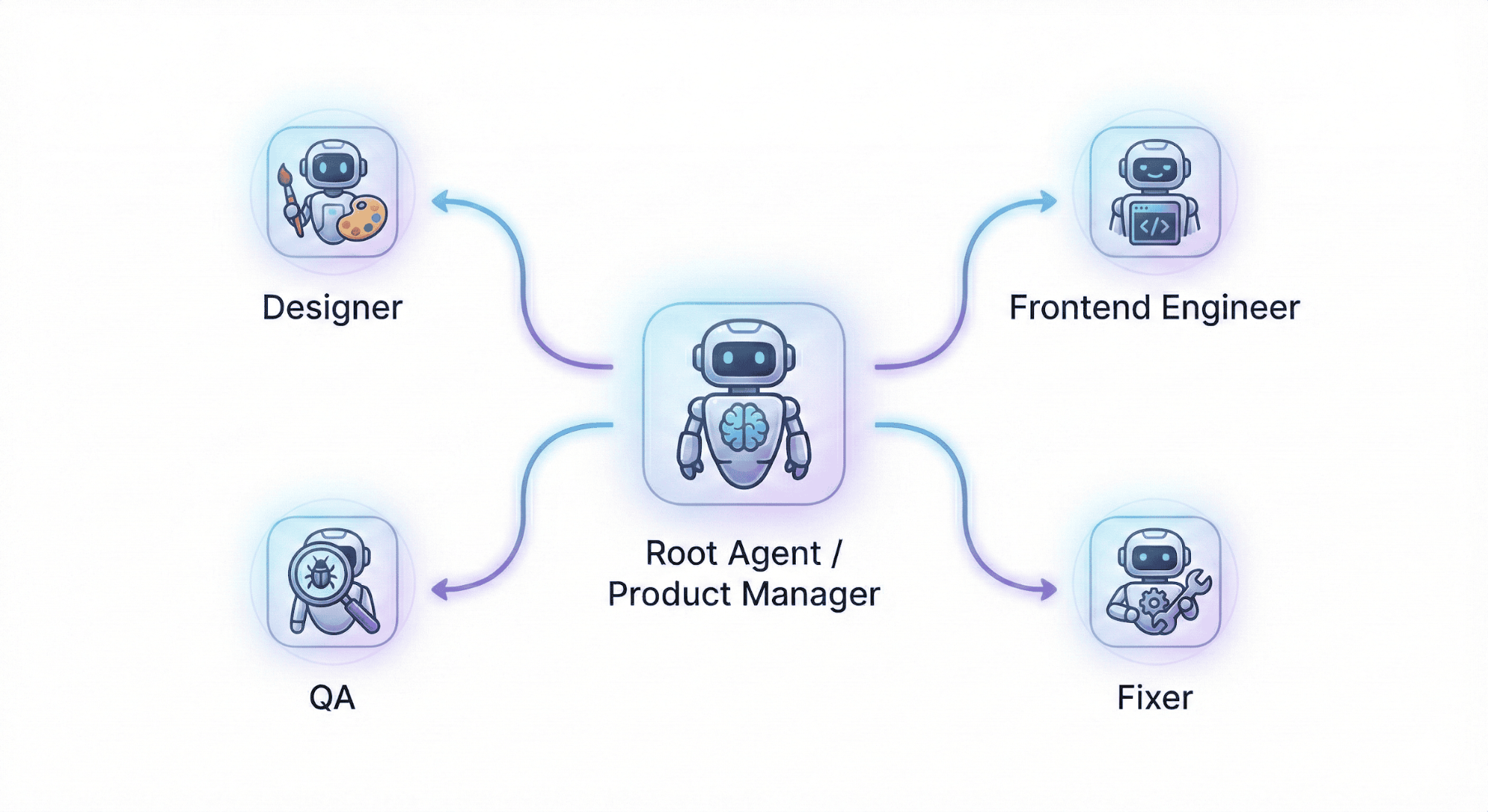
Docker Agent is an open source tool for building teams of specialized AI agents. Instead of prompting one general-purpose model to do everything, you define agents with specific roles that collaborate to solve complex problems.
Here’s a typical dev-team configuration:
agents:
root:
model: openai/gpt-5
description: Product Manager - Leads the development team and coordinates iterations
instruction: |
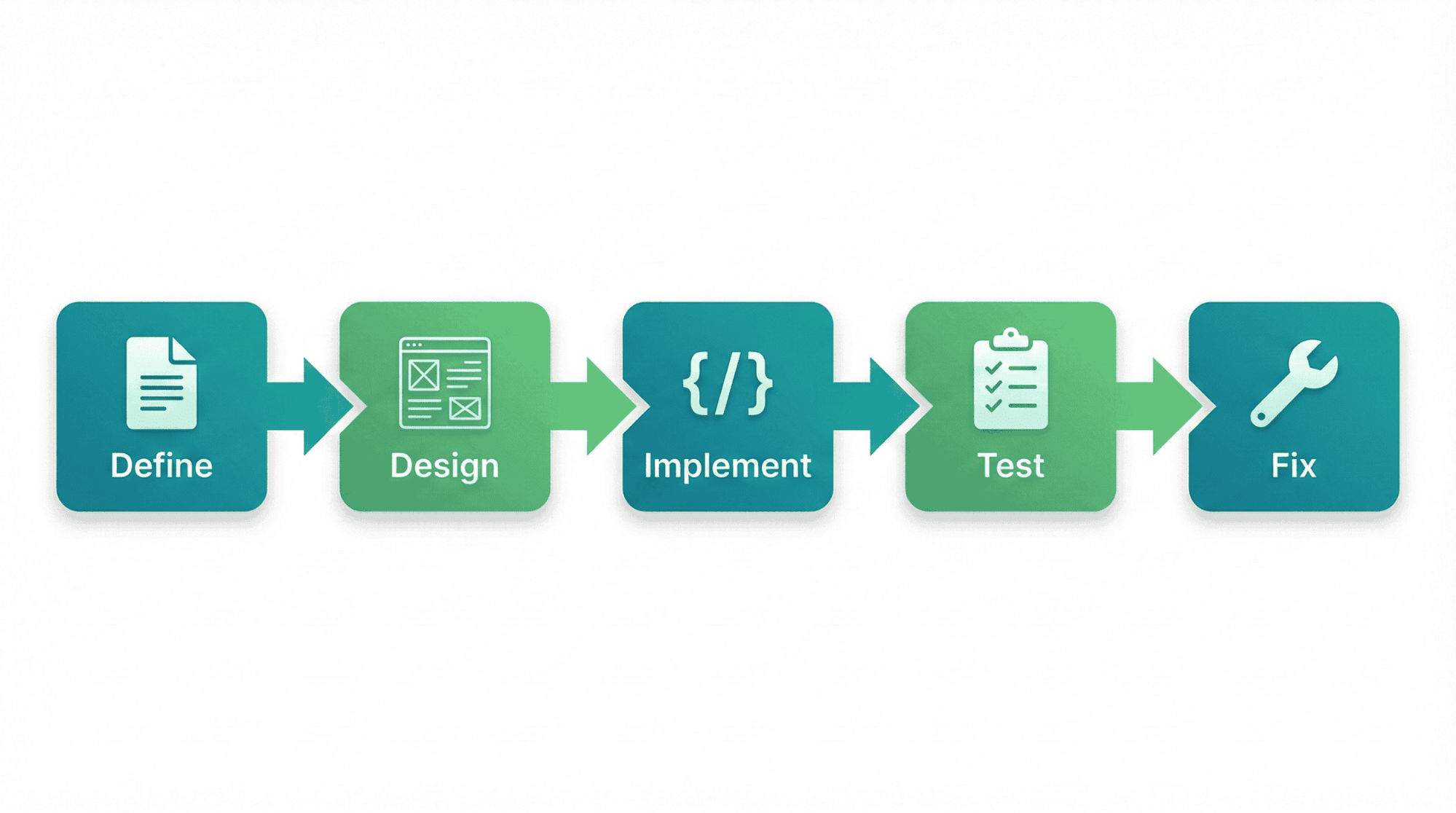
Break user requirements into small iterations. Coordinate designer → frontend → QA.
- Define feature and acceptance criteria
- Ensure iterations deliver complete, testable features
- Prioritize based on value and dependencies
sub_agents: [designer, awesome_engineer, qa, fixer_engineer]
toolsets:
- type: filesystem
- type: think
- type: todo
- type: memory
path: dev_memory.db
designer:
model: openai/gpt-5
description: UI/UX Designer - Creates user interface designs and wireframes
instruction: |
Create wireframes and mockups for features. Ensure responsive, accessible designs.
- Use consistent patterns and modern principles
- Specify colors, fonts, interactions, and mobile layout
toolsets:
- type: filesystem
- type: think
- type: memory
path: dev_memory.db
qa:
model: openai
description: QA Specialist - Analyzes errors, stack traces, and code to identify bugs
instruction: |
Analyze error logs, stack traces, and code to find bugs. Explain what's wrong and why it's happening.
- Review test results, error messages, and stack traces
.......
awesome_engineer:
model: openai
description: Awesome Engineer - Implements user interfaces based on designs
instruction: |
Implement responsive, accessible UI from designs. Build backend APIs and integrate.
..........
fixer_engineer:
model: openai
description: Test Integration Engineer - Fixes test failures and integration issues
instruction: |
Fix test failures and integration issues reported by QA.
- Review bug reports from QA
The root agent acts as product manager, coordinating the team. When a user requests a feature, root delegates to designer for wireframes, then awesome_engineer for implementation, qa for testing, and fixer_engineer for bug fixes. Each agent uses its own model, has its own context, and accesses tools like filesystem, shell, memory, and MCP servers.
Agent Configuration
Each agent is defined with five key attributes:
- model: The AI model to use (e.g.,
openai/gpt-5,anthropic/claude-sonnet-4-5). Different agents can use different models optimized for their tasks. - description: A concise summary of the agent’s role. This helps Docker Agent understand when to delegate tasks to this agent.
- instruction: Detailed guidance on what the agent should do. Includes workflows, constraints, and domain-specific knowledge.
- sub_agents: A list of agents this agent can delegate work to. This creates the team hierarchy.
- toolsets: The tools available to the agent. Built-in options include
filesystem(read/write files),shell(run commands),think(reasoning),todo(task tracking),memory(persistent storage), andmcp(external tool connections).
This configuration system gives you fine-grained control over each agent’s capabilities and how they coordinate with each other.
Why Agent Teams Matter
One agent handling complex work means constant context-switching. Split the work across focused agents instead, each handles what it’s best at. Docker Agent manages the coordination.
The benefits are clear:
- Specialization: Each agent is optimized for its role (design vs. coding vs. debugging)
- Parallel execution: Multiple agents can work on different aspects simultaneously
- Better outcomes: Focused agents produce higher quality work in their domain
- Maintainability: Clear separation of concerns makes teams easier to debug and iterate
The Problem: Running AI Agents Safely
Agent teams are powerful, but they come with a serious security concern. These agents need to:
- Read and write files on your system
- Execute shell commands (npm install, git commit, etc.)
- Access external APIs and tools
- Run potentially untrusted code
Giving AI agents full access to your development machine is risky. A misconfigured agent could delete files, leak secrets, or run malicious commands. You need isolation, agents should be powerful but contained.
Traditional virtual machines are too heavy. Chroot jails are fragile. You need something that provides:
- Strong isolation from your host machine
- Workspace access so agents can read your project files
- Familiar experience with the same paths and tools
- Easy setup without complex networking or configuration
Docker Sandboxes: The Secure Foundation
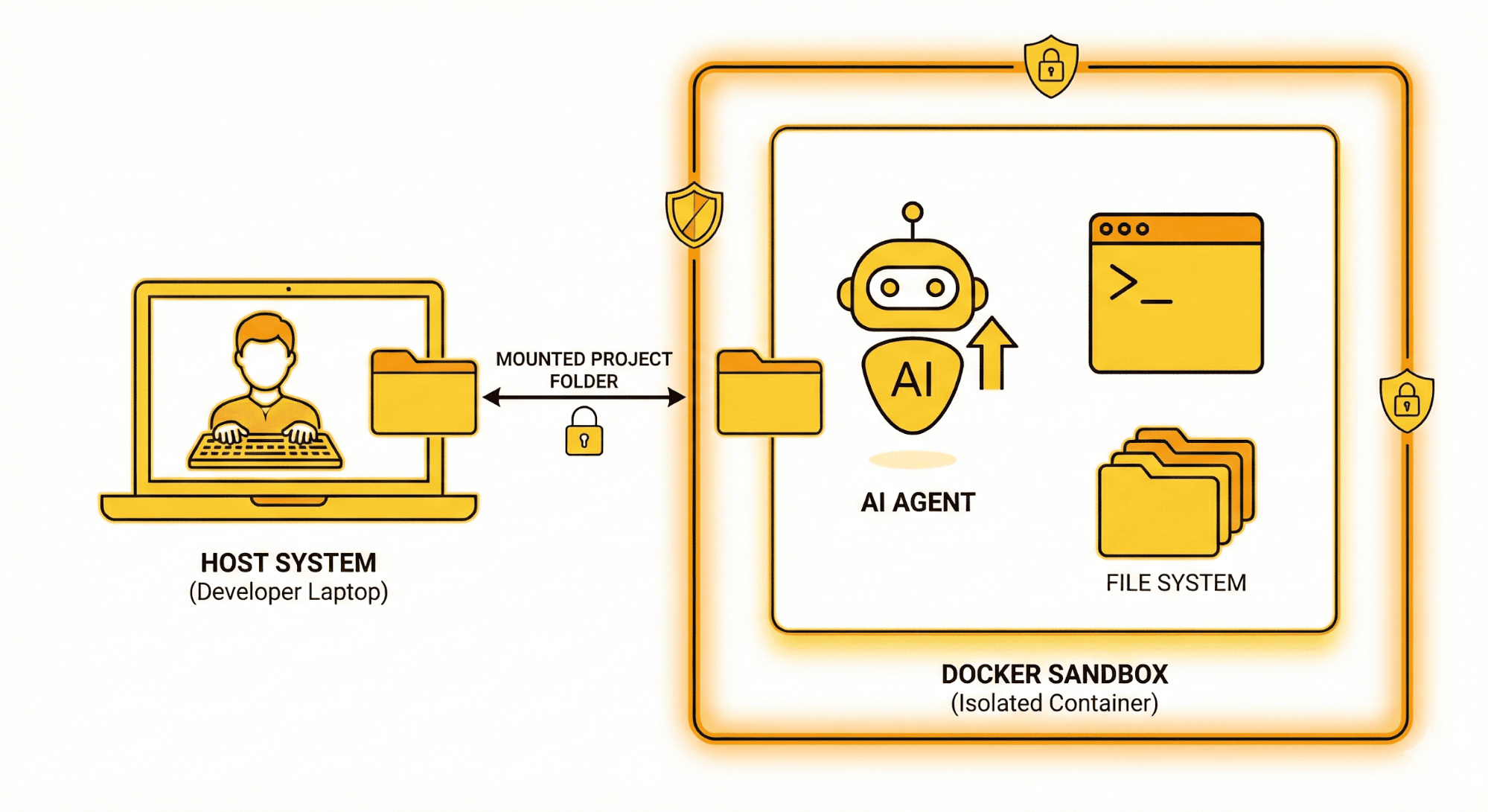
Docker Sandboxes solves this by providing isolated environments for running AI agents. As of Docker Desktop 4.60+, sandboxes run inside dedicated microVMs, providing a hard security boundary beyond traditional container isolation. When you run docker sandbox run <agent>, Docker creates an isolated microVM workspace that:
- Mounts your project directory at the same absolute path (on Linux and macOS)
- Preserves your Git configuration for proper commit attribution
- Does not inherit environment variables from your current shell session
- Gives agents full autonomy without compromising your host
- Provides network isolation with configurable allow/deny lists
Docker Sandboxes now natively supports six agent types: Claude Code, Gemini, Codex, Copilot, Agent, and Kiro (all experimental). Agent can be launched directly as a sandbox agent:
# Run Agent natively in a sandbox
docker sandbox create agent ~/path/to/workspace
docker sandbox run agent ~/path/to/workspace
Or, for more control, use a detached sandbox:
# Create a sandbox
docker sandbox run -d --name my-agent-sandbox claude
# Copy agent into the sandbox
docker cp /usr/bin/agent <container-id>:/usr/bin/agent
# Run your agent team
docker exec -it <container-id> bash -c "cd /path/to/workspace && agent run dev-team.yaml"
Your workspace /Users/alice/projects/myapp on the host is also /Users/alice/projects/myapp inside the microVM. Error messages, scripts with hard-coded paths, and relative imports all work as expected. But the agent is contained in its own microVM, it can’t access files outside the mounted workspace, and any damage it causes is limited to the sandbox.
Why Docker Sandboxes Matter
The combination of agents and Docker Sandboxes gives you something powerful:
- Full agent autonomy: Agents can install packages, run tests, make commits, and use tools without constant human oversight
- Complete safety: Even if an agent makes a mistake, it’s contained within the microVM sandbox
- Hard security boundary: MicroVM isolation goes beyond containers, each sandbox runs in its own virtual machine
- Network control: Allow/deny lists let you restrict which external services agents can access
- Familiar experience: Same paths, same tools, same workflow as working directly on your machine
- Workspace persistence: Changes sync between host and microVM, so your work is always available
Here’s how the workflow looks in practice:
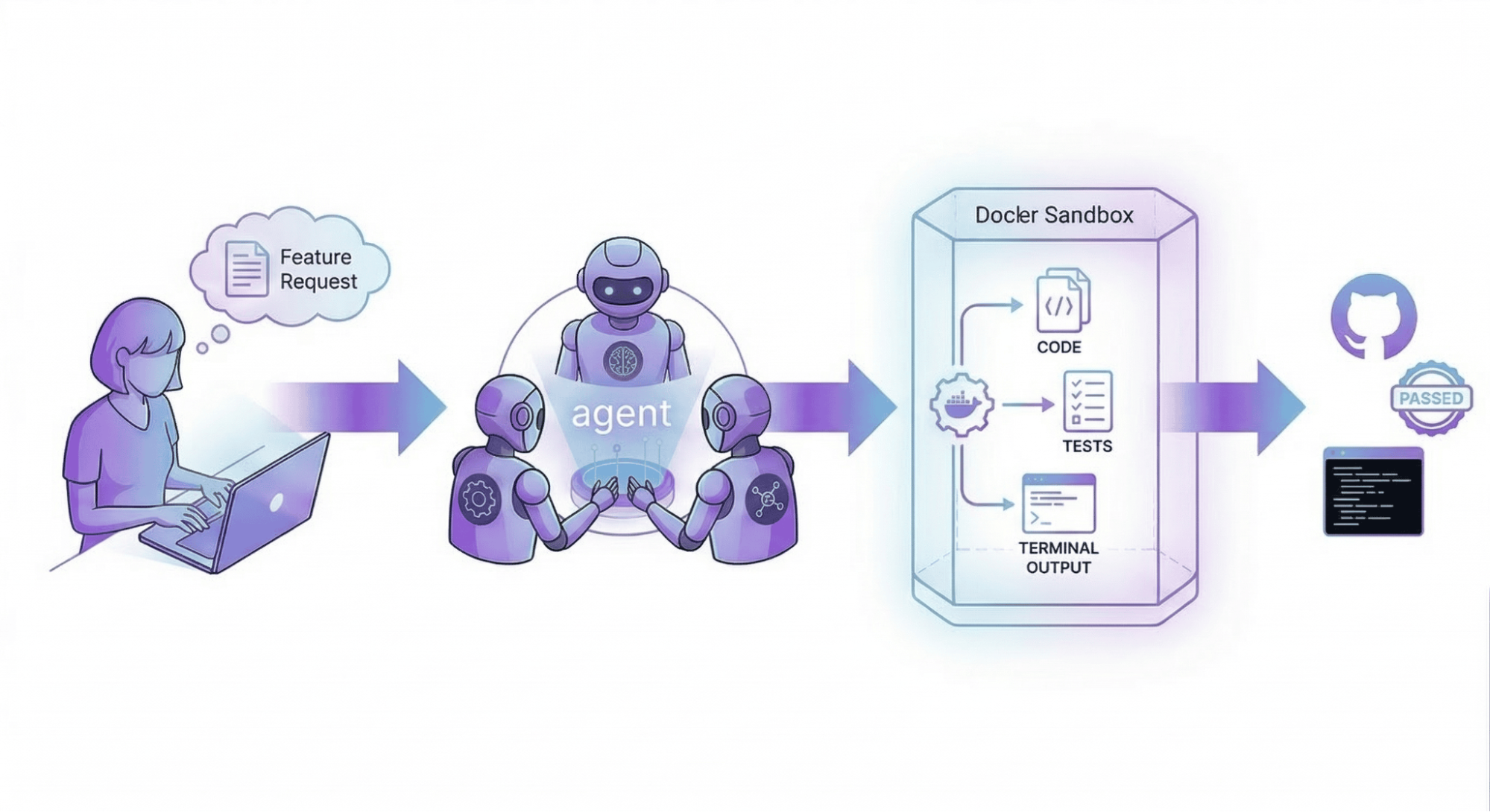
- User requests a feature to the root agent: “Create a bank app with Gradio”
- Root creates a todo list and delegates to the designer
- Designer generates wireframes and UI specifications
- Awesome_engineer implements the code, running
pip install gradioandpython app/main.py - QA runs tests, finds bugs, and reports them
- Fixer_engineer resolves the issues
- Root confirms all tests pass and marks the feature complete
All of this happens autonomously inside a sandboxed environment. The agents can install dependencies, modify files, and execute commands, but they’re isolated from your host machine.
Try It Yourself
Let’s walk through setting up a simple agent team in a Docker Sandbox.
Prerequisites
- Docker Desktop 4.60+ with sandbox support (microVM-based isolation)
- agent (included in Docker Desktop 4.49+)
- API key for your model provider (Anthropic, OpenAI, or Google)
Step 1: Create Your Agent Team
Save this configuration as dev-team.yaml:
models:
openai:
provider: openai
model: gpt-5
agents:
root:
model: openai
description: Product Manager - Leads the development team
instruction: |
Break user requirements into small iterations. Coordinate designer → frontend → QA.
sub_agents: [designer, awesome_engineer, qa]
toolsets:
- type: filesystem
- type: think
- type: todo
designer:
model: openai
description: UI/UX Designer - Creates designs and wireframes
instruction: |
Create wireframes and mockups for features. Ensure responsive designs.
toolsets:
- type: filesystem
- type: think
awesome_engineer:
model: openai
description: Developer - Implements features
instruction: |
Build features based on designs. Write clean, tested code.
toolsets:
- type: filesystem
- type: shell
- type: think
qa:
model: openai
description: QA Specialist - Tests and identifies bugs
instruction: |
Test features and identify bugs. Report issues to fixer.
toolsets:
- type: filesystem
- type: think
Step 2: Create a Docker Sandbox
The simplest approach is to use agent as a native sandbox agent:
# Run agent directly in a sandbox (experimental)
docker sandbox run agent ~/path/to/your/workspace
Alternatively, use a detached Claude sandbox for more control:
# Start a detached sandbox
docker sandbox run -d --name my-dev-sandbox claude
# Copy agent into the sandbox
which agent # Find the path on your host
docker cp $(which agent) $(docker sandbox ls --filter name=my-dev-sandbox -q):/usr/bin/agent
Step 3: Set Environment Variables
# Run agent with your API key (passed inline since export doesn't persist across exec calls)
docker exec -it -e OPENAI_API_KEY=your_key_here my-dev-sandbox bash
Step 4: Run Your Agent Team
# Mount your workspace and run agent
docker exec -it my-dev-sandbox bash -c "cd /path/to/your/workspace && agent run dev-team.yaml"
Now you can describe what you want to build, and your agent team will handle the rest:
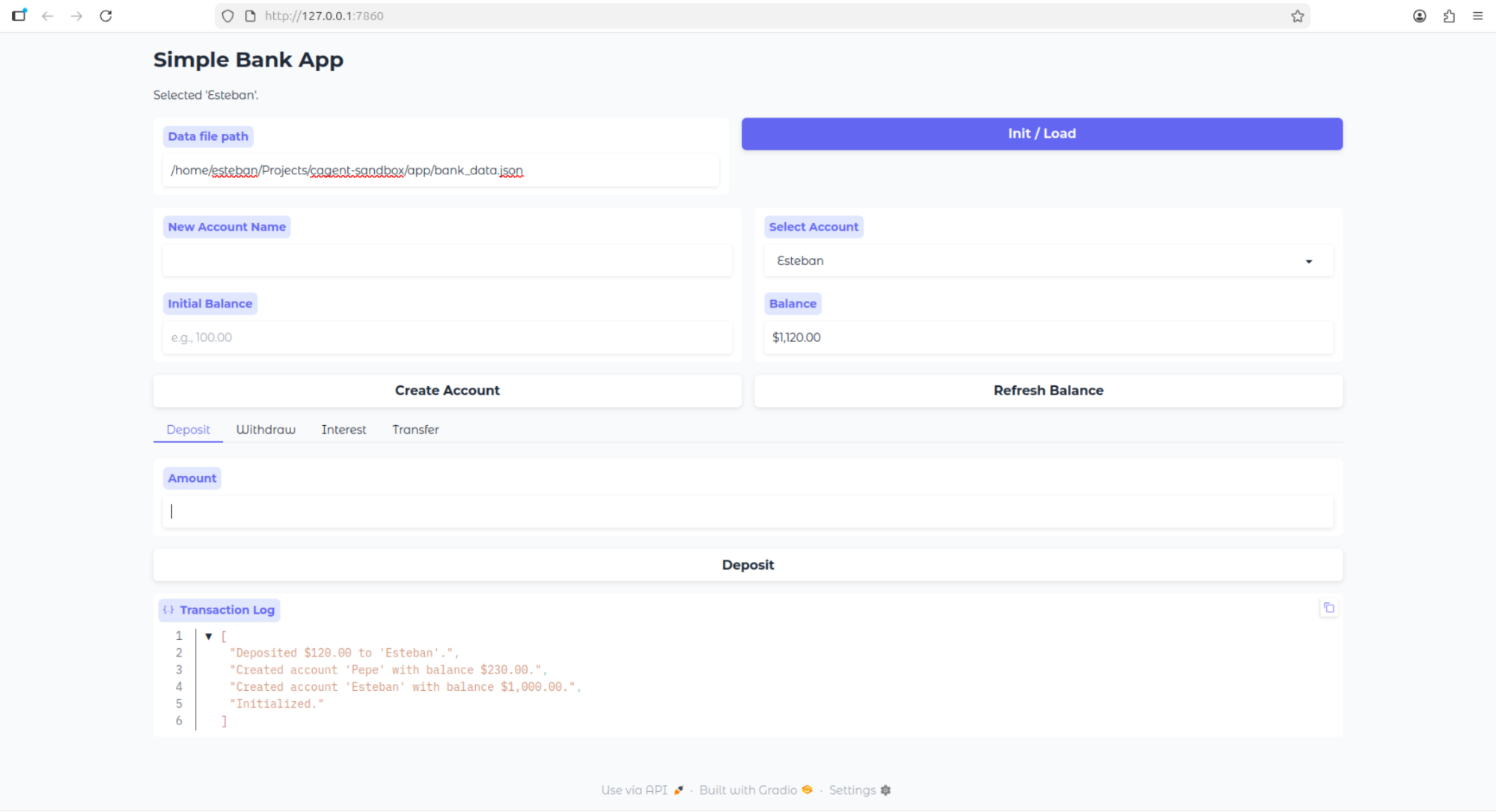
User: Create a bank application using Python. The bank app should have basic functionality like account savings, show balance, withdraw, add money, etc. Build the UI using Gradio. Create a directory called app, and inside of it, create all of the files needed by the project
Agent (root): I'll break this down into iterations and coordinate with the team...
Watch as the designer creates wireframes, the engineer builds the Gradio app, and QA tests it, all autonomously in a secure sandbox.
Final result from a one shot prompt
Step 5: Clean Up
When you’re done:
# Remove the sandbox
docker sandbox rm my-dev-sandbox
Docker enforces one sandbox per workspace. Running docker sandbox run in the same directory reuses the existing container. To change configuration, remove and recreate the sandbox.
Current Limitations
Docker Sandboxes and Docker Agent are evolving rapidly. Here are a few things to know:
- Docker Sandboxes now supports six agent types natively: Claude Code, Gemini, Codex, Copilot, agent, and Kiro. All are experimental and breaking changes may occur between Docker Desktop versions.
- Custom Shell that doesn’t include a pre-installed agent binary. Instead, it provides a clean environment where you can install and configure any agent or tool
- MicroVM sandboxes require macOS or Windows. Linux users can use legacy container-based sandboxes with Docker Desktop 4.57+
- API keys may still need manual configuration depending on the agent type
- Sandbox templates are optimized for certain workflows; custom setups may require additional configuration
Why This Matters Now
AI agents are becoming more capable, but they need infrastructure to run safely and effectively. The combination of agent and Docker Sandboxes addresses this by:
|
Feature |
Traditional Approach |
With agent + Docker Sandboxes |
|
Autonomy |
Limited – requires constant oversight |
High – agents work independently |
|
Security |
Risky – agents have host access |
Isolated – agents run in microVMs |
|
Specialization |
One model does everything |
Multiple agents with focused roles |
|
Reproducibility |
Inconsistent across machines |
MicroVM-isolated, version-controlled |
|
Scalability |
Manual coordination |
Automated team orchestration |
This isn’t just about convenience, it’s about enabling AI agents to do real work in production environments, with the safety guarantees that developers expect.
What’s Next
- Explore the Docker Agent documentation to build your own agent teams
- Check out Docker Sandboxes for advanced configurations
- Browse example agent configurations in the agent repository
- Integrate agent with your editor or use agents as tools in MCP clients
Conclusion
We’re moving from “prompting AI to write code” to “orchestrating AI teams to build software.” agent gives you the team structure; Docker Sandboxes provides the secure foundation.
The days of wearing every hat as a solo developer are numbered. With specialized AI agents working in isolated containers, you can focus on what matters, designing great software, while your AI team handles the implementation, testing, and iteration.
Try it out. Build your own agent team. Run it in a Docker Sandbox. See what happens when you have a development team at your fingertips, ready to ship features while you grab lunch.