

Docker Desktop is one of the most widely used developer tools in the world, yet for millions of enterprise developers, running it simply hasn’t been an option. The environments they rely on, such as virtual desktop infrastructure (VDI) platforms and managed desktops, often lack the resources or capabilities needed to run Docker Desktop.
As enterprises scaled to support remote and contractor teams, these environments became the default, effectively blocking many developers from using Docker Desktop altogether. This slowed teams down and cut developers off from faster builds, the latest Docker features, and meaningful productivity gains. As a result, teams were forced into expensive workarounds that are difficult to secure and painful to maintain.
Today, that changes.
Docker Offload is a fully managed cloud service that moves the container engine into Docker’s secure cloud, allowing developers to run Docker from any environment without changing their existing workflows. As of today, Docker Offload is generally available.
What this means in practice is simple. Developers keep using the same terminal, the same docker run commands, and the same Docker Desktop UI they are already familiar with. The only thing that has changed is where the engine runs, and by moving it to the cloud, Docker Desktop now works in every environment that once blocked it.
How It Works
When you run Docker Offload, it automatically routes the container engine to Docker’s secure cloud. The developer opens Docker Desktop exactly as they always have. No configuration. No retraining or reconfiguring applications for new tools. Containers run in Docker’s cloud infrastructure, and everything, including bind mounts, port forwarding, and Docker Compose, works identically to local.
Every connection runs over an encrypted tunnel on SOC 2 Certified infrastructure, and session activity is logged centrally, giving security teams the audit trail they already require without any changes to existing tooling, firewall rules, or endpoint policies. Every session runs in a temporary, isolated environment without data persistence, and closes cleanly.
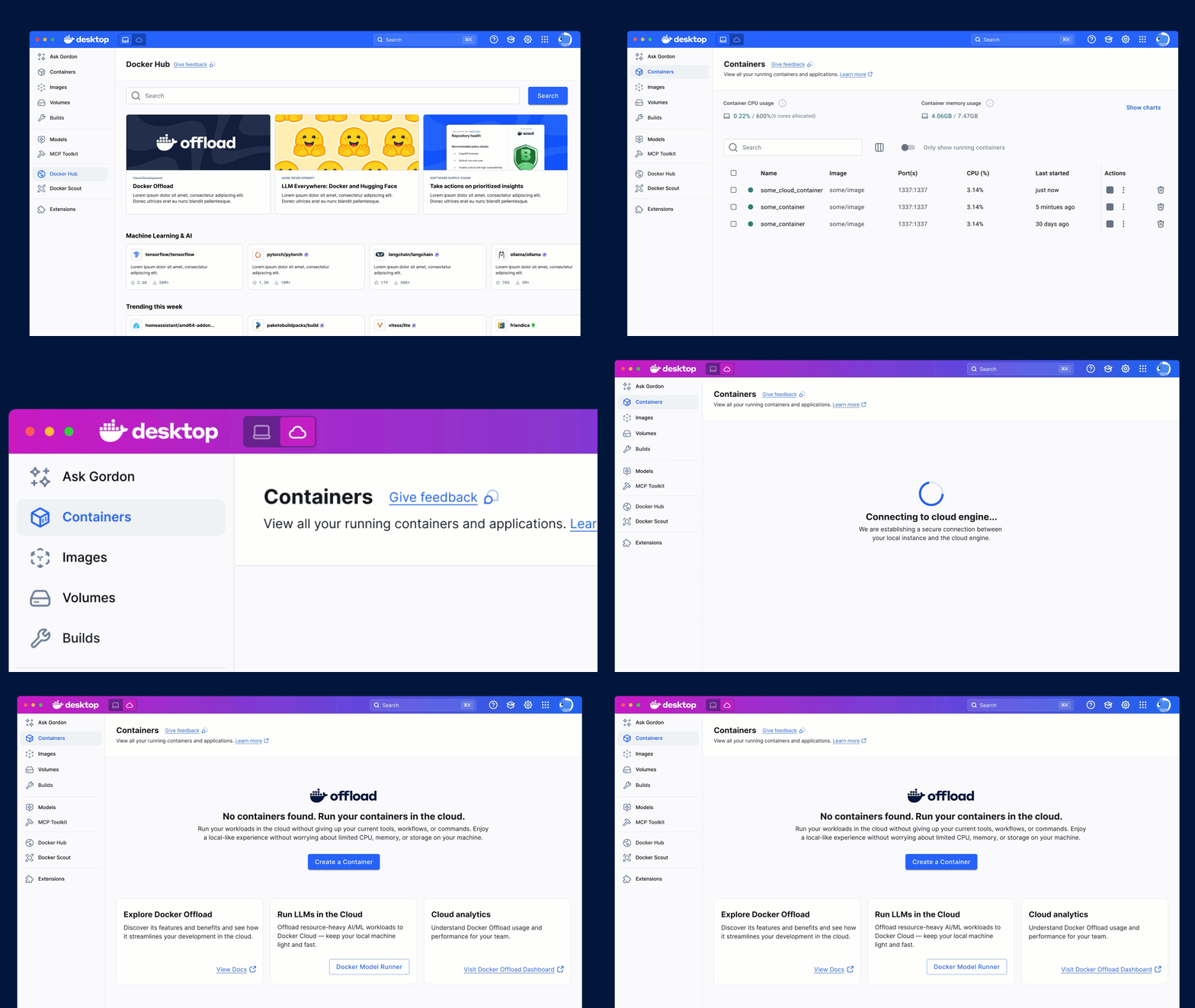
What Can You Do With Docker Offload?
Run full Docker in any environment
Every Docker CLI command and every Docker Desktop feature works in VDI, locked-down laptops, remote workstations, and policy-restricted networks. Developers are productive from day one, using the exact CLI commands, workflows, and muscle memory they already have.
Same Infrastructure. New Capabilities.
Offload deploys alongside your existing VDI infrastructure without touching a single piece of it. Infrastructure and platform teams get a clean drop-in: existing network segmentation, IAM boundaries, and access control policies all stay exactly in place. Centralized admin controls, SSO, and per-user access management are built in from day one.
Keep security non-negotiable
Dedicated cloud sessions are destroyed at every session end, data stays clean, developer devices stay completely unaffected, and your security perimeter stays intact. Offload operates within your existing security architecture, not around it. SOC 2 Certified, with deployment options that scale from multi-tenant VM-level isolation up to a dedicated single-tenant VPC with private network connectivity for regulated environments.
Unblock developers in minutes
Offload detects constrained environments automatically and activates without developer configuration. Teams go from blocked to building without tickets, setup queues, or IT escalations. When nothing changes for the developer, adoption actually happens.
Current Deployment Options
Docker Offload is currently available in two deployment methods.
Multi-Tenant provides VM-level isolation on Docker-managed infrastructure. It’s the fastest path for most enterprise teams: no ops overhead, no infrastructure to maintain, productive from the moment it’s enabled.
Single-Tenant provides a dedicated VPC and private network access available, important for organizations in Finance, Healthcare, Government, and other regulated industries. Traffic never traverses the public internet, meeting the network isolation requirements most regulated enterprises enforce as a baseline. For security architects evaluating data residency and compliance requirements, this is the deployment model built for you.
Docker Offload is an add-on to Docker Business. Available now, through Docker’s Sales Team.
Coming Soon
Today’s launch addresses the environment problem. Developers in managed and constrained environments can finally run Docker, without workarounds and without compromise. But we’re not stopping there. Also shipping this year:
- Single-Tenant Bring-Your-Own-Cloud (BYOC): Compute runs in your cloud account, your data never leaves your environment, and SOC 2 Certified security stays intact.
- CI/CD Pipeline Integration: Bring Offload to GitHub Actions, GitLab CI, and Jenkins to give every developer the same Docker experience in CI as locally, with cloud-based pipeline compute.
- GPU-backed instances: Unlocking AI/ML workloads in managed environments for the first time.
The Road Ahead
Development has outgrown the local machine. Docker Offload closes that gap. Infrastructure teams keep their architecture intact. Security teams get the compliance they require. Developers keep the workflows they know. The full power of Docker, for every developer, everywhere.
This is just the beginning. Learn more about the power of Docker Offload , explore our Docker Offload Docs, and reach out to the Docker Sales Team to start your journey with Offload.