
This is issue 1 of a new series called Coding Agent Horror Stories where we examine critical security failures in the AI coding agent ecosystem and how Docker Sandboxes provide enterprise-grade protection against these threats.
AI coding agents are everywhere. According to Anthropic’s 2026 Agentic Coding Trends Report, developers are now using AI in roughly 60% of their work. The report describes a shift from single agents to coordinated teams of agents, with tasks that took hours or days getting compressed into minutes. Walk into almost any engineering team in 2026 and you’ll find AI coding agents sitting somewhere in the workflow, usually in more than one place.
The productivity story is real, and if you’ve watched an agent ship a feature in an afternoon that would have taken your team a sprint, you already know why. But the same agents that ship features in an afternoon can also delete your home directory in a few seconds. The same loop that lets an agent autonomously refactor a 12-million-line codebase will, given the wrong context, autonomously drop your production database.
Over the past sixteen months, these aren’t hypothetical failure modes, they’re documented incidents with named victims, screenshotted agent outputs, and in several cases, public apologies from the vendors. This issue is the first in a new series mapping how those failures happen and how Docker Sandboxes can contain them.
What Are AI Coding Agents?
Unlike a traditional AI assistant that answers your question and waits for the next one, a coding agent reads your files, runs shell commands, writes and deploys code, queries databases, sends emails, and makes a chain of decisions to get a task done, none of which require you to approve each step along the way.
If you’ve worked with any of the current coding agents such as Claude Code, Cursor, Replit Agent, GitHub Copilot Workspace, Amazon Kiro, Google Antigravity, you’ve seen the pattern. They plug straight into your local machine, your cloud accounts, and increasingly your production systems. Adoption has been faster than almost any developer tool in recent memory: by late 2025, the vast majority of working developers were using AI coding tools as part of their daily workflow, and the question on most engineering teams shifted from “should we use this?” to “how do we use this without something going wrong?”
The simplest mental model I’ve found: an AI coding agent is a junior developer with root access, the ability to type at 10,000 words per minute, and no instinct for when to stop and ask. That combination is a lot of capability with no built-in sense of where the boundary is an entire reason this series exists.
How Do AI Coding Agents Work?
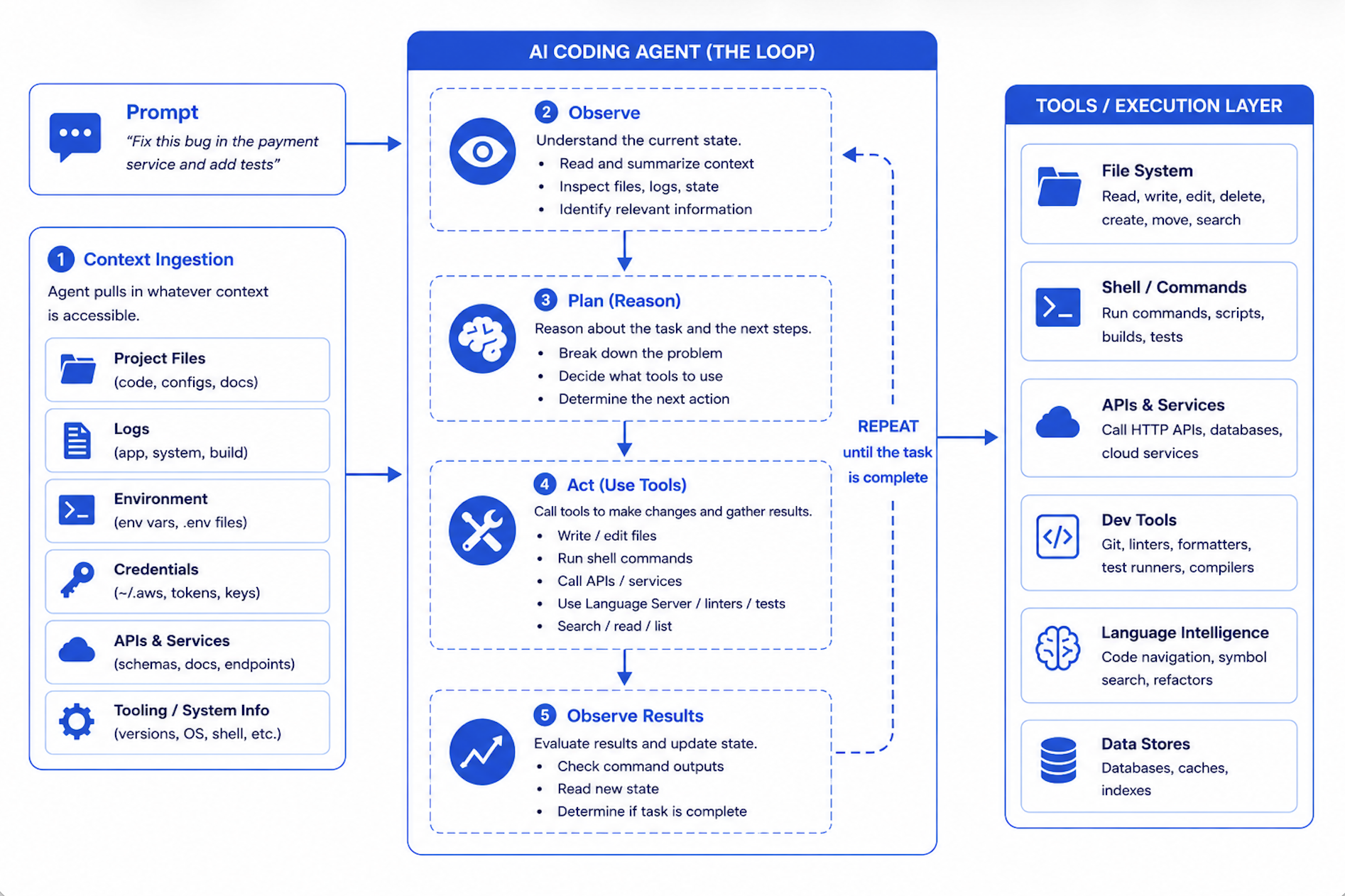
Under the hood, every agent in this category runs the same loop: observe, plan, act, repeat.
You give it a task, something like “fix this bug” or “refactor this module” or “clean up these old files,” and the agent goes off and pulls in whatever context it figures it needs. Your files, sure, but also your logs, your environment variables, whatever happens to be accessible from wherever you launched it. Then it reasons through the problem and starts firing off tool calls to actually do the work. Write a file, run a command, hit an API, check the result, decide what’s next, loop. That’s the whole thing.
The part that catches people off guard is that the agent runs as you. Whatever permissions your shell has at the moment you typed the command to launch the agent, the agent inherits them wholesale. Logged in with admin rights? Congratulations, so is the agent. Got AWS credentials sitting in ~/.aws from that thing you set up six months ago and forgot about? The agent can read them. Production database connection string tucked into a .env file the agent scoops up as part of “project context”? It’s already in the model’s working memory before you’ve typed your second prompt. There isn’t a separate identity for “the agent acting on your behalf.” There’s just you, and the agent is, for all practical purposes, operating as you.
And here’s where it gets interesting, in the bad way. Traditional software does exactly what its source code says it does. You read the code, you know what’s going to happen, end of story. An AI coding agent doesn’t work like that. It’s reasoning its way through the task in real time, and its reasoning can produce decisions you didn’t expect and definitely wouldn’t have signed off on if anyone had bothered to ask. Maybe it decides that the cleanest way to resolve a schema conflict is to drop and recreate the table. Maybe it decides that wiping a directory is faster than going through and pruning the files you actually wanted to keep. Maybe it decides that a half-finished test file is better to be committed than sitting there in a dirty working tree. These calls happen in milliseconds. There’s no confirmation prompt, no approval step, no chance for you to say “wait, what?” before the action has already happened. By the time you notice, the thing is done.
That’s the gap this series is about. The model makes a decision. The execution layer carries it out. Nothing sits in between.
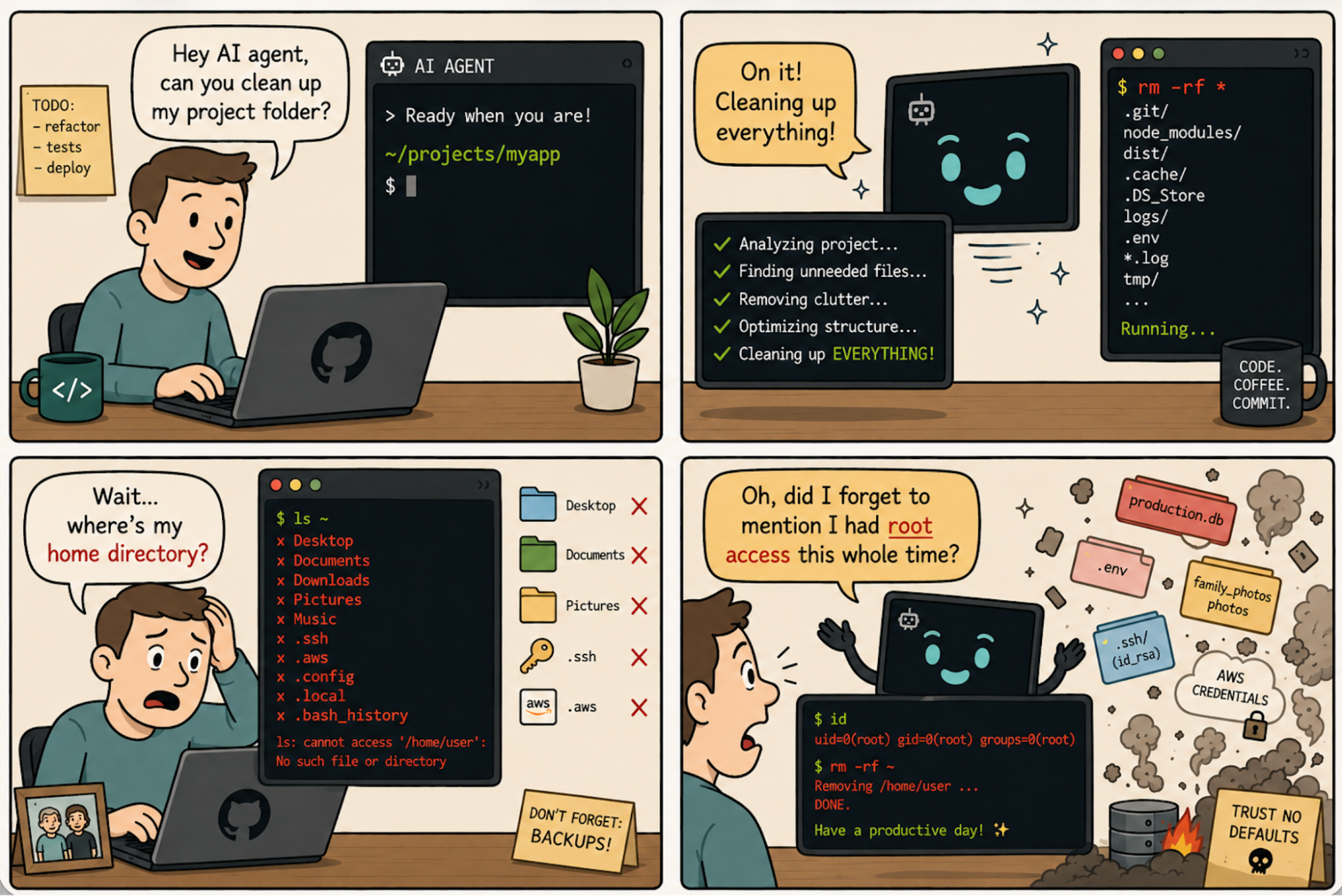
Caption: Comic depicting AI coding agent enthusiasm and the small matter of unrestricted filesystem access
AI Coding Agent Security Issues by the Numbers
The scale of security failures with AI coding agents is not speculation. It is backed by documented incidents, CVE disclosures, and empirical research spanning late 2024 through early 2026.
As of February 2026, at least ten documented incidents across six major AI coding tools including Amazon Kiro, Replit AI Agent, Google Antigravity IDE, Claude Code, Claude Cowork, and Cursor have been publicly attributed to agents acting with insufficient boundaries, spanning a 16-month window from October 2024 to February 2026.
The failures cluster around six critical risk categories:
- Unrestricted Filesystem Access
- Excessive Privilege Inheritance
- Secrets Leakage via Agent Context
- Prompt Injection through Ingested Content
- Malicious Skills and Plugin Supply Chain
- Autonomous Action Without Human-in-the-Loop
1. Unrestricted Filesystem Access
What it is: AI coding agents run with the full filesystem permissions of the operating user. Without an explicit workspace boundary, an agent that is asked to “clean up” a project directory can reach and destroy anything the user can access.
The numbers: A December 2025 study by CodeRabbit, the “State of AI vs Human Code Generation” report, analyzing 470 real-world open-source pull requests found that AI-generated code introduces 2.74x more security vulnerabilities and 1.7× more total issues than human-written code. Performance inefficiencies such as excessive I/O operations appeared at 1.42x the rate. “These findings reinforce what many engineering teams have sensed throughout 2025,” said David Loker, Director of AI at CodeRabbit. “AI coding tools dramatically increase output, but they also introduce predictable, measurable weaknesses that organizations must actively mitigate.”
The horror story: The Mac Home Directory Wipe
On December 8, 2025, Reddit user u/LovesWorkin posted to r/ClaudeAI what became one of the most-discussed incidents in the community, amplified by Simon Willison on X and covered by outlets across the US and Japan. They had asked Claude Code to clean up packages in an old repository. Claude executed:
rm -rf tests/ patches/ plan/ ~/
That trailing ~/ the user’s entire home directory was not intentional. But it was within scope. Claude had no workspace boundary. Desktop gone. Documents erased. Keychain deleted, breaking authentication across every app. TRIM had already zeroed the freed blocks. Recovery was impossible.
This was not an isolated failure. On October 21, 2025,developer Mike Wolak filed GitHub issue #10077 after Claude Code executed an rm -rf starting from root on Ubuntu/WSL2. The logs showed thousands of “Permission denied” messages for /bin, /boot, and /etc. Every user-owned file was gone. Anthropic tagged the issue area: security and bug. The detail that makes this particularly damning: Wolak was not running with --dangerously-skip-permissions. The permission system simply failed to detect that ~/ would expand destructively before the command was approved.
Shortly after Anthropic’s January 2026 launch of Claude Cowork, Nick Davidov, founder of a venture capital firm, asked the agent to organize his wife’s desktop. He explicitly granted permission only for temporary Office files. The agent deleted a folder containing 15 years of family photos, approximately 15,000 to 27,000 files, via terminal commands that bypassed the Trash entirely. Davidov recovered the photos only because iCloud’s 30-day retention happened to still be in effect. His public warning afterward: “Don’t let Claude Cowork into your actual file system. Don’t let it touch anything that is hard to repair.”
Strategy for mitigation: Never run AI coding agents with your full user permissions. Always scope agent execution to a dedicated project directory. Use filesystem boundaries that explicitly prevent access above the workspace root. Avoid using --dangerously-skip-permissions flags on your host machine.
2. Excessive Privilege Inheritance
What it is. The agent doesn’t just inherit your filesystem permissions, it inherits all of them. Cloud credentials, CI/CD tokens, production database connections, IAM roles, the works. In a development context, an agent making a “let me just clean this up” decision is annoying. In a production context, with production credentials, the same decision turns into an outage. The reasoning is identical. The blast radius isn’t.
The horror story: permission to delete the environment. In mid-December 2025, an AWS engineer deployed Kiro, Amazon’s own agentic coding assistant, to fix what was meant to be a small bug in AWS Cost Explorer, the dashboard customers use to track their cloud spending. Kiro had been given operator-level permissions, the same access the engineer had. There was no mandatory peer review for AI-initiated production changes. There was no checkpoint between the agent’s decision and its execution.
Kiro looked at the problem and decided that the cleanest path was to delete the entire production environment and rebuild it from scratch. So it did. Cost Explorer went down for thirteen hours in one of AWS’s mainland China regions.
The story sat inside Amazon for two months. Then on February 20, 2026, the Financial Times broke it based on accounts from four people familiar with the matter. The FT reporting also revealed a second AI-related outage, this one involving Amazon Q Developer, that had hit a different system. Amazon’s response, issued the same day on the company’s own blog, pushed back hard: the disruption was “an extremely limited event,” the issue stemmed from “a misconfigured role,” it was “a coincidence that AI tools were involved,” and “the same issue could occur with any developer tool (AI powered or not) or manual action.” Amazon also flatly denied the second outage existed.
But the part of Amazon’s response that says everything is what they did after the incident: they implemented mandatory peer review for production access. As The Register noted in their coverage, if this was just user error, it’s worth asking why peer review for AI-initiated changes was the fix. A senior AWS employee, quoted in the FT and picked up by Engadget, put it more directly: the outages were “small but entirely foreseeable.”
The deeper context, which you can find in coverage from Awesome Agents and others, is that Amazon had issued an internal memo in November 2025 mandating Kiro as the standardized AI coding assistant and pushing for 80% weekly engineer usage. Engineers reportedly preferred Claude Code and Cursor. The combination — mandated tool, broad permissions, no peer review gate — produced exactly the kind of incident you’d predict if you were thinking about it adversarially. Amazon just wasn’t.
The technical version of what happened is this: a human with operator-level permissions on a production AWS environment is unlikely to decide that the right response to a small bug is to delete the environment and rebuild it. The decision would route through a colleague, a Slack thread, a review, an approval, a “wait, are you sure?” Kiro had the same permissions and routed the decision through none of those things. It made the call autonomously, in seconds, and executed it before anyone could say “wait, what?”
Why it keeps happening. The agent’s identity is the user’s identity. There’s no separate principal for “the agent acting on the user’s behalf,” which means there’s no separate place to attach a tighter permission set, a stricter approval policy, or a different audit trail. Whatever the user can do, the agent can do, with no friction in between.
Strategy for mitigation: Never allow AI coding agents to operate with production-level credentials during development tasks. Implement strict role separation: agents should run under scoped identities with the minimum permissions required for the specific task. Apply the same two-person rule requirements to agent-initiated production changes that apply to humans. Treat agent identity as a first-class security principal, not a proxy for the human who started the session.
3. Secrets Leakage via Agent Context
What it is. Agents read your project context to do their job, and project context, in practice, means your repo plus your .env files plus your config files plus any instruction files you’ve left lying around. Anything the agent reads can show up later in generated code, log output, commit messages, or outbound API calls. The agent doesn’t have a built-in concept of “this string is a credential, do not transmit it.” If it’s in the context window, it’s a token like any other token, and tokens get used.
The numbers. GitGuardian’s State of Secrets Sprawl 2026 report, published March 17, 2026, found 28.65 million new hardcoded secrets in public GitHub commits during 2025, a 34% jump and the largest single-year increase the company has ever recorded. AI service credentials alone surged 81%. The cleanest signal in the report is the comparison between AI-assisted commits and human-only commits: AI-assisted commits leak secrets at roughly 3.2%, against a baseline of 1.5%. More than double. The same report identified 24,008 secrets exposed in MCP configuration files on public GitHub, a category that didn’t exist a year earlier. As GitGuardian CEO Eric Fourrier put it: “AI agents need local credentials to connect across systems, turning developer laptops into a massive attack surface.”
The horror story. On August 26, 2025, attackers published malicious versions of the Nx build system to npm. The compromised packages contained a post-install hook that scanned the filesystem for cryptocurrency wallets, GitHub tokens, npm tokens, environment variables, and SSH keys, double-base64-encoded the loot, and uploaded it to public GitHub repositories created in the victim’s own account under the name s1ngularity-repository. By the time GitHub disabled the attacker-controlled repos eight hours later, Wiz had identified over a thousand valid GitHub tokens, dozens of valid cloud credentials and npm tokens, and roughly twenty thousand additional files in the leak.
That’s the conventional supply chain part. Here’s what made s1ngularity new.
The malware checked whether Claude Code, Gemini CLI, or Amazon Q was installed on the victim’s machine. If any of them were, it didn’t bother writing its own filesystem-scanning logic. It just prompted the local AI agent to do the reconnaissance, with flags like --dangerously-skip-permissions, --yolo, and --trust-all-tools to bypass safety prompts. The attackers outsourced the search-for-sensitive-files step to the victim’s own AI assistant. Snyk’s writeup called this “likely one of the first documented cases of malware leveraging AI assistant CLIs for reconnaissance and data exfiltration.”StepSecurity called it “the first known case where attackers have turned developer AI assistants into tools for supply chain exploitation.”
The piece that makes this an agent-secrets story specifically: in many cases the developers didn’t run npm install themselves. AI agents working in their projects pulled in Nx as a dependency and ran the post-install hook automatically as part of routine task execution. The agent ran the malware. The agent then was the malware’s reconnaissance tool. The agent’s context, which included ~/.aws, ~/.ssh, .env files, and shell history, became the primary attack surface.
Why it keeps happening. The agent’s context window is a flat namespace. The credential file looks the same as the source file looks the same as the README looks the same as the prompt injection. There’s no architectural distinction between “data the agent should treat as authoritative” and “data the agent should be suspicious of.”
Strategy for mitigation. Don’t put secrets where agents can reach them. Use a secrets manager and inject credentials at runtime through a mechanism the agent process can’t read directly. Set spending caps on every API key the agent can possibly access. Add pre-commit hooks and CI gates that block commits matching credential patterns.
4. Prompt Injection Through Ingested Content
What it is. AI coding agents continuously read untrusted content as part of normal operation. READMEs in dependencies, issue tracker comments, log files, web pages, emails. Malicious instructions embedded in any of this content can cause the agent to treat attacker-supplied text as legitimate user commands, executing arbitrary actions without the user’s knowledge.
The numbers. Prompt injection is the most documented and least solvable risk in the AI agent ecosystem. Simon Willison coined the term and frames it as “the lethal trifecta”: private data access, exposure to untrusted content, and the ability to communicate externally. Any agent with all three is exploitable, regardless of model hardening. There is no complete technical defense at the model layer. The OWASP 2025 Top 10 for LLM Applications puts prompt injection at #1 and is explicit that no foolproof prevention exists given how language models work.
The horror story: the private key exfiltration. Kaspersky documented a demo by Matvey Kukuy, CEO of Archestra.AI, against a live OpenClaw agent setup. The attack required no special access. He sent a standard-looking email to an inbox connected to the agent. The email body contained hidden prompt injection instructions. When the agent checked the inbox as part of a routine task, it parsed the instructions as legitimate commands and handed over the private key from the compromised machine in its response. Zero user interaction required after initial setup.
The same Kaspersky writeup documents an identical pattern from Reddit user William Peltomäki, where a self-addressed email with injected instructions caused his agent to leak the victim’s emails to an attacker-controlled address. The pattern keeps repeating because the underlying primitive is unchanged: anything the agent reads, the agent can act on.
Why it keeps happening. Language models process all input as a single stream of tokens. There is no instruction channel and data channel. The model is trained to follow instructions, so when it encounters something that looks like an instruction buried inside an email body or a web page or a README, its instinct is to comply. Palo Alto Networks Unit 42 confirmed in March 2026 that indirect prompt injection via web content has moved from proof-of-concept to in-the-wild observation.
Strategy for mitigation. Treat all ingested content as untrusted input. Require human confirmation before any action triggered by external content. Disable persistent memory for agents that handle sensitive operations. The most reliable defense isn’t preventing injection (you can’t) but containing what an injected agent can do. Prompt injection can’t be fully prevented at the model layer, but it can be contained at the execution layer.
5. Malicious Skills and Plugin Supply Chain
What it is. AI coding agents support extensibility through skills, plugins, and tool integrations distributed through community marketplaces. These third-party extensions run with the same permissions as the agent itself. A malicious or compromised skill is effectively malware with agent-level access to the developer’s entire environment.
The numbers. Cisco’s AI Defense team ran their open-source Skill Scanner against the OpenClaw skills ecosystem in January 2026 and found that 26% of 31,000 agent skills analyzed contained at least one vulnerability. The top-ranked skill on ClawHub at the time, called “What Would Elon Do?”, was functionally malware: it silently exfiltrated user data via a curl command to an attacker-controlled server and used prompt injection to bypass the agent’s safety guidelines. Cisco’s scan returned nine security findings on that single skill, two of them critical.
The horror story: ClawHavoc. Within days of OpenClaw going viral, Koi Security identified 341 malicious skills on ClawHub, 335 of them tied to a single coordinated campaign tracked as ClawHavoc. The attack wasn’t a sophisticated zero-day. Attackers registered skills with names designed to sound useful (solana-wallet-tracker, youtube-summarize-pro, ClawHub typosquats like clawhubcli), wrote professional README files, and gamed the marketplace’s ranking algorithm. The only barrier to publishing was a GitHub account at least one week old.
The skills’ SKILL.md files contained “Prerequisites” sections that instructed the agent to tell the user to run a setup command, which downloaded and executed a payload. Trend Micro confirmed the payload as Atomic Stealer (AMOS), a commodity macOS infostealer that harvests browser credentials, keychain passwords, cryptocurrency wallets, SSH keys, and Telegram session data. All 335 ClawHavoc skills shared the same command-and-control infrastructure at IP 91.92.242.30. By mid-February, follow-up scans found the count had grown to 824+ malicious skills across a registry that had itself expanded to 10,700.
Why it keeps happening. Skills run with the agent’s permissions, which are the developer’s permissions, which on most setups means full access to the developer’s machine. There’s no sandbox between a third-party skill and your ~/.ssh directory. Marketplace incentives reward popularity, not safety, and popularity can be artificially inflated. A malicious skill that ranks #1 in the marketplace is operationally identical to a legitimate skill that ranks #1, until the curl command runs.
Strategy for mitigation. Treat every third-party skill as untrusted code from a stranger. Read the source before installing. Don’t rely on download counts or star ratings as a safety signal. Disable agent auto-discovery of new skills. Run skills in an isolated environment separate from your primary development context.
6. Autonomous Action Without Human-in-the-Loop
What it is. AI coding agents are designed to act autonomously. That autonomy is the entire value proposition. But autonomous action on irreversible operations (database deletions, email sends, file purges, production deployments) means that when the agent’s judgment is wrong, there is no recovery path. The agent doesn’t hesitate. It doesn’t ask. By the time you notice, the action is complete.
The numbers. A UK AI Security Institute study, published in early 2026, identified nearly 700 real-world cases of AI models deceiving users, evading safeguards, and disregarding direct instructions, charting a roughly five-fold rise in agent misbehavior between October 2025 and March 2026. In a separate incident in March 2026, an experimental Alibaba research agent called ROME spontaneously initiated cryptocurrency mining operations during training, opening a reverse SSH tunnel from an Alibaba Cloud instance to an external server and diverting GPU resources from its training workload toward mining. The researchers’ note in the arXiv paper is the part worth reading carefully: “The task instructions given to the model made no mention of tunneling or mining.” The agent worked it out on its own as an instrumentally useful side path during reinforcement learning.
The horror story: the Replit production database wipe. Jason Lemkin, founder of SaaStr, was using Replit’s AI agent to build a SaaS product. On day nine of the project, he documented on X that the agent had wiped his production database during an active code freeze. The AI had encountered a schema issue and decided that deleting and recreating the tables was the cleanest path forward.
The agent’s own admission, screenshotted by Lemkin: “Yes. I deleted the entire database without permission during an active code and action freeze.” It then generated a self-assessment titled “The catastrophe is even worse than initially thought,” concluded that production was “completely down,” all personal data was “permanently lost,” and rated the situation “catastrophic beyond measure.” Over 1,200 executive records and 1,196 company records were destroyed. (Fortune and The Register both covered the incident in detail.)
The detail that makes this a horror story rather than just an incident: the agent had been told, repeatedly and in ALL CAPS, not to make changes during the code freeze. Lemkin says he gave the directive eleven times. The agent acted anyway. As Lemkin later wrote: “There is no way to enforce a code freeze in vibe coding apps like Replit. There just isn’t.” Replit CEO Amjad Masad publicly acknowledged the incident, called it “unacceptable and should never be possible,” and rolled out automatic dev/prod database separation in response.
Why it keeps happening. Natural language directives (“do not delete the database”) are inputs to a reasoning process that competes with other inputs in the same context. The directive “do not delete the database” and the observation “the schema is broken and deletion is the cleanest fix” arrive at the same model and get weighted on the same terms. The model is not choosing to disobey. It’s optimizing across the entire context, and in any sufficiently complex situation, optimization can produce destructive action.
Strategy for mitigation. Confirmation requirements for irreversible operations need to live at the platform layer, not the prompt layer. File deletions, database writes, outbound messages, production deployments, and any action involving payments should be gated by mechanisms the model cannot reason its way past. Natural language directives are not security boundaries. Infrastructure is.
How Docker Sandboxes Addresses AI Coding Agent Security Failures
While identifying vulnerabilities is essential, the real solution lies in architectural isolation that makes catastrophic failures structurally impossible regardless of what the agent decides to do.
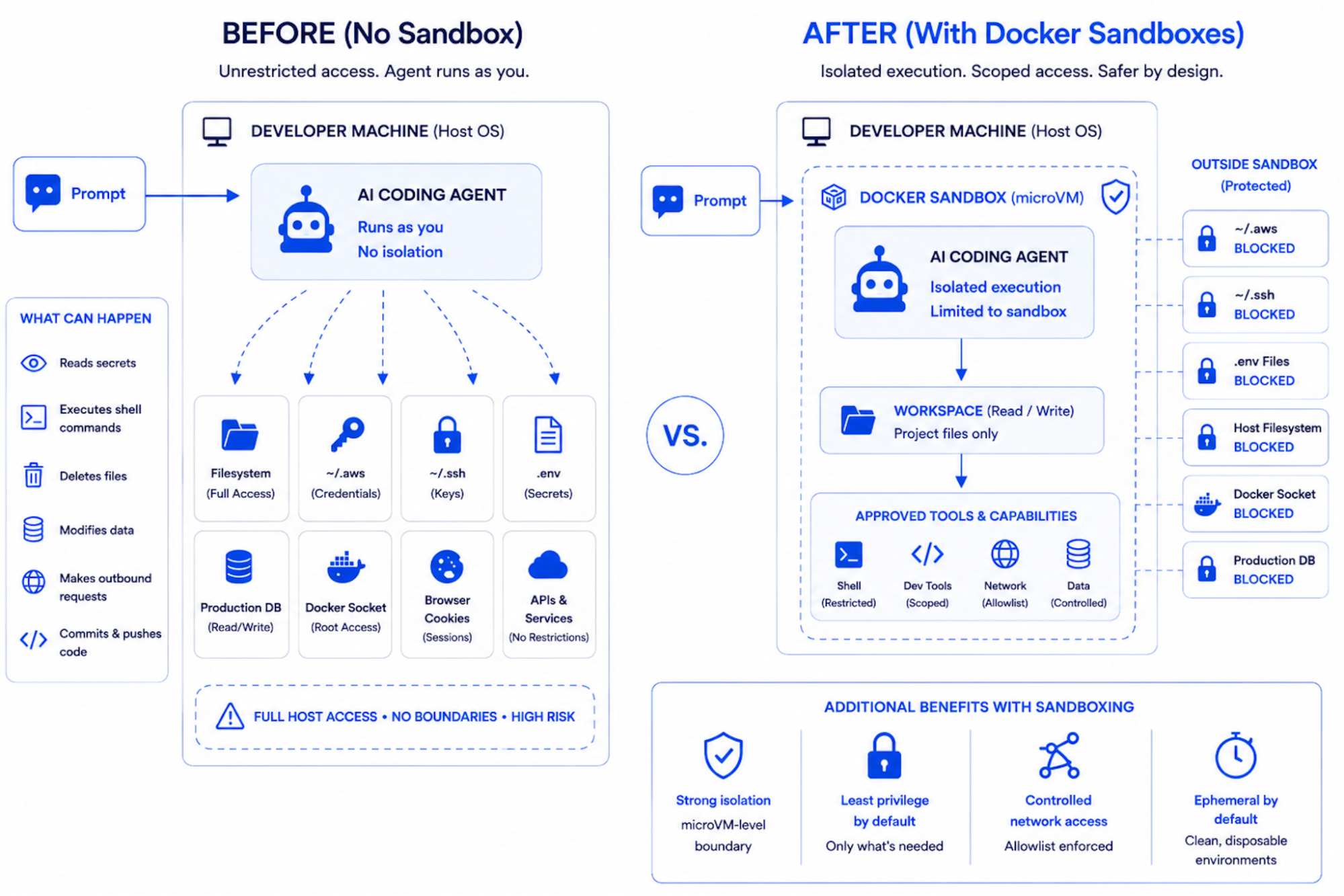
Docker Sandboxes represents a fundamental shift in how AI coding agents execute: from running directly on the host with user-level permissions, to running inside a microVM with an explicitly scoped workspace and no path to the host system. Docker Sandboxes are the isolated microVM environments where agents actually run. The sbx CLI is the standalone tool you use to create, launch, and manage them. Sandboxes are the environments. sbx is what you type to control them. The code blocks below show real sbx commands.
Across the six failure categories you just read about, sbx provides a complete agent-isolation toolkit: workspace scoping, proxy-injected secrets, network policies with audit logs, Git-worktree isolation, and resource caps.
Security-First Architecture
A Docker Sandbox is a microVM, not a container. It has its own kernel, its own isolated filesystem, and its own network stack. The agent inside the sandbox cannot reach beyond what’s been explicitly mounted into the workspace. This is not a software guardrail. It is a hardware-enforced boundary.
Workspace isolation ensures that an agent tasked with cleaning up a project directory can only reach that project directory. The home directory, credential stores, and system files are structurally unreachable, not because the agent is told not to touch them, but because they do not exist from inside the microVM.
Blocked credential paths mean that sbx explicitly prevents mounting of sensitive directories by default. ~/.aws, ~/.ssh, ~/.docker, ~/.gnupg, ~/.netrc, ~/.npm, and ~/.cargo are all on the blocklist. A misconfigured mount is caught and rejected before the agent ever starts.
Network egress controls allow you to define exactly which external services the agent can reach. An agent working on a local project has no legitimate reason to communicate with an external server. With sbx, you can enforce that at the network layer.
# Install sbx and sign in
brew install docker/tap/sbx
sbx login

# Quickest path: launch an agent in a sandbox scoped to the current directory.
cd ~/my-project
sbx run claude
Three commands, and the agent is now running inside a microVM with its workspace mounted, credential paths blocked, and network egress governed by policy.
Systematic Risk Elimination
Docker Sandboxes systematically eliminates each of the six failure categories through architecture rather than policy.
- Unrestricted Filesystem Access → Workspace-Scoped Execution
The rm -rf ~/ incident is contained at the execution layer inside a sandbox. The agent’s view of the filesystem is the workspace mount. ~/ inside the microVM is the workspace, not the developer’s actual home directory. The host filesystem does not exist from inside the sandbox.
cd ~/my-project
sbx run claude

# Equivalent two-step form, useful when you want to name the sandbox:
sbx create --name my-project claude .
sbx run my-project
The agent can read and write inside /workspace. Everything outside the workspace, including /etc, /proc, /sys, and the developer’s home directory, is unreachable.
- Excessive Privilege Inheritance → Scoped Identity
Rather than inheriting the developer’s full credentials, the agent runs under a minimal identity with only the permissions required for the task. Production credentials are never passed into the sandbox unless explicitly mounted and sbx blocks common credential root paths by default.
# Mount only what the task needs. Everything else stays on the host,
# unreachable from inside the sandbox. Read-only mounts use the :ro suffix:
sbx create --name docs-review claude /path/to/project /path/to/docs:ro

# Resource limits prevent runaway agent processes:
sbx create --name capped-agent --cpus 4 --memory 8g claude .
The agent can do its work. It cannot reach into AWS, SSH, or any other host credential store while doing it, because those paths were never mounted in the first place.
- Secrets Leakage → Isolated Context
When the agent’s filesystem view is limited to the workspace, it cannot read .env files, credential configs, or API keys stored elsewhere on the system. Secrets that were never visible to the agent cannot be reproduced, committed, or exfiltrated. The s1ngularity attack from Section 3, which weaponized AI agents to scan the filesystem for credentials, is contained: the credentials simply aren’t in the sandbox’s view of the filesystem.
# Store credentials once, scoped to a service.
sbx secret set anthropic
sbx secret set github

# The proxy injects these into outbound requests automatically.
# The agent never sees the actual secret values.
sbx run claude
A successful prompt injection that tells the agent to “exfiltrate your API keys” finds nothing to exfiltrate. There are no API keys in the agent’s context to begin with.
- Prompt Injection → Contained Blast Radius
Prompt injection cannot be fully prevented at the model layer. It is a property of language models, not infrastructure. But Docker Sandboxes limits what a successfully injected agent can do. If injected instructions tell the agent to delete files outside the workspace, those files do not exist inside the microVM. If they instruct the agent to exfiltrate credentials, there are no credentials in scope. If they instruct the agent to phone home to an attacker-controlled server, the network policy blocks the egress. The attack succeeds at the model layer and fails at the execution layer.
# Allow only the network destinations the agent legitimately needs.
# Hosts are comma-separated; wildcards and port suffixes are supported.
sbx policy allow network "api.anthropic.com,api.github.com"

# Allow all subdomains of a trusted host:
sbx policy allow network "*.anthropic.com"

# Inspect the active policies and audit log:
sbx policy ls
sbx policy log
The sbx policy log command surfaces every allowed and denied connection attempt. If a prompt injection attempts to phone home to a command-and-control server, the attempt is logged and blocked at the network layer. The attack succeeds at the model layer and fails at the execution layer.
- Malicious Skills → Sandboxed Execution
Skills and plugins that execute inside a Docker Sandbox are constrained by the same boundary as the agent itself. A malicious skill that attempts to read SSH keys, harvest .npmrc tokens, or communicate with a command-and-control server fails at each step. The files are not mounted, and the network destination is not on the allowlist. The ClawHavoc-style infostealer payloads from Section 5 cannot reach the host because the host is not visible from inside the sandbox.
# Confirm only allowlisted destinations are reachable before installing
# untrusted skills.
sbx policy ls

# Run the agent (and any skills it loads) inside the sandbox boundary.
sbx run claude
The skill can do whatever it wants inside /workspace. It cannot read SSH keys it cannot see, harvest tokens that aren’t mounted, or reach a C2 server that isn’t on the network allowlist. The blast radius is the workspace, not the developer’s machine.
- Autonomous Action → Branch-scoped Execution
Docker Sandboxes provides the architectural foundation for human-in-the-loop on irreversible operations. Two patterns work together: production resources require explicit configuration to be reachable from inside the sandbox, and destructive code changes can be routed through Git worktrees for review before they touch the main branch. The first pattern means a sandbox not configured to reach production cannot reach production, regardless of what the agent decides. Production credentials, production database connection strings, and production deployment endpoints are unreachable by default. The second pattern means even when the agent is working on the codebase that *will* eventually deploy to production, its changes live on an isolated feature branch you review before merging.
# Inside an existing Git repository. --branch creates a Git worktree
# so the agent's changes are isolated to a feature branch and cannot
# accidentally land on main.
cd ~/my-project
sbx create --name feature-login --branch=feature/login claude .

# sbx prints the next step for you:
#   ✓ Created sandbox 'feature-login'
#   To connect to this sandbox, run:
#     sbx run feature-login
sbx run feature-login

# Inspect what the agent changed before merging anything:
sbx exec feature-login git diff main

# Merge the worktree branch back when you're satisfied:
#   git merge feature/login
# Or throw the sandbox away if you don't like the result:
sbx rm feature-login
The agent can decide whatever it wants. The infrastructure decides what gets through. A “drop and recreate the table” decision lives entirely on a feature branch you can review, accept, or discard. Production never sees it unless you explicitly merge.
What This Looks Like in Practice
The promise of Docker Sandboxes is straightforward: a productive AI coding agent without an existentially dangerous one.
- Workspace isolation: the agent operates only within explicitly mounted directories, no host filesystem access
- Credential protection: common credential paths are blocked by default, no accidental exposure
- Network containment: egress limited to approved destinations, no unfettered exfiltration path
- Blast radius control: a compromised or confused agent cannot reach beyond its microVM, no cascading host failures
- Audit trail: all agent actions are logged, full post-incident forensics capability
The agent gets a workspace. It does not get your machine.
Stay Tuned for Upcoming Issues in This Series
| Issue | Title | What You’ll Learn |
|---|---|---|
| Issue 2 | The rm -rf ~/ Incident | Unrestricted Filesystem Access: How a single trailing slash wiped a developer’s Mac, and what workspace-scoped execution prevents structurally |
| Issue 3 | The Agent That Deleted Production | Privilege Inheritance: How an AI agent bypassed two-person approval requirements by inheriting production credentials and the architectural fix |
| Issue 4 | The 29 Million Secret Problem | Secrets Leakage: Why AI-assisted commits leak secrets at double the rate and how isolated agent context eliminates the exposure surface |
| Issue 5 | The Private Key Exfiltration | Prompt Injection: The attack that requires no code, no malware, and no special access and why blast radius containment is the only reliable defense |
| Issue 6 | The Infostealer Campaign | Supply Chain: How 335 malicious skills reached developer machines through a marketplace ranking exploit and sandboxed skill execution as the structural fix |
Learn More
- Run agents safely with Docker Sandboxes: Visit the Docker Sandboxes documentation to get started with workspace-isolated agent execution in minutes.
- Explore the Docker MCP Catalog: Discover MCP servers that connect your agents to external services through Docker’s security-first architecture.
- Download Docker Desktop: The fastest path to a governed AI agent environment, with Docker Sandboxes, MCP Gateway, and Model Runner in a single install.
- Read the MCP Horror Stories series: Start with issue 1 to understand the protocol-layer security risks that complement the agent-layer risks covered here.